







Question: In Visual Basic/VB.net, I am having trouble with a loop. A simple background of my program is, I am sending commands to a signal generator.
In Visual Basic/VB.net, I am having trouble with a loop. A simple background of my program is, I am sending commands to a signal generator. I am sending a new frequency value and it is in a loop. The loop of sending new frequencies to the signal generator is accomplished and the signal generator displays all the values while the program is in the loop. That works. However, my problem is, when I want to display all these updating values in my program, I only can read the initial frequency. In other words, when I read the value of the frequency and display it in a text box, it does not update. It just remains the same even though the signal generator is getting new values. How can I change my program so that I am able to read the string in a loop so it can update itself?
My initial thought is, I would have to momentarily pause F from incrementing, wait for my read command to be accomplished, then increment F. Any thoughts?
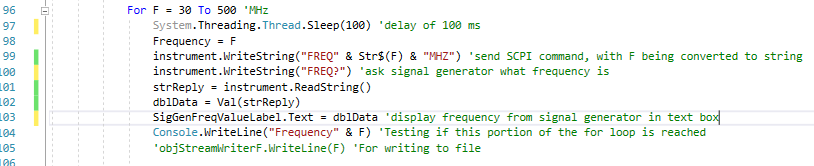
96 97 98 For F 30 To 500 'MHz System. Threading.Thread.Sleep (100) 'delay of 100 ms FrequencyF instrument.WriteString("FREQ" & Strs(F) & "MHZ") send SCPI command, with F being converted to string instrument.WriteString("FREQ?") 'ask signal generator what frequency is strReply - instrument.ReadString) db1Data-Val(strReply) SigGenFreaValueLabel.Text - dblData 'display frequency from signal generator in text box Console.writeline(" Frequency" & F) Testing if this portion of the for loop is reached objStreamriterF.WriteLine(F) 'For writing to file 100 101 L02 03 104 ??5 96 97 98 For F 30 To 500 'MHz System. Threading.Thread.Sleep (100) 'delay of 100 ms FrequencyF instrument.WriteString("FREQ" & Strs(F) & "MHZ") send SCPI command, with F being converted to string instrument.WriteString("FREQ?") 'ask signal generator what frequency is strReply - instrument.ReadString) db1Data-Val(strReply) SigGenFreaValueLabel.Text - dblData 'display frequency from signal generator in text box Console.writeline(" Frequency" & F) Testing if this portion of the for loop is reached objStreamriterF.WriteLine(F) 'For writing to file 100 101 L02 03 104 ??5
Step by Step Solution
There are 3 Steps involved in it

Get step-by-step solutions from verified subject matter experts
 Study Help