







Question: In Visual Studio using Console App (.NET Core) (4) (4 marks) In Visual Studio, create and test a console application that does the following: (1)
In Visual Studio using Console App (.NET Core)
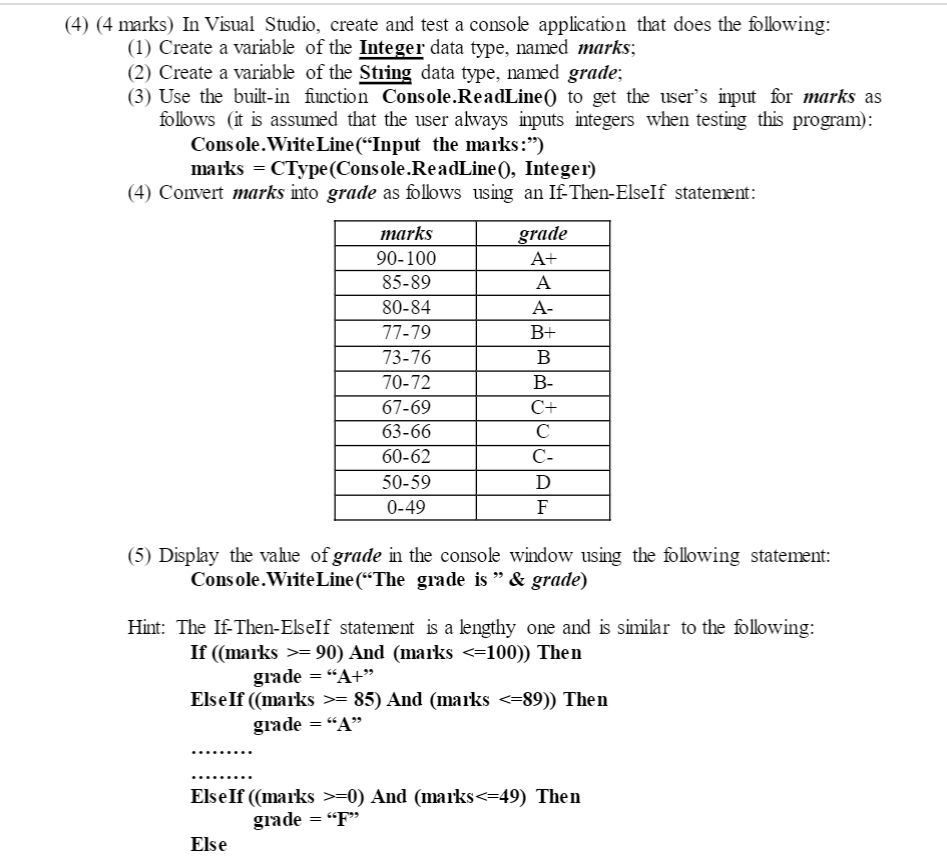
(4) (4 marks) In Visual Studio, create and test a console application that does the following: (1) Create a variable of the Integer data type, named marks; (2) Create a variable of the String data type, named grade; (3) Use the built-in function Console.ReadLine() to get the user's imput for marks as follows (it is assumed that the user always inputs integers when testing this program): Console.WriteLine("Input the marks:") marks = CType(Console.ReadLine(), Integer) (4) Convert marks into grade as follows using an If-Then-ElseIf statement: marks 90-100 85-89 80-84 77-79 73-76 70-72 67-69 63-66 60-62 50-59 0-49 grade A+ A A- B+ B B- C+ C- D F (5) Display the value of grade in the console window using the following statement: Console.WriteLine(The grade is & grade) Hint: The If-Then-ElseIf statement is a lengthy one and is similar to the following: If ((marks >= 90) And (marks = 85) And (marks =0) And (marks
Step by Step Solution
There are 3 Steps involved in it

Get step-by-step solutions from verified subject matter experts
 Study Help