







Question: In windows Task 1 - Research and manage users and folder with batch files Demonstrate your knowledge of the command line interface; perform any research
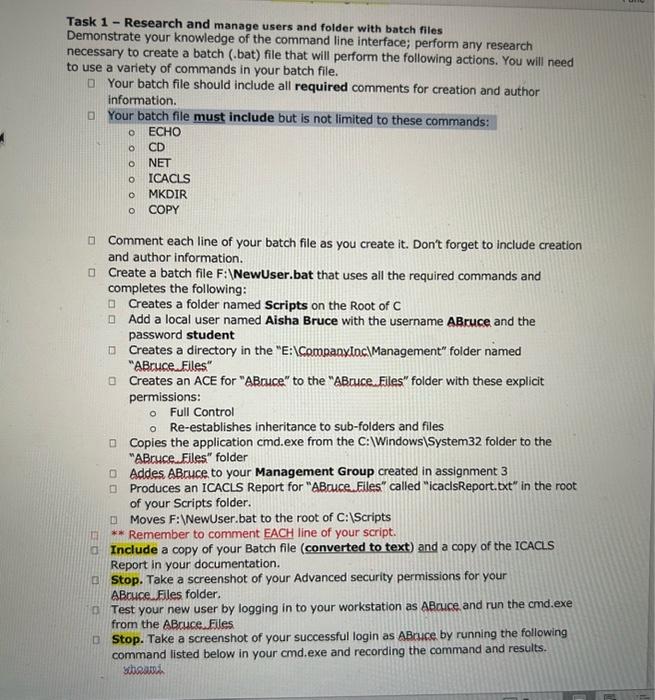
Task 1 - Research and manage users and folder with batch files Demonstrate your knowledge of the command line interface; perform any research necessary to create a batch (.bat) file that will perform the following actions. You will need to use a variety of commands in your batch file. Your batch file should include all required comments for creation and author information. Your batch file must include but is not limited to these commands: ECHO CD NET ICACLS MKDIR COPY Comment each line of your batch file as you create it. Don't forget to include creation and author information. Create a batch file F : WewUser.bat that uses all the required commands and completes the following: Creates a folder named Scripts on the Root of C [ Add a local user named Aisha Bruce with the username ABruce and the password student D Creates a directory in the "E: \CompanxinciManagement" folder named "ABruce. Files" Creates an ACE for "ABruce" to the "ABruce. Files" folder with these explicit permissions: - Full Control - Re-establishes inheritance to sub-folders and files B Copies the application cmd.exe from the C: \Windows \ System 32 folder to the "ABruce.Files" folder [. Addes ABruce to your Management Group created in assignment 3 [ P Produces an ICACLS Report for "ABauce. Files" called "icacisReport.txt" in the root of your Scripts folder. [] Moves F:WewUser.bat to the root of C: IScripts ** Remember to comment EACH line of your script. Include a copy of your Batch file (converted to text) and a copy of the ICACIS Report in your documentation. Stop. Take a screenshot of your Advanced security permissions for your ABruce. Files folder. Test your new user by logging in to your workstation as ABcuce and run the cmd.exe from the ABruce. Files Stop. Take a screenshot of your successful login as ABruce by running the following command listed below in your cmd.exe and recording the command and results
Step by Step Solution
There are 3 Steps involved in it

Get step-by-step solutions from verified subject matter experts
 Study Help