Question: #include BattleBoatsGame.h #include BattleBoat.h #include using namespace std; const bool BattleBoatsGame::isRevealed(unsigned int x, unsigned int y) const { // TODO: implement this function return false;
#include "BattleBoatsGame.h" #include "BattleBoat.h" #include using namespace std;
const bool BattleBoatsGame::isRevealed(unsigned int x, unsigned int y) const { // TODO: implement this function return false; }
bool BattleBoatsGame::shot(unsigned int x, unsigned int y) { // TODO: implement this function return false; }
unsigned int BattleBoatsGame::getBoatsSunk() const { // TODO: implement this function return 0; }
#include "BattleBoatBoard.h" #include using namespace std;
BattleBoatBoard::BattleBoatBoard(unsigned int* boatLengths, unsigned int boatCount) { // TODO: Write the constructor here. }
const BattleBoat* BattleBoatBoard::getBoat(unsigned int x, unsigned int y) const { // TODO: Return a pointer to a boat if one exists at the coordinates (x, y). return nullptr; }
BattleBoat * BattleBoatBoard::getBoat(unsigned int x, unsigned int y) { // TODO: Return a pointer to a boat if one exists at the coordinates (x, y). return nullptr; }
#include "BattleBoat.h" #include using namespace std;
BattleBoat::BattleBoat(unsigned int length) : length { min(MAX_LENGTH, length) } { }
unsigned int BattleBoat::getLength() const { return length; }
unsigned int BattleBoat::getStartX() const { return startX; }
unsigned int BattleBoat::getStartY() const { return startY; }
bool BattleBoat::isVertical() const { return vertical; }
ostream& BattleBoat::printSegment(ostream& out, unsigned int x, unsigned int y) const { if (length == 1) { // Single cell boat out
out "; } else if (vertical) { if (y == startY) { // Top end cap out
if (hits[0]) { out
out
if (hits[length - 1]) { out
out
if (hits[y - startY]) { out
out
if (hits[0]) { out
out
if (hits[length - 1]) { out
out "; } else { // Middle horizontal segment out
if (hits[x - startX]) { out
out
return out; }
void BattleBoat::setStartX(unsigned int startX) { this->startX = startX; }
void BattleBoat::setStartY(unsigned int startY) { this->startY = startY; }
void BattleBoat::setVertical(bool vertical) { this->vertical = vertical; }
bool BattleBoat::intersects(const BattleBoat& other) const { // TODO: Implement this function return false; }
bool BattleBoat::isHit(unsigned int x, unsigned int y) const { // TODO: Implement this function return false; }
void BattleBoat::hit(unsigned int x, unsigned int y) { // TODO: Implement this function }
bool BattleBoat::isSunk() const { // TODO: Implement this function return false; }
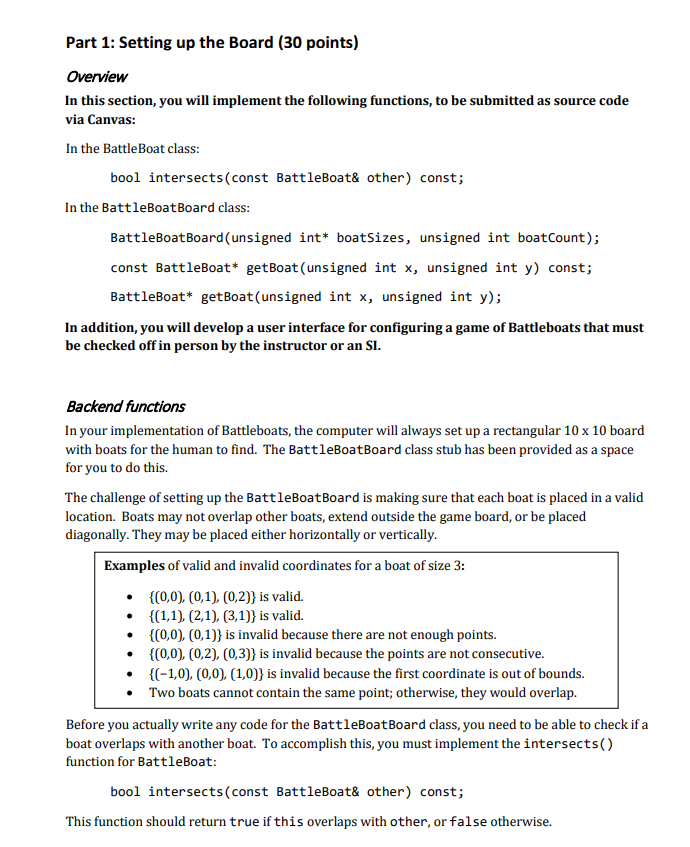
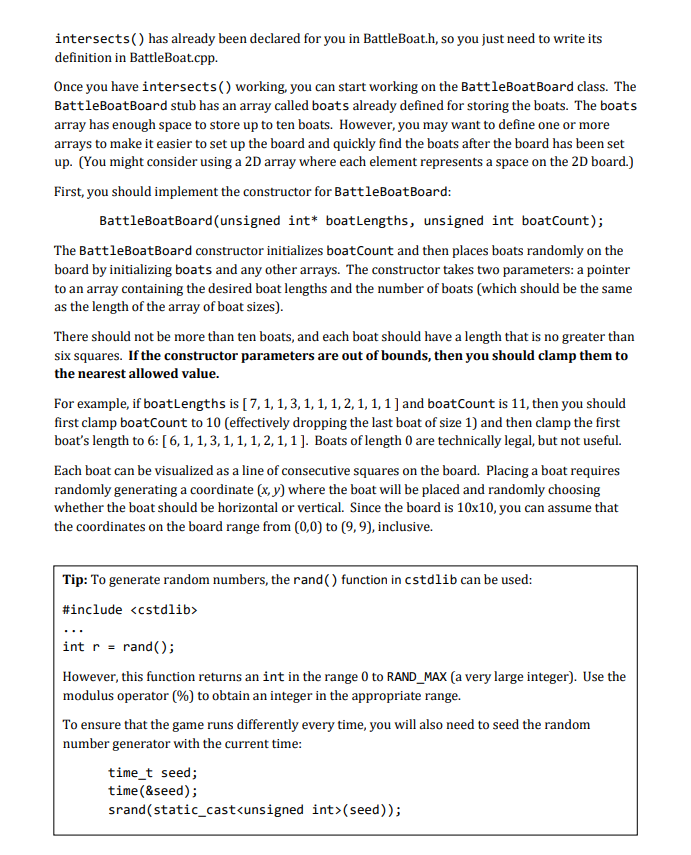
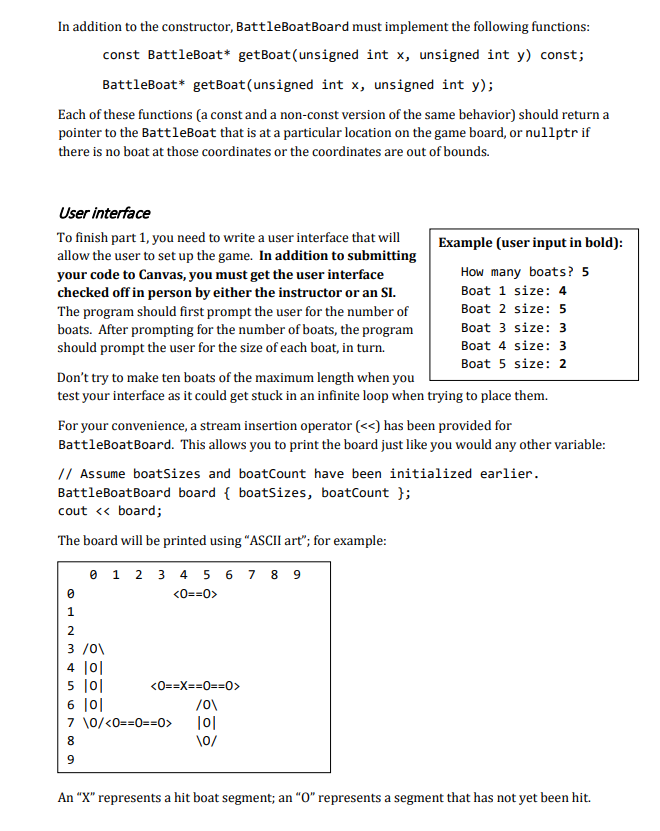
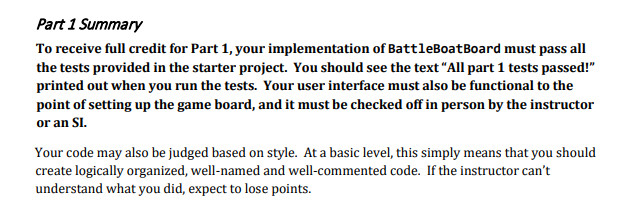
Part 1: Setting up the Board (30 points) Overview In this section, you will implement the following functions, to be submitted as source code via Canvas: In the BattleBoat class: bool intersects (const BattleBoat& other) const; In the BattleBoatBoard class: BattleBoat Board(unsigned int* boatSizes, unsigned int boatCount); const BattleBoat* getBoat(unsigned int x, unsigned int y) const; BattleBoat* getBoat(unsigned int x, unsigned int y); In addition, you will develop a user interface for configuring a game of Battleboats that must be checked off in person by the instructor or an SI. Backend functions In your implementation of Battleboats, the computer will always set up a rectangular 10 x 10 board with boats for the human to find. The BattleBoatBoard class stub has been provided as a space for you to do this. The challenge of setting up the BattleBoat Board is making sure that each boat is placed in a valid location. Boats may not overlap other boats, extend outside the game board, or be placed diagonally. They may be placed either horizontally or vertically. Examples of valid and invalid coordinates for a boat of size 3: {0,0), (0,1),(0,2)} is valid. {(1,1), (2,1),(3,1)) is valid. {(0,0), (0,1)} is invalid because there are not enough points. {(0,0), (0,2), (0,3)} is invalid because the points are not consecutive. {(-1,0), (0,0),(1,0)} is invalid because the first coordinate is out of bounds. Two boats cannot contain the same point; otherwise, they would overlap. Before you actually write any code for the BattleBoatBoard class, you need to be able to check if a boat overlaps with another boat. To accomplish this, you must implement the intersects() function for BattleBoat: bool intersects (const BattleBoat& other) const; This function should return true if this overlaps with other, or false otherwise. intersects() has already been declared for you in BattleBoat.h, so you just need to write its definition in BattleBoat.cpp. Once you have intersects() working, you can start working on the BattleBoatBoard class. The BattleBoatBoard stub has an array called boats already defined for storing the boats. The boats array has enough space to store up to ten boats. However, you may want to define one or more arrays to make it easier to set up the board and quickly find the boats after the board has been set up. (You might consider using a 2D array where each element represents a space on the 2D board.) First, you should implement the constructor for BattleBoatBoard: BattleBoatBoard(unsigned int* boatLengths, unsigned int boatCount); The BattleBoatBoard constructor initializes boatCount and then places boats randomly on the board by initializing boats and any other arrays. The constructor takes two parameters: a pointer to an array containing the desired boat lengths and the number of boats (which should be the same as the length of the array of boat sizes) There should not be more than ten boats, and each boat should have a length that is no greater than six squares. If the constructor parameters are out of bounds, then you should clamp them to the nearest allowed value. For example, if boatLengths is [7, 1, 1,3,1, 1, 1, 2, 1, 1, 1 ] and boatCount is 11, then you should first clamp boatCount to 10 (effectively dropping the last boat of size 1) and then clamp the first boat's length to 6: (6,1,1,3,1,1,1,2,1,1]. Boats of length 0 are technically legal, but not useful. Each boat can be visualized as a line of consecutive squares on the board. Placing a boat requires randomly generating a coordinate (x, y) where the boat will be placed and randomly choosing whether the boat should be horizontal or vertical. Since the board is 10x10, you can assume that the coordinates on the board range from (0,0) to (9,9), inclusive. Tip: To generate random numbers, the rand() function in cstdlib can be used: #include int r = rand(); However, this function returns an int in the range 0 to RAND_MAX (a very large integer). Use the modulus operator (%) to obtain an integer in the appropriate range. To ensure that the game runs differently every time, you will also need to seed the random number generator with the current time: time_t seed; time(&seed); srand(static_cast(seed)); In addition to the constructor, BattleBoatBoard must implement the following functions: const BattleBoat* getBoat(unsigned int x, unsigned int y) const; BattleBoat* getBoat(unsigned int x, unsigned int y); Each of these functions (a const and a non-const version of the same behavior) should return a pointer to the BattleBoat that is at a particular location on the game board, or nullptr if there is no boat at those coordinates or the coordinates are out of bounds. User interface To finish part 1, you need to write a user interface that will Example (user input in bold): allow the user to set up the game. In addition to submitting your code to Canvas, you must get the user interface How many boats? 5 checked off in person by either the instructor or an SI. Boat 1 size: 4 The program should first prompt the user for the number of Boat 2 size: 5 boats. After prompting for the number of boats, the program Boat 3 size: 3 should prompt the user for the size of each boat, in turn. Boat 4 size: 3 Boat 5 size: 2 Don't try to make ten boats of the maximum length when you test your interface as it could get stuck in an infinite loop when trying to place them. For your convenience, a stream insertion operator ( 6 7 8 9 101 5 101 6 10 /01 7 \0/ 10 10/ An "X" represents a hit boat segment; an "O" represents a segment that has not yet been hit. Part 1 Summary To receive full credit for Part 1, your implementation of BattleBoatBoard must pass all the tests provided in the starter project. You should see the text "All part 1 tests passed!" printed out when you run the tests. Your user interface must also be functional to the point of setting up the game board, and it must be checked off in person by the instructor or an SI. Your code may also be judged based on style. At a basic level, this simply means that you should create logically organized, well-named and well-commented code. If the instructor can't understand what you did, expect to lose points. Part 1: Setting up the Board (30 points) Overview In this section, you will implement the following functions, to be submitted as source code via Canvas: In the BattleBoat class: bool intersects (const BattleBoat& other) const; In the BattleBoatBoard class: BattleBoat Board(unsigned int* boatSizes, unsigned int boatCount); const BattleBoat* getBoat(unsigned int x, unsigned int y) const; BattleBoat* getBoat(unsigned int x, unsigned int y); In addition, you will develop a user interface for configuring a game of Battleboats that must be checked off in person by the instructor or an SI. Backend functions In your implementation of Battleboats, the computer will always set up a rectangular 10 x 10 board with boats for the human to find. The BattleBoatBoard class stub has been provided as a space for you to do this. The challenge of setting up the BattleBoat Board is making sure that each boat is placed in a valid location. Boats may not overlap other boats, extend outside the game board, or be placed diagonally. They may be placed either horizontally or vertically. Examples of valid and invalid coordinates for a boat of size 3: {0,0), (0,1),(0,2)} is valid. {(1,1), (2,1),(3,1)) is valid. {(0,0), (0,1)} is invalid because there are not enough points. {(0,0), (0,2), (0,3)} is invalid because the points are not consecutive. {(-1,0), (0,0),(1,0)} is invalid because the first coordinate is out of bounds. Two boats cannot contain the same point; otherwise, they would overlap. Before you actually write any code for the BattleBoatBoard class, you need to be able to check if a boat overlaps with another boat. To accomplish this, you must implement the intersects() function for BattleBoat: bool intersects (const BattleBoat& other) const; This function should return true if this overlaps with other, or false otherwise. intersects() has already been declared for you in BattleBoat.h, so you just need to write its definition in BattleBoat.cpp. Once you have intersects() working, you can start working on the BattleBoatBoard class. The BattleBoatBoard stub has an array called boats already defined for storing the boats. The boats array has enough space to store up to ten boats. However, you may want to define one or more arrays to make it easier to set up the board and quickly find the boats after the board has been set up. (You might consider using a 2D array where each element represents a space on the 2D board.) First, you should implement the constructor for BattleBoatBoard: BattleBoatBoard(unsigned int* boatLengths, unsigned int boatCount); The BattleBoatBoard constructor initializes boatCount and then places boats randomly on the board by initializing boats and any other arrays. The constructor takes two parameters: a pointer to an array containing the desired boat lengths and the number of boats (which should be the same as the length of the array of boat sizes) There should not be more than ten boats, and each boat should have a length that is no greater than six squares. If the constructor parameters are out of bounds, then you should clamp them to the nearest allowed value. For example, if boatLengths is [7, 1, 1,3,1, 1, 1, 2, 1, 1, 1 ] and boatCount is 11, then you should first clamp boatCount to 10 (effectively dropping the last boat of size 1) and then clamp the first boat's length to 6: (6,1,1,3,1,1,1,2,1,1]. Boats of length 0 are technically legal, but not useful. Each boat can be visualized as a line of consecutive squares on the board. Placing a boat requires randomly generating a coordinate (x, y) where the boat will be placed and randomly choosing whether the boat should be horizontal or vertical. Since the board is 10x10, you can assume that the coordinates on the board range from (0,0) to (9,9), inclusive. Tip: To generate random numbers, the rand() function in cstdlib can be used: #include int r = rand(); However, this function returns an int in the range 0 to RAND_MAX (a very large integer). Use the modulus operator (%) to obtain an integer in the appropriate range. To ensure that the game runs differently every time, you will also need to seed the random number generator with the current time: time_t seed; time(&seed); srand(static_cast(seed)); In addition to the constructor, BattleBoatBoard must implement the following functions: const BattleBoat* getBoat(unsigned int x, unsigned int y) const; BattleBoat* getBoat(unsigned int x, unsigned int y); Each of these functions (a const and a non-const version of the same behavior) should return a pointer to the BattleBoat that is at a particular location on the game board, or nullptr if there is no boat at those coordinates or the coordinates are out of bounds. User interface To finish part 1, you need to write a user interface that will Example (user input in bold): allow the user to set up the game. In addition to submitting your code to Canvas, you must get the user interface How many boats? 5 checked off in person by either the instructor or an SI. Boat 1 size: 4 The program should first prompt the user for the number of Boat 2 size: 5 boats. After prompting for the number of boats, the program Boat 3 size: 3 should prompt the user for the size of each boat, in turn. Boat 4 size: 3 Boat 5 size: 2 Don't try to make ten boats of the maximum length when you test your interface as it could get stuck in an infinite loop when trying to place them. For your convenience, a stream insertion operator ( 6 7 8 9 101 5 101 6 10 /01 7 \0/ 10 10/ An "X" represents a hit boat segment; an "O" represents a segment that has not yet been hit. Part 1 Summary To receive full credit for Part 1, your implementation of BattleBoatBoard must pass all the tests provided in the starter project. You should see the text "All part 1 tests passed!" printed out when you run the tests. Your user interface must also be functional to the point of setting up the game board, and it must be checked off in person by the instructor or an SI. Your code may also be judged based on style. At a basic level, this simply means that you should create logically organized, well-named and well-commented code. If the instructor can't understand what you did, expect to lose points









 Study Help