







Question: include couple of total calculationd using formula Create and format a basic budget sheet for the current year (January Through December). It should include the
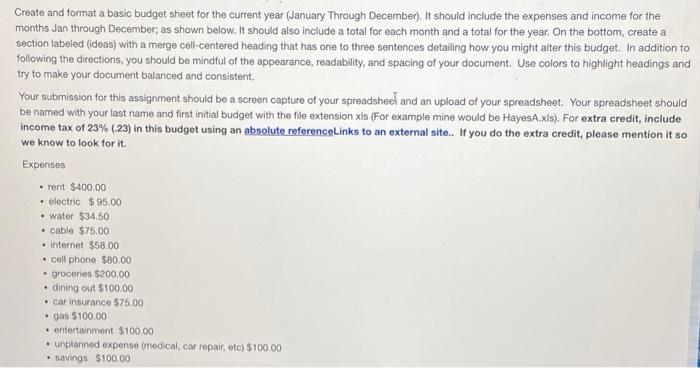
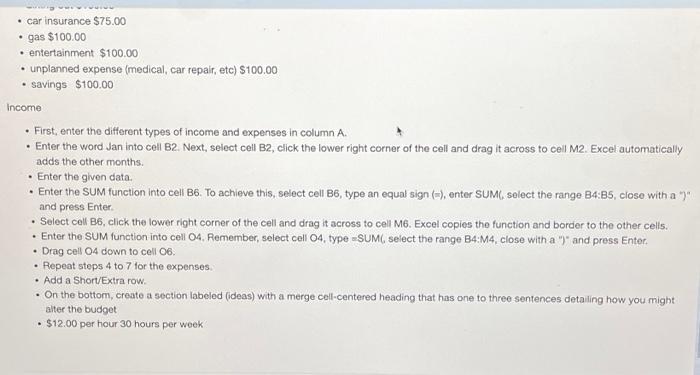
Create and format a basic budget sheet for the current year (January Through December). It should include the expenses and income for the months Jan through December; as shown below. It should also include a total for each month and a total for the year. On the bottom, create a section labeled (ideas) with a merge cell-centered heading that has one to three sentences detalling how you might alter this budget. In addition to following the directions, you should be mindfut of the appearance, readability, and spacing of your document. Use colors to highlight headings and try to make your document balanced and consistent. Your submission for this assignment should be a screen capture of your spreadsheef and an upload of your spreadsheet. Your spreadsheet should be named with your last name and first initial budget with the fle extension xls (For example mine would be HayesA.x/s). For extra credit, include income tax of 23% ( (23) in this budget using an absolute referencelinks to an external site.. If you do the extra credit, please mention it so we know to look for it. Expenses - rent $400.00 - electric $95.00 - water $34.50 - cable $75.00 - internet $58.00 - cell phone $80.00 - groceries $200.00 - dining out $100.00 - car insurance $75.00 - gas $100.00 - entertainment $100.00 - unplanned expense (medical, car repair, etc) $100.00 - savings $100.00 - car insurance $75.00 - gas $100.00 - entertainment $100.00 - unplanned expense (medical, car repair, etc) $100.00 - savings $100.00 Income - First, enter the different types of income and expenses in column A. - Enter the word Jan into cell B2. Next, select cell B2, click the lower right corner of the cell and drag it across to cell M2. Excel automatically adds the other months. - Enter the given data. - Enter the SUM function into cell B6. To achieve this, select cell B6, type an equal sign ( () , enter SUMC, select the range B4:B5, close with a ")" and press Enter. - Select cell B6, click the lower right corner of the cell and drag it across to cell M6. Excel copies the function and border to the other cells. - Enter the SUM function into cell O4, Remember, select cell O4, type = SUM( select the range B4:M4, close with a " ")" and press Enter. - Drag cell OA down to cell O6. - Plepeat steps 4 to 7 for the expenses. - Add a Short/Extra row. - On the bottom, create a section labeled (ideas) with a merge cell-centered heading that has one to three sentences detaling how you might alter the budget - \$12.00 per hour 30 hours per woek
Step by Step Solution
There are 3 Steps involved in it

Get step-by-step solutions from verified subject matter experts
 Study Help