







Question: #include find. h extern char * strstr _ w _ option ( char * haystack, char * needle, flags option ) ; extern void
#include "find. h
extern char strstrwoptionchar haystack, char needle, flags option;
extern void quicksortchar int left, int right;
char lineptrMAXLINES;
int readlines
int len, nlines ;
char p line MAXLEN ;
while fgetsline MAXLEN, stdin
len strlenline;
if nlines s MAXLINES malloclen Hi
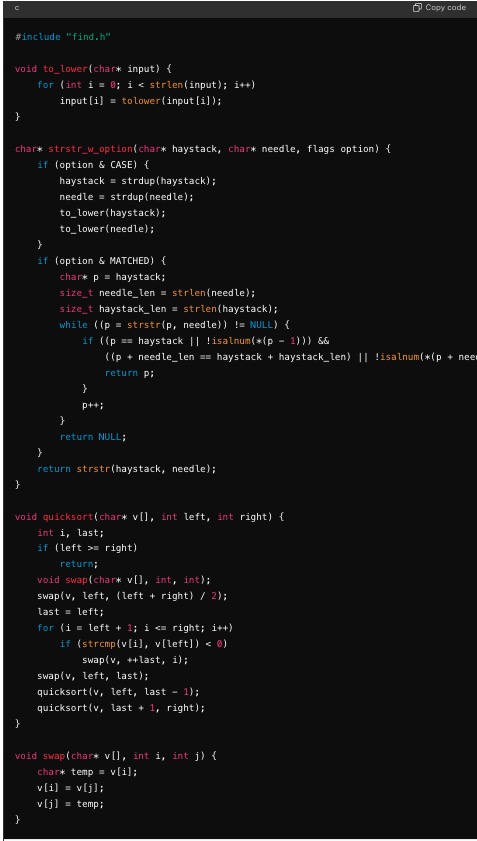
Im working on a C program that reads multiple lines of input, searches for a pattern provided via commandline arguments, and supports several flags to modify the output. However, Im encountering issues with two specific flags:
s Flag Sorting: When using the s flag to sort the lines alphabetically, the program outputs duplicate lines and sometimes causes a segmentation fault.
p Flag Partial Print: The p flag should print lines containing the pattern in a shortened format with ellipses. However, the output is not as expected and doesn't handle ellipses correctly.
Below is the relevant code for handling these flags. Could you please help me identify and fix the issues?
Issues:
Segmentation Fault with s Flag:
When using the s flag, the program outputs duplicate lines and sometimes causes a segmentation fault.
Partial Print with p Flag:
The p flag should print lines containing the pattern in a shortened format with ellipses. However, the output is not as expected and doesn't handle ellipses correctly.
Example Outputs:
Command: find s in input.txt
Input:
Im very interested in Computer Science
This is a test statement
Im in
InNOut has great burgers in fact
Last sentence In
Expected Output:
Im in
Im very interested in Computer Science
InNOut has great burgers in fact
Command: find p in input.txt
Expected Output:
Im very...inience
Im in
InNOut hin fact
Step by Step Solution
There are 3 Steps involved in it
1 Expert Approved Answer
Step: 1 Unlock

Question Has Been Solved by an Expert!
Get step-by-step solutions from verified subject matter experts
Step: 2 Unlock
Step: 3 Unlock
 Study Help