







Question: Include formulas Completing a First-Stage Allocation to Activity Cost Pools Chocolates by Jacki has provided information relating to its current year. The Controller has asked
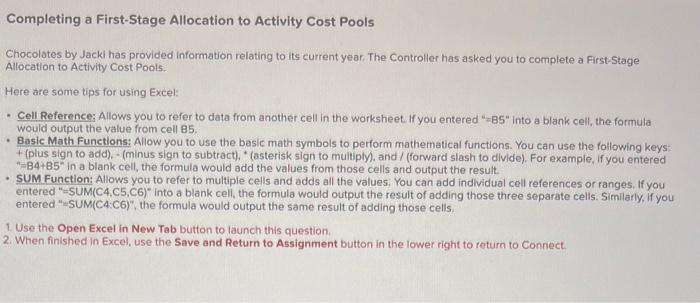
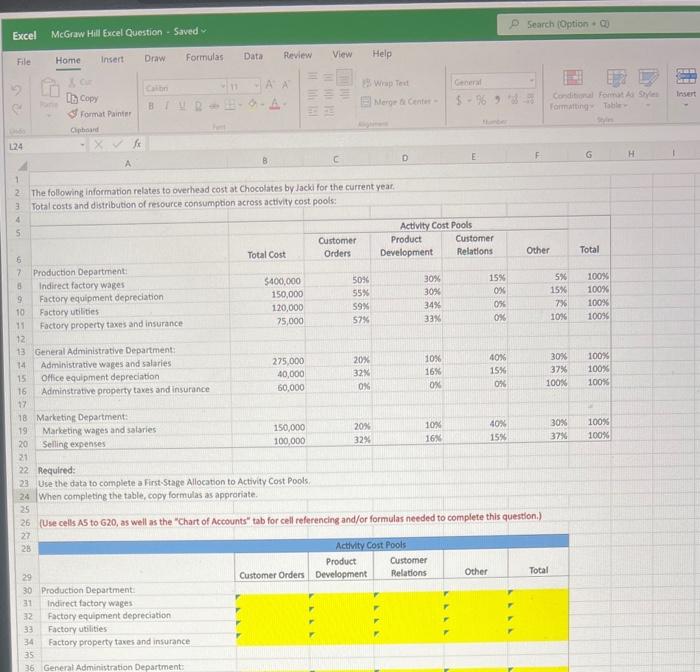
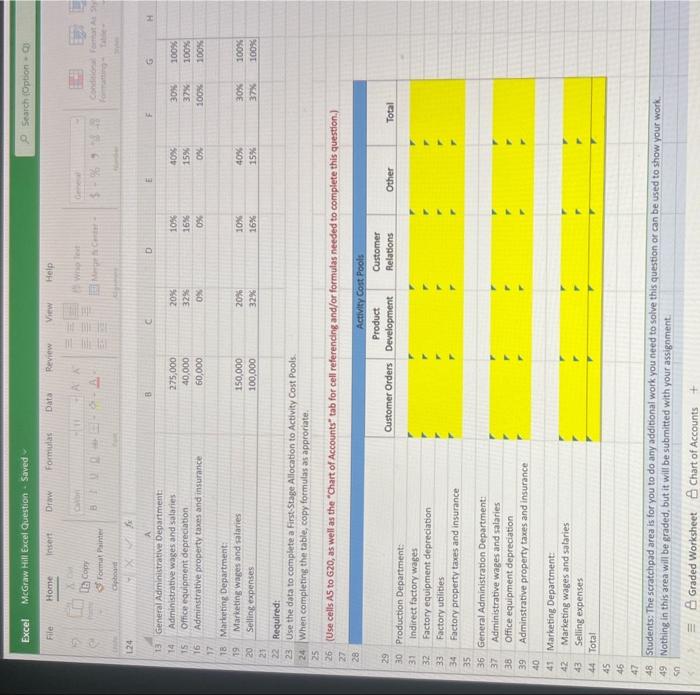
Completing a First-Stage Allocation to Activity Cost Pools Chocolates by Jacki has provided information relating to its current year. The Controller has asked you to complete a First-Stage Allocation to Activity Cost Pools. Here are some tips for using Excel: - Cell Reference; Allows you to refer to data from another cell in the worksheet. If you entered "=B5" into a blank cell, the formula would output the value from cell 85 . - Basic Math Functions: Allow you to use the basic math symbols to perform mathematical functions. You can use the following keys: + (plus sign to add), - (minus sign to subtract), " (asterisk sign to multiply), and / (forward slash to divide). For example, If you entered "=B4+85" in a blank cell, the formula would add the values from those cells and output the result. - SUM Function: Allows you to refer to multiple cells and adds all the values. You can add individual cell references or ranges, If you entered "=SUM(C4,C5,C6)" into a blank cell, the formula would output the result of adding those three separate cells. Similarly, if you entered "SUM(C4:C6)", the formula would output the same result of adding those cells. 1. Use the Open Excel in New Tab button to launch this question. 2. When finished in Excel, use the Save and Return to Assignment button in the lower right to roturn to Connect. Excel McGraw Hill fxcel Question - Saved Q. Search (Option + Ej) File Home Insert: Draw Formulas Data Review View Help DB copy \&f format painter 124. 2. The following information relates to overhead cost at Chocolates by Jacki for the current yeat: 3. Total costs and distribution of resource consumption across activity cost pools: Required: Use the data to complete a First-Stage Allocation to Activity Cost Pools: When completing the table, copy formulas as approriate. (Use cells A5 to 620 , as well as the "Chart of Accounts" tab for cell referencing and/or formulas needed to complete this questlon.) Excel McGraw Hill Excel Question - Soved File Home loseit Drane formulas Data Review View Help Dib copr: St rocmal Painter 124 13: General Aciministrative Degartment: 14. Administrative wages and salaries Office equipment depreciation Adminstrative property taxs and insurance Marheting Department: Required: Use the data to complete a First-Stage Allocation to Activity Cost Pools. When completing the table, copy formulas as approriate. (Use cells AS to G20, as well as the "Chart of Accounts" tab for cell referencing and/or formulas needed to complete this question.) Production Department: Indirect factory wages Factory equipment depreciation Factory utilities Factory property taxes and insurance General Administration Department: Administrative wages and salaries Office equipment depreciation Adminstrative property taxes and insurance Marketing Department: Marketing wages and salaries Selling expenses Total 45 45 47. 48 Students: The seratchpad area is for you to do any additional work you need to solve this question or can be used to show your work. Nothing in this area will be graded, but it will be submitted with your assignment. Completing a First-Stage Allocation to Activity Cost Pools Chocolates by Jacki has provided information relating to its current year. The Controller has asked you to complete a First-Stage Allocation to Activity Cost Pools. Here are some tips for using Excel: - Cell Reference; Allows you to refer to data from another cell in the worksheet. If you entered "=B5" into a blank cell, the formula would output the value from cell 85 . - Basic Math Functions: Allow you to use the basic math symbols to perform mathematical functions. You can use the following keys: + (plus sign to add), - (minus sign to subtract), " (asterisk sign to multiply), and / (forward slash to divide). For example, If you entered "=B4+85" in a blank cell, the formula would add the values from those cells and output the result. - SUM Function: Allows you to refer to multiple cells and adds all the values. You can add individual cell references or ranges, If you entered "=SUM(C4,C5,C6)" into a blank cell, the formula would output the result of adding those three separate cells. Similarly, if you entered "SUM(C4:C6)", the formula would output the same result of adding those cells. 1. Use the Open Excel in New Tab button to launch this question. 2. When finished in Excel, use the Save and Return to Assignment button in the lower right to roturn to Connect. Excel McGraw Hill fxcel Question - Saved Q. Search (Option + Ej) File Home Insert: Draw Formulas Data Review View Help DB copy \&f format painter 124. 2. The following information relates to overhead cost at Chocolates by Jacki for the current yeat: 3. Total costs and distribution of resource consumption across activity cost pools: Required: Use the data to complete a First-Stage Allocation to Activity Cost Pools: When completing the table, copy formulas as approriate. (Use cells A5 to 620 , as well as the "Chart of Accounts" tab for cell referencing and/or formulas needed to complete this questlon.) Excel McGraw Hill Excel Question - Soved File Home loseit Drane formulas Data Review View Help Dib copr: St rocmal Painter 124 13: General Aciministrative Degartment: 14. Administrative wages and salaries Office equipment depreciation Adminstrative property taxs and insurance Marheting Department: Required: Use the data to complete a First-Stage Allocation to Activity Cost Pools. When completing the table, copy formulas as approriate. (Use cells AS to G20, as well as the "Chart of Accounts" tab for cell referencing and/or formulas needed to complete this question.) Production Department: Indirect factory wages Factory equipment depreciation Factory utilities Factory property taxes and insurance General Administration Department: Administrative wages and salaries Office equipment depreciation Adminstrative property taxes and insurance Marketing Department: Marketing wages and salaries Selling expenses Total 45 45 47. 48 Students: The seratchpad area is for you to do any additional work you need to solve this question or can be used to show your work. Nothing in this area will be graded, but it will be submitted with your assignment
Step by Step Solution
There are 3 Steps involved in it

Get step-by-step solutions from verified subject matter experts
 Study Help