





Question: #include #include //file read/write #include //string library using namespace std; { // application to image processing int row = 0, col = 0, numrows =

#include #include //file read/write #include //string library using namespace std; { // application to image processing int row = 0, col = 0, numrows = 0, numcols = 0; ifstream infile("deep.pgm", ios::in | ios::binary); string inputLine = ""; // Read image header // First line : version getline(infile, inputLine); // read one line if (inputLine.compare("P5") != 0) cerr > numcols >> numrows; cout > max_val; cout

unsigned char* data1D = new unsigned char[numrows*numcols]; // for data read infile.read(reinterpret_cast(data1D), numrows*numcols * sizeof(unsigned char)); // Now print the array and process the data for (row = 0; row 100) // image processing: binarization data1D[row*numcols + col] = 255; else data1D[row*numcols + col] = 0; } cout

// save to image ofstream ofp; string fname = "processed.pgm"; ofp.open(fname, ios::binary ); if (!ofp) { cout
#include #include //file read/write #include //string library using namespace std; { //

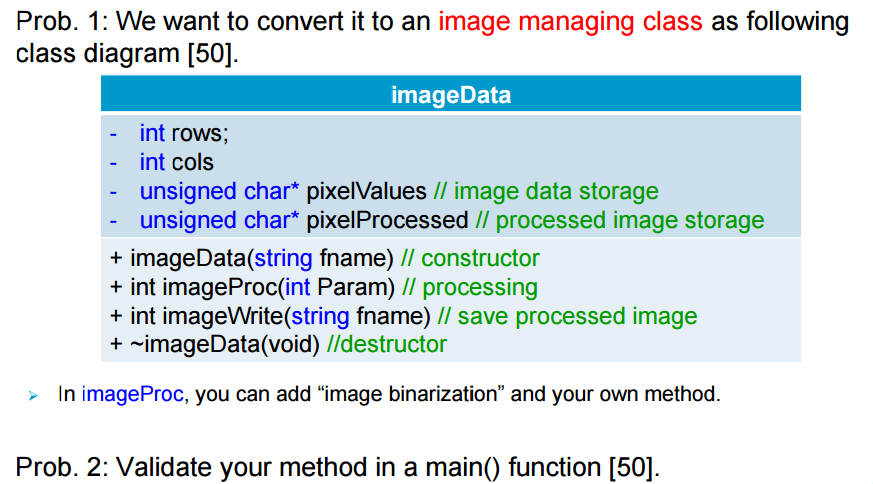
Prob. 1: We want to convert it to an image managing class as following class diagram 1501 image Data int rows int cols unsigned char* pixelValues ll image data storage unsigned char* pixelProcessed ll processed image storage imageData (string fname) constructor int imageProc (int Param) processing int imageWrite(string fname) ll save processed image mageData (void) //destructor In imageProc, you can add "image binarization" and your own method Prob. 2: Validate your method in a main function [50]

Step by Step Solution

There are 3 Steps involved in it

1 Expert Approved Answer
Step: 1 Unlock blur-text-image
Question Has Been Solved by an Expert!

Get step-by-step solutions from verified subject matter experts

Step: 2 Unlock
Step: 3 Unlock

Students Have Also Explored These Related Databases Questions!