







Question: #include #include #include #include class List; using Item = std::string; // IMPLEMENT THE QUEUE CLASS class Queue { private: public: //Queue may have no more
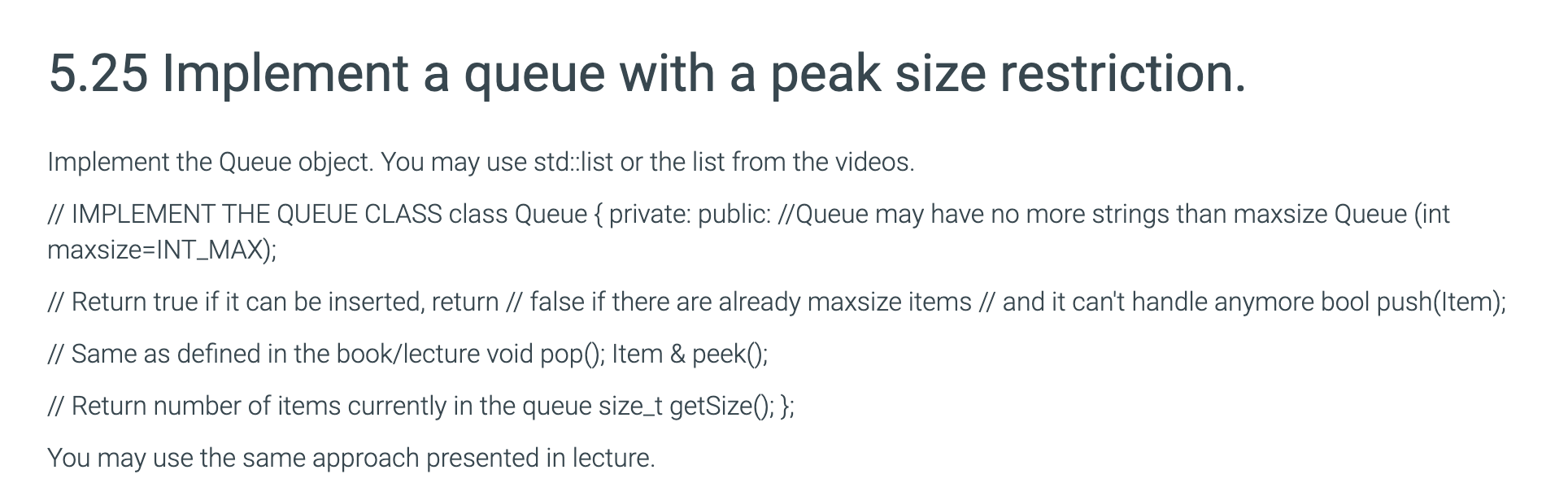
#include
class List; using Item = std::string;
// IMPLEMENT THE QUEUE CLASS class Queue { private: public: //Queue may have no more strings than maxsize Queue (int maxsize=INT_MAX);
// Return true if it can be inserted, return // false if there are already maxsize items // and it can't handle anymore bool push(Item);
// Same as defined in the book/lecture void pop(); Item & peek();
// Return number of items currently in the queue size_t getSize(); };
bool Queue::push(Item i) { return true; }
void Queue::pop() { }
Item& Queue::peek() {
}
size_t Queue::getSize() { return 0; }
int main() {
Queue s;
s.push("apples"); s.push("bread"); s.push("snack");
Item &i = s.peek(); std::cout 5.25 Implement a queue with a peak size restriction. Implement the Queue object. You may use std::list or the list from the videos. // IMPLEMENT THE QUEUE CLASS class Queue { private: public: //Queue may have no more strings than maxsize Queue (int maxsize=INT_MAX); // Return true if it can be inserted, return // false if there are already maxsize items // and it can't handle anymore bool push(Item); // Same as defined in the book/lecture void pop(); Item & peek(); // Return number of items currently in the queue size_t getSize(); }; You may use the same approach presented in lecture
Step by Step Solution
There are 3 Steps involved in it

Get step-by-step solutions from verified subject matter experts
 Study Help