







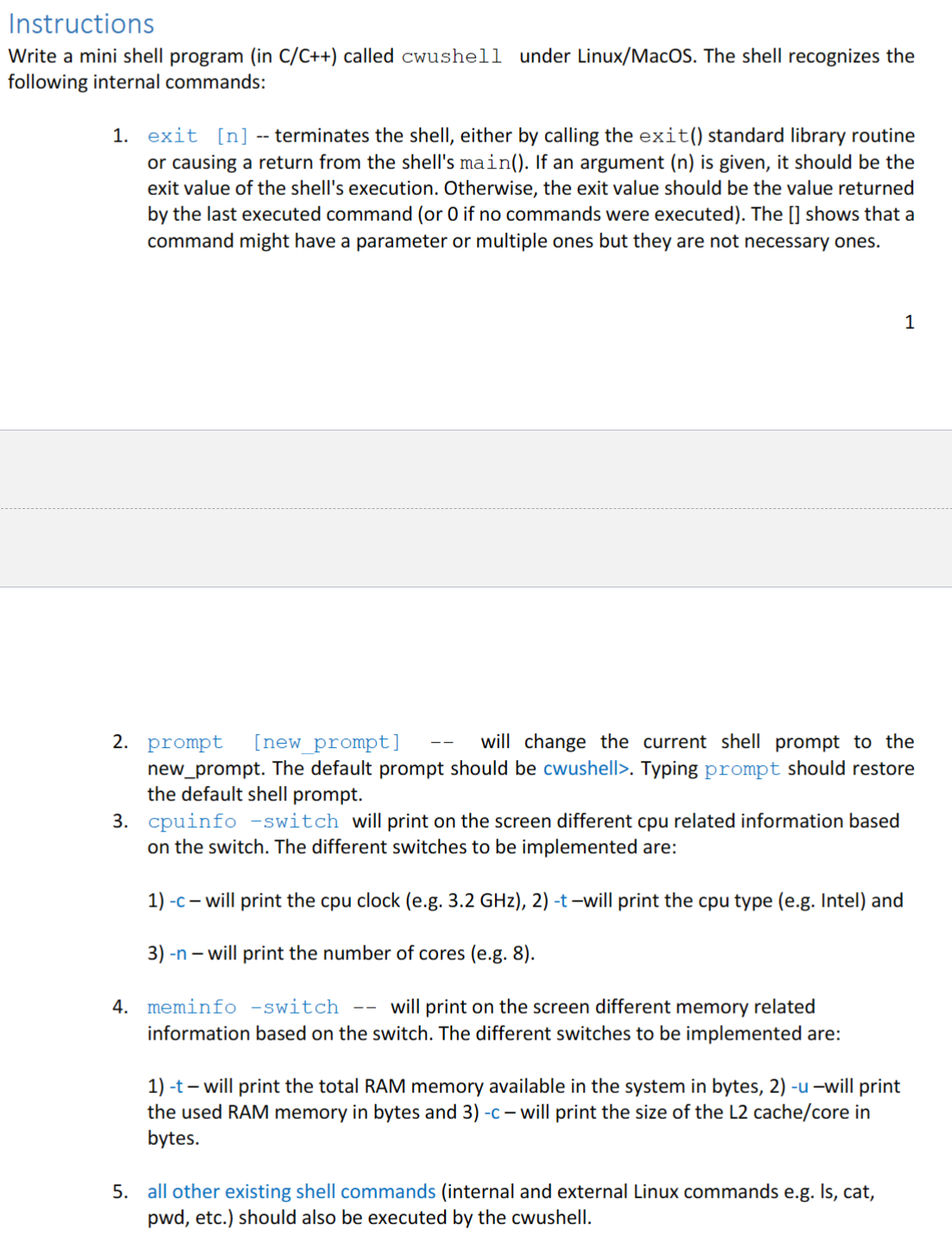
Question: #include #include #include #include #include #include #include #include using namespace std; void executeCommand ( const vector& args ) ; vector parseInput ( string input )
#include
#include
#include
#include
#include
#include
#include
#include
using namespace std;
void executeCommandconst vector& args;
vector parseInputstring input;
void printCpuClockSpeed;
int main
string input;
string prompt "cwushell;
vector args;
while true
cout prompt ;
getlinecin input;
args parseInputinput;
if argsempty
continue;
Internal command: exit
if args "exit"
int exitStatus args.size stoiargs : ;
exitexitStatus;
Internal command: prompt
else if args "prompt"
if argssize
prompt args;
else
prompt "cwushell;
Internal command: cpuinfo
else if args "cpuinfo"
if argssize
if argsc
printCpuClockSpeed;
else if argst
Print CPU type
else if argsn
Print number of CPU cores
else
cout "Invalid switch for cpuinfo" endl;
else
cout No switch provided for cpuinfo" endl;
Internal command: meminfo
else if args "meminfo"
Similar to cpuinfo
External commands
else
executeCommandargs;
return ;
void printCpuClockSpeed
ifstream fileproccpuinfo;
if file.isopen
cerr "Error opening file: strerrorerrno endl;
return;
string line;
while getlinefile line
if linefindcpu MHz string::npos
Process the line to extract CPU speed
The line typically looks like "cpu MHz :
sizet pos line.find:;
if pos string::npos
string speedStr line.substrpos ;
double speedMHz stodspeedStr;
cout "CPU Clock Speed: speedMHz MHz endl;
break;
file.close;
vector parseInputstring input
vector args;
string arg;
istringstream issinput;
while iss arg
args.pushbackarg;
return args;
void executeCommandconst vector& args
pidt pid fork;
if pid
perrorfork;
else if pid
Convert vector to char array for execvp
vector cargs;
for const auto& arg : args
cargs.pushbackconstcastargcstr;
cargs.pushbacknullptr;
execvpcargs cargs.data;
perrorexecvp;
exitEXITFAILURE;
else
waitnullptr; Wait for the child process to finish
Step by Step Solution
There are 3 Steps involved in it
1 Expert Approved Answer
Step: 1 Unlock

Question Has Been Solved by an Expert!
Get step-by-step solutions from verified subject matter experts
Step: 2 Unlock
Step: 3 Unlock
 Study Help