







Question: #include #include #include #include #include int main() { int PID; char lineGot[256]; char *cmd; while (1){ printf(cmd: ); fgets(lineGot, 256, stdin); // Get a string
![lineGot[256]; char *cmd; while (1){ printf("cmd: "); fgets(lineGot, 256, stdin); // Get](https://dsd5zvtm8ll6.cloudfront.net/si.experts.images/questions/2024/09/66f3bb37eb8c6_20766f3bb374eb0f.jpg)
#include
int main() { int PID; char lineGot[256]; char *cmd; while (1){ printf("cmd: "); fgets(lineGot, 256, stdin); // Get a string from user (includes ) cmd = strtok(lineGot, " "); // Get the string without the if( strcmp(cmd, "e") == 0 ) // loop terminates when "e" is typed exit (0); // creates a new process. Parent gets the child's process ID. Child gets 0. if ( (PID=fork()) > 0) { wait(NULL); } else if (PID == 0) /* child process */ { execlp (cmd, cmd, NULL); /* exec cannot return. If so do the following */ fprintf (stderr, "Cannot execute %s ", cmd); exit(1); /* exec failed */ } else if ( PID == -1) { fprintf (stderr, "Cannot create a new process "); exit (2); } } }
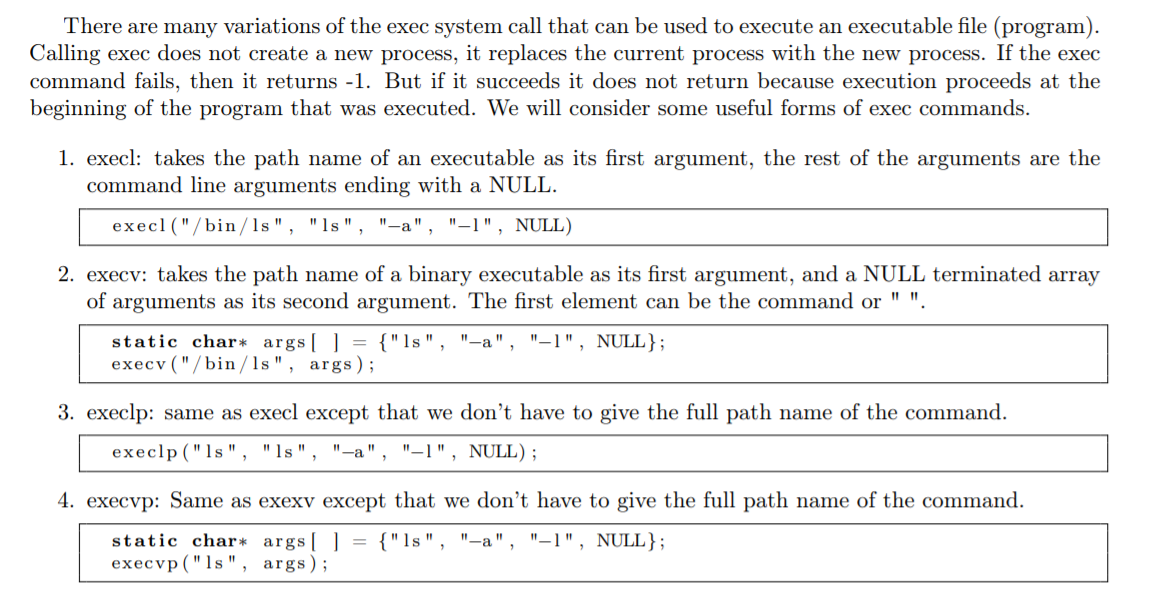
There are many variations of the exec system call that can be used to execute an executable file (program). Calling exec does not create a new process, it replaces the current process with the new process. If the exec command fails, then it returns -1. But if it succeeds it does not return because execution proceeds at the beginning of the program that was executed. We will consider some useful forms of exec commands. 1. execl: takes the path name of an executable as its first argument, the rest of the arguments are the command line arguments ending with a NULL. execl('/bin/ls", "ls", "-", "-1", NULL) 2. execv: takes the path name of a binary executable as its first argument, and a NULL terminated array of arguments as its second argument. The first element can be the command or "". static char* args[] = {"ls", "-a", "-1", NULL}; execv ("/bin/ls", args); 3. execlp: same as execl except that we don't have to give the full path name of the command. execlp ("ls", "s", "-", "-1", NULL); 4. execvp: Same as exexy except that we don't have to give the full path name of the command. static char* args[] = {"ls", "-a", "-1", NULL}; execvp ("ls", args); shell.c below is a stripped down shell program. It will run a Unix command without any arguments. Copy and save the program as shell.c. Modify the program so that it can execute any shell command. It should be able to take at least 2 arguments. Usually, you need to parse the command line you enter. Using execvp instead of execlp will probably help. It should work on any UNIX command consisting of 0-2 arguments after the command entered by the user, and be error free. The following are a few test cases that the user could enter. $ cp filel file2 $ ls -1 $ who char *strtok(char *str, const char *delim) is a useful function for parsing the input string. You can see below how it used " " as a delimiter to get everything before that character. You can specify "" as a delimiter to split the string into arguments. The first time you use it, give it a string as the first parameter to tokenize. This will return the first token. You can then use it subsequent times with NULL as the first parameter and it will return subsequent tokens in order. After the last token was returned, it returns NULL. For example if you wrote: char input ( = "Hello World!"; strtok (input, ""); strtok (NULL, ""); strtok (NULL, ""); ...the first call would return "Hello". The second call would return "World!". And the third call would return NULL. There are many variations of the exec system call that can be used to execute an executable file (program). Calling exec does not create a new process, it replaces the current process with the new process. If the exec command fails, then it returns -1. But if it succeeds it does not return because execution proceeds at the beginning of the program that was executed. We will consider some useful forms of exec commands. 1. execl: takes the path name of an executable as its first argument, the rest of the arguments are the command line arguments ending with a NULL. execl('/bin/ls", "ls", "-", "-1", NULL) 2. execv: takes the path name of a binary executable as its first argument, and a NULL terminated array of arguments as its second argument. The first element can be the command or "". static char* args[] = {"ls", "-a", "-1", NULL}; execv ("/bin/ls", args); 3. execlp: same as execl except that we don't have to give the full path name of the command. execlp ("ls", "s", "-", "-1", NULL); 4. execvp: Same as exexy except that we don't have to give the full path name of the command. static char* args[] = {"ls", "-a", "-1", NULL}; execvp ("ls", args); shell.c below is a stripped down shell program. It will run a Unix command without any arguments. Copy and save the program as shell.c. Modify the program so that it can execute any shell command. It should be able to take at least 2 arguments. Usually, you need to parse the command line you enter. Using execvp instead of execlp will probably help. It should work on any UNIX command consisting of 0-2 arguments after the command entered by the user, and be error free. The following are a few test cases that the user could enter. $ cp filel file2 $ ls -1 $ who char *strtok(char *str, const char *delim) is a useful function for parsing the input string. You can see below how it used " " as a delimiter to get everything before that character. You can specify "" as a delimiter to split the string into arguments. The first time you use it, give it a string as the first parameter to tokenize. This will return the first token. You can then use it subsequent times with NULL as the first parameter and it will return subsequent tokens in order. After the last token was returned, it returns NULL. For example if you wrote: char input ( = "Hello World!"; strtok (input, ""); strtok (NULL, ""); strtok (NULL, ""); ...the first call would return "Hello". The second call would return "World!". And the third call would return NULL
Step by Step Solution
There are 3 Steps involved in it

Get step-by-step solutions from verified subject matter experts
 Study Help