







Question: #include #include #include #include #include md_parser.h #include util.h using namespace std; typedef enum { NORMALTEXT, LINKTEXT, ISLINK, LINKURL } PARSE_STATE_T; void MDParser::parse(std::string filename, std::set &
#include
using namespace std;
typedef enum { NORMALTEXT, LINKTEXT, ISLINK, LINKURL } PARSE_STATE_T;
void MDParser::parse(std::string filename, std::set<:string>& allSearchableTerms, std::set<:string>& allOutgoingLinks) { // Attempts to open the file. ifstream wfile(filename.c_str()); if(!wfile) { throw invalid_argument("Bad webpage filename in MDParser::parse()"); }
// Remove any contents of the sets before starting to parse. allSearchableTerms.clear(); allOutgoingLinks.clear();
// The initial state is parsing a normal term. PARSE_STATE_T state = NORMALTEXT;
// Initialize the current term and link as empty strings. string term = ""; string link = "";
// Get the first character from the file. char c = wfile.get();
// Continue reading from the file until input fails. while(!wfile.fail()) { // Logic for parsing a normal term. if(state == NORMALTEXT) { // ADD YOUR CODE HERE
} // Logic for parsing a link. else if (state == LINKTEXT) { // ADD YOUR CODE HERE
} else if( state == ISLINK ) { // ADD YOUR CODE HERE
} // Else we are in the LINKURL state. else { // ADD YOUR CODE HERE
} // Attempt to get another character from the file. c = wfile.get(); } // ADD ANY REMAINING CODE HERE
// Close the file. wfile.close(); }
std::string MDParser::display_text(std::string filename) { // Attempts to open the file. ifstream wfile(filename.c_str()); if (!wfile) { throw std::invalid_argument("Bad webpage filename in TXTParser::parse()"); } std::string retval;
// The initial state is parsing a normal term. PARSE_STATE_T state = NORMALTEXT;
char c = wfile.get();
// Continue reading from the file until input fails. while (!wfile.fail()) { // Logic for parsing a normal term. if (state == NORMALTEXT) { // The moment we hit a bracket, we input our current working term // into the allSearchableTerms set, reset the current term, and move into // parsing a link. if (c == '[') { state = LINKTEXT; } retval += c; } // Logic for parsing a link. else if (state == LINKTEXT) { // When we hit the closing bracket, then we must be finished getting the link. if (c == ']') { state = ISLINK; } retval += c; } else if (state == ISLINK) { if (c == '(') { state = LINKURL; } else { state = NORMALTEXT; retval += c; } } // Else we are in the LINKURL state. else { // When we hit a closing parenthese then we are done, and the link can be inserted. if (c == ')') { state = NORMALTEXT; } } c = wfile.get(); } return retval; }
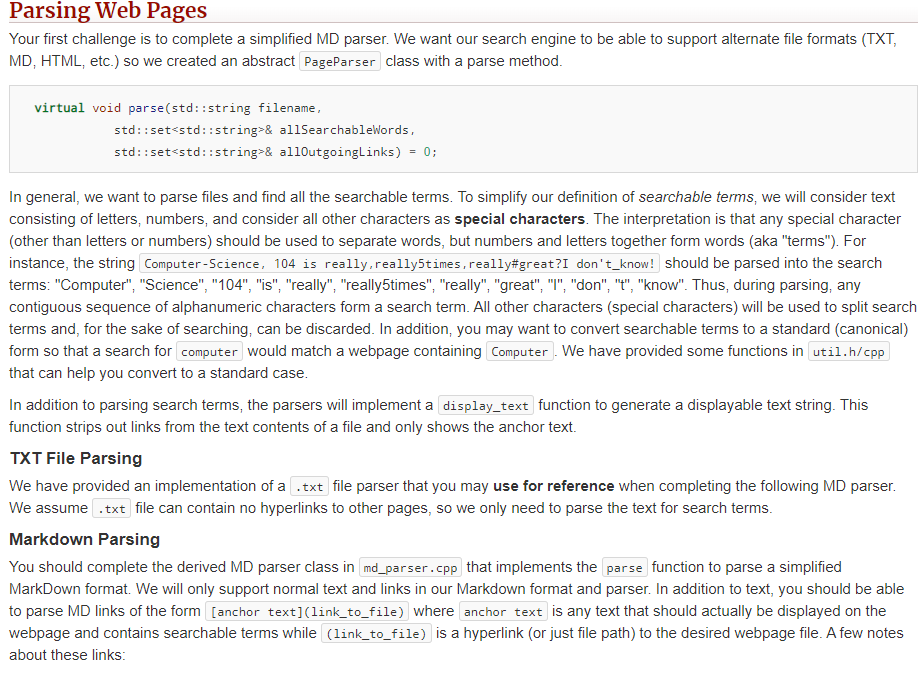
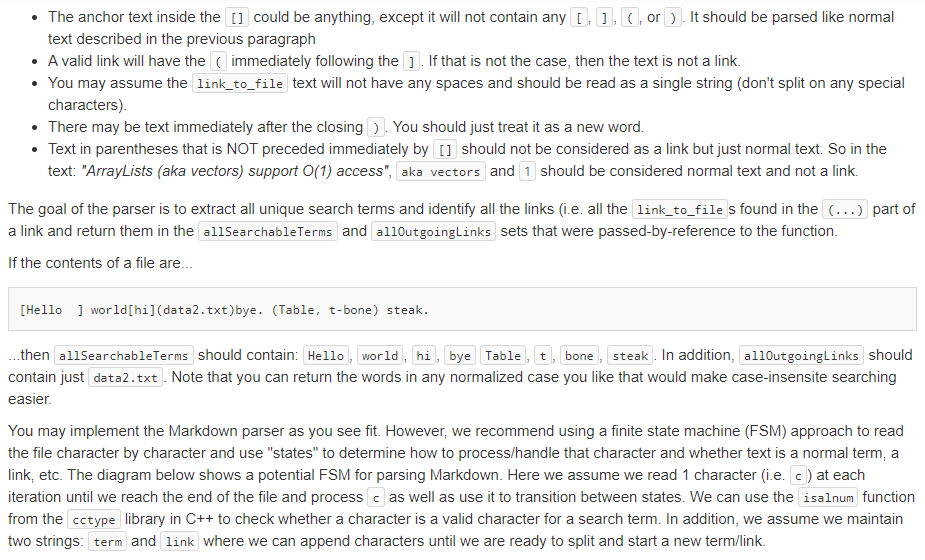
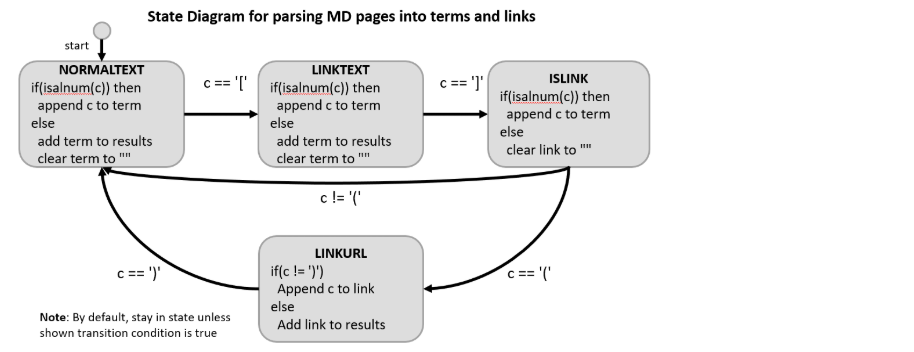
Parsing Web Pages Your first challenge is to complete a simplified MD parser. We want our search engine to be able to support alternate file formats (TXT, MD, HTML, etc.) so we created an abstract PageParser class with a parse method. virtual void parse(std::string filename, std::set<:string>& allSearchableWords, std::set<:string>& alloutgoingLinks) = 0; In general, we want to parse files and find all the searchable terms. To simplify our definition of searchable terms, we will consider text consisting of letters, numbers, and consider all other characters as special characters. The interpretation is that any special character (other than letters or numbers) should be used to separate words, but numbers and letters together form words (aka "terms"). For instance, the string Computer-Science, 104 is really, really5times, really#great?I don't_know! should be parsed into the search terms: "Computer", "Science", "104", "is", "really", "really5times", "really", "great", "T", "don", "t", "know". Thus, during parsing, any contiguous sequence of alphanumeric characters form a search term. All other characters (special characters) will be used to split search terms and, for the sake of searching, can be discarded. In addition, you may want to convert searchable terms to a standard (canonical) form so that a search for computer would match a webpage containing Computer. We have provided some functions in util.h/cpp that can help you convert to a standard case. In addition to parsing search terms, the parsers will implement a display_text function to generate a displayable text string. This function strips out links from the text contents of a file and only shows the anchor text. TXT File Parsing We have provided an implementation of a .txt file parser that you may use for reference when completing the following MD parser. We assume .txt file can contain no hyperlinks to other pages, so we only need to parse the text for search terms. Markdown Parsing You should complete the derived MD parser class in md_parser.cpp that implements the parse function to parse a simplified MarkDown format. We will only support normal text and links in our Markdown format and parser. In addition to text, you should be able to parse MD links of the form [anchor text](link_to_file) where anchor text is any text that should actually be displayed on the webpage and contains searchable terms while (link_to_file) is a hyperlink (or just file path) to the desired webpage file. A few notes about these links: The anchor text inside the [] could be anything, except it will not contain any [ ] c, or). It should be parsed like normal text described in the previous paragraph A valid link will have the immediately following the ] . If that is not the case, then the text is not a link You may assume the link_to_file text will not have any spaces and should be read as a single string (don't split on any special characters). There may be text immediately after the closing). You should just treat it as a new word. Text in parentheses that is NOT preceded immediately by [] should not be considered as a link but just normal text. So in the text: "ArrayLists (aka vectors) support O(1) access", aka vectors and 1 should be considered normal text and not a link. The goal of the parser is to extract all unique search terms and identify all the links (i.e. all the link_to_file s found in the (...) part of a link and return them in the allSearchableTerms and alloutgoingLinks sets that were passed-by-reference to the function. If the contents of a file are. [Hello ] world[hi](data.txt)bye. (Table, t-bone) steak. ...then allSearchableTerms should contain: Hello world, hi, bye Table, t bone steak. In addition, alloutgoingLinks should contain just data2.txt . Note that you can return the words in any normalized case you like that would make case-insensite searching easier. You may implement the Markdown parser as you see fit. However, we recommend using a finite state machine (FSM) approach to read the file character by character and use "states" to determine how to process/handle that character and whether text is a normal term, a link, etc. The diagram below shows a potential FSM for parsing Markdown. Here we assume we read 1 character i.e. c) at each iteration until we reach the end of the file and process c as well as use it to transition between states. We can use the isalnum function from the cctype library in C++ to check whether a character is a valid character for a search term. In addition, we assume we maintain two strings: term and link where we can append characters until we are ready to split and start a new term/link. State Diagram for parsing MD pages into terms and links start 1 c == 'T' c == '1' NORMALTEXT if(isalnum(c)) then append c to term else add term to results clear term to LINKTEXT if(isalnum(c)) then append c to term else add term to results clear term to ISLINK if(isalnum(c)) then append c to term else clear link to "" c!= '/' c == ')'. CE='' LINKURL if(c != ')') Append c to link else Add link to results Note: By default, stay in state unless shown transition condition is true
Step by Step Solution
There are 3 Steps involved in it

Get step-by-step solutions from verified subject matter experts
 Study Help