







Question: #include #include #include #include using namespace std; const int MAX_H = 512; const int MAX_W = 512; // Reads a PGM file. // Notice that:
#include
#include#include #include using namespace std; const int MAX_H = 512; const int MAX_W = 512; // Reads a PGM file. // Notice that: height and width are passed by reference! void readImage(int image[MAX_H][MAX_W], int &height, int &width) { char c; int x; ifstream instr; instr.open("inImage.pgm"); // read the header P2 instr >> c; assert(c == 'P'); instr >> c; assert(c == '2'); // skip the comments (if any) while ((instr>>ws).peek() == '#') { instr.ignore(4096, ' '); } instr >> width; instr >> height; assert(width > max; assert(max == 255); for (int row = 0; row > image[row][col]; instr.close(); return; } // Writes a PGM file // Need to provide the array data and the image dimensions void writeImage(int image[MAX_H][MAX_W], int height, int width) { ofstream ostr; ostr.open("outImage.pgm"); if (ostr.fail()) { cout = 0); ostr Task G (Bonus). Kernel method image filtering
A sliding window operator replaces each pixel with some function of its 8 neighbors (and itself). Consider pixel e and its 8 neighbors (labeled a-i) that form a 3x3 window around it:
. . . . . . . . . . . . . a b c . . . d e f . . . g h i . . . . . . . .The operation replaces pixel e (in the middle of the 3x3 window) with some function of its neighbors f(a,b,c,d,e,f,g,h,i). It is possible to implement blur, edge detection, and many other image processing operations using this technique.
References:
Lodes Computer Graphics Tutorial - Image Filtering
Interactive demo for different functions (kernels)
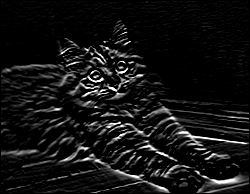
For this task, write a program kernel.cpp, which implements a horizontal edge detection operation. One way to detect horizontal edges is to use the function
f(a,b,c,d,e,f,g,h,i) = (g+2h+i)-(a+2b+c)
(This is one component of the so called Sobel operator, if you want to read more about it.)
Example:
Remark 1: Note that this is a sliding window operator unlike the non-overlapping window pixelization operator in the previous task. That is, the considered window is always a window around the pixel whose value is being computed.
Remark 2: You shouldnt overwrite the original array. Make a new array for the output, and write the resulting pixel color into the new array.
Remark 3: There are several ways to handle the pixels on the borders, which dont have all 8 neighbors available. Come up with any reasonable way to assign their colors (you can assume that the non-existing neighbors are black, or make the boundary wrap around, or even simply assign black color to the boundary pixels in the output).
Remark 4: If the resulting color is less than 0 or greater than 255, make them 0 and 255 respectively, otherwise writeImage function will complain that the colors are out of range.
Step by Step Solution
There are 3 Steps involved in it

Get step-by-step solutions from verified subject matter experts
 Study Help