







Question: #include #include #include music.h /* FUNCTION PROTOTYPES */ void sys_init(void); void delayby1ms(unsigned int); /* FUNCTION DEFINITIONS */ void main(void) { unsigned char newkey = 0;
#include
#include
#include "music.h"
/* FUNCTION PROTOTYPES */
void sys_init(void);
void delayby1ms(unsigned int);
/* FUNCTION DEFINITIONS */
void main(void)
{
unsigned char newkey = 0; /* P7 key state variables */
unsigned char oldkey = 0; /* " */
unsigned char note_h = ZH; /* initial values for note frequency/duration */
unsigned char note_l = ZL; /* " */
sys_init(); /* configure hardware and peripherals */
SFRPAGE = UART0_PAGE; /* select UART SFR page; print welcome */
printf(" *** NEW PLAYER PIANO SESSION *** ");
/* MAIN LOOP */
while (1) {
SFRPAGE = 0x0F; /* select P7 SFR page */
newkey = P7; /* get state of P7 keys (P7.0 - P7.7) */
if (newkey != oldkey) /* key pressed/released? */
{
oldkey = newkey; /* if so, save new key code */
// INSERT YOUR CODE HERE
/* LOAD AND PRINT NEW NOTE VALUES */
SFRPAGE = UART0_PAGE; /* switch to UART SFR page for console output */
switch ( newkey ) { /* select new note value */
case 0x80:
printf("C4 ");
note_h = C4H; /* C4 */
note_l = C4L; /* " */
break;
// INSERT YOUR CODE HERE
default:
printf("| ");
note_h = ZH; /* silence */
note_l = ZL; /* " */
} /* end switch() */
SFRPAGE = TMR2_PAGE; /* switch to T2 SFR page for timer/buzzer */
/* BEGIN PLAYING NEW NOTE */
// INSERT YOUR CODE HERE
} /* end if() */
} /* end main loop */
} /* end main() */
void delayby1ms(unsigned int k)
{
unsigned char p;
unsigned int i;
p = SFRPAGE; /* save previous SFR page */
SFRPAGE = 0; /* switch to T0 page */
for (i = 0; i
TH0 = 0xEB; /* place 59410 in TH0:TL0 so T0 overflows in 1 ms */
TL0 = 0x12;
TF0 = 0;
TR0 = 1; /* start Timer 0 */
while(!TF0); /* wait for 1 ms */
TR0 = 0; /* stop Timer 0 */
}
SFRPAGE = p; /* restore previous SFR page */
}
void sys_init(void)
{
SFRPAGE = 0x0F; /* switch to SFR configuration page (F) */
WDTCN = 0xDE; /* disable watchdog timer */
WDTCN = 0xAD; /* " */
CLKSEL = 0; /* select internal oscillator as SYSCLK */
OSCICN = 0x83; /* " */
XBR0 = 0xF7; /* assign all peripheral signals to port pins */
XBR1 = 0xFF; /* " */
XBR2 = 0x5D; /* " */
XBR3 = 0x8F; /* " */
P2MDOUT = 0x80; /* enable T2 pin output */
P7MDOUT = 0xFF; /* enable P7 as push-pull output */
P6MDOUT = 0xFF; /* enable P6 as push-pull output */
P7 = 0;
P6 = 0;
SFRPAGE = TMR4_PAGE; /* Configure Timer 4 for UART */
RCAP4H = 0xFF; /* set UART0 baud rate to 19200 */
RCAP4L = 0xB2; /* " */
TMR4H = 0xFF; /* " */
TMR4L = 0xB2; /* " */
TMR4CF = 0x08; /* select SYSCLK as TMR4's clock source */
TMR4CN = 0x04; /* select Timer 4 reload mode */
SFRPAGE = TMR2_PAGE; /* Configure Timer 2 */
TMR2CF = 0x0A; /* select SYSCLK as timer 2 clock, enable T2 output */
TMR2CN = 0;
SFRPAGE = UART0_PAGE; /* switch to SFR page 0 */
SCON0 = 0x50; /* UART0 in mode 1, enable reception */
SSTA0 = 0x0F; /* use TMR4 to generate UART0 baud rate */
TI0 = 1; /* get ready to transceive */
RI0 = 0; /* get ready to receive */
TMOD = 0x11; /* configure Timer 0 and 1 to mode 1 */
CKCON = 0x01; /* Timer 0 use system clock divided by 4 as clock source */
SPI0CN = 0x01; /* enable SPI in 3-wire mode */
}
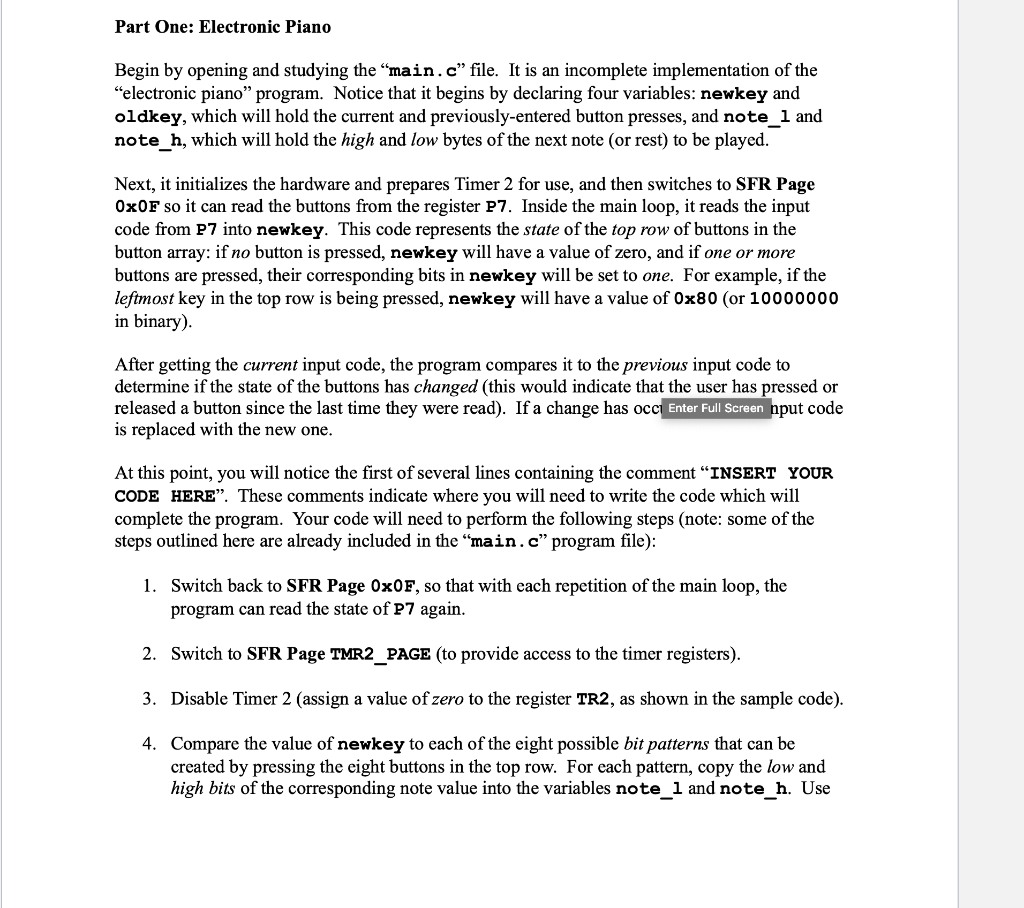
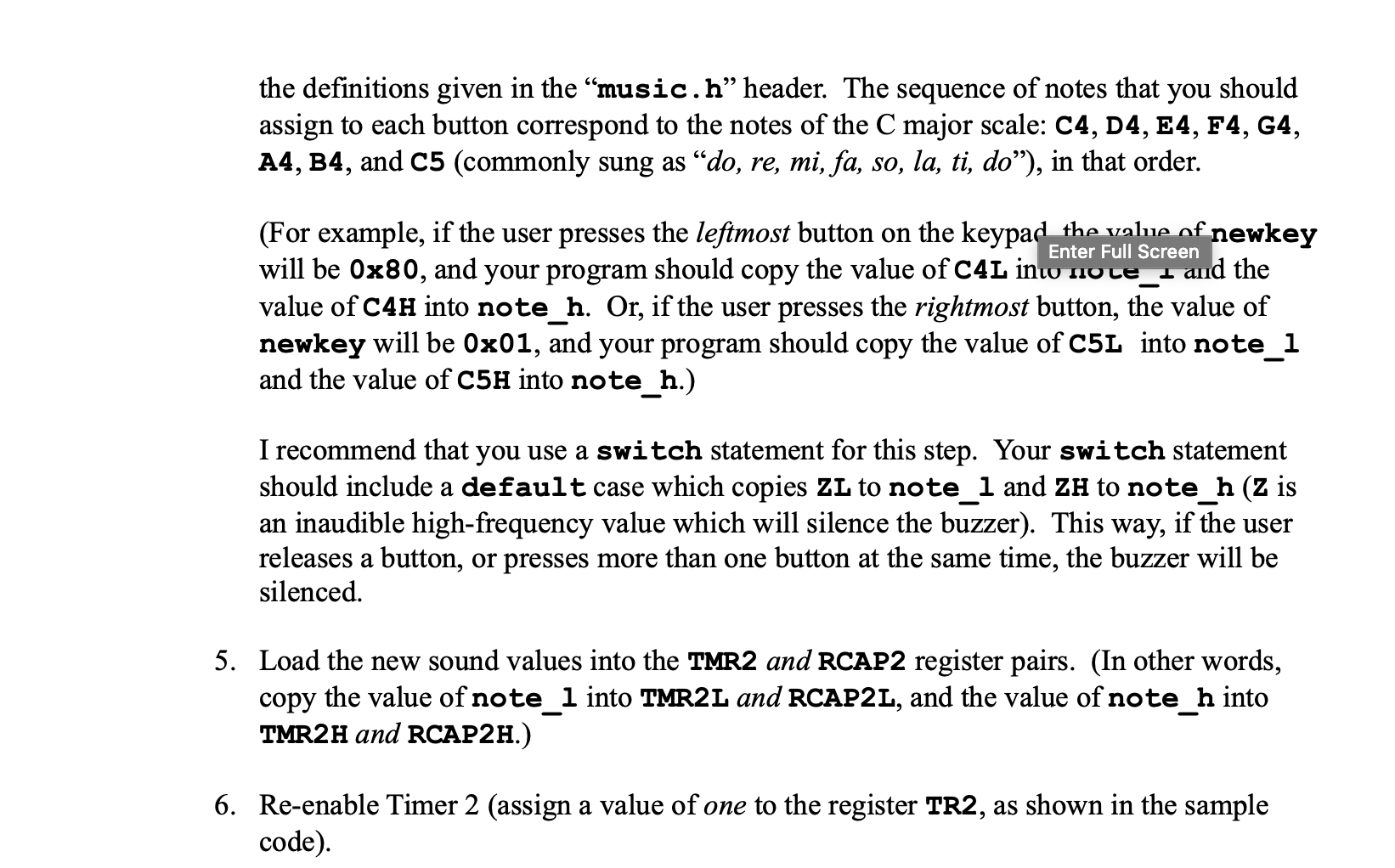
Part One: Electronic Piano Begin by opening and studying the main.c file. It is an incomplete implementation of the "electronic piano" program. Notice that it begins by declaring four variables: newkey and oldkey, which will hold the current and previously-entered button presses, and note_1 and note_h, which will hold the high and low bytes of the next note (or rest) to be played. Next, it initializes the hardware and prepares Timer 2 for use, and then switches to SFR Page Ox0F so it can read the buttons from the register P7. Inside the main loop, it reads the input code from P7 into newkey. This code represents the state of the top row of buttons in the button array: if no button is pressed, newkey will have a value of zero, and if one or more buttons are pressed, their corresponding bits in newkey will be set to one. For example, if the leftmost key in the top row is being pressed, newkey will have a value of 0x80 (or 10000000 in binary). After getting the current input code, the program compares it to the previous input code to determine if the state of the buttons has changed (this would indicate that the user has pressed or released a button since the last time they were read). If a change has occi Enter Full Screen nput code is replaced with the new one. At this point, you will notice the first of several lines containing the comment "INSERT YOUR CODE HERE. These comments indicate where you will need to write the code which will complete the program. Your code will need to perform the following steps (note: some of the steps outlined here are already included in the main.c program file): 1. Switch back to SFR Page 0x0F, so that with each repetition of the main loop, the program can read the state of P7 again. 2. Switch to SFR Page TMR2_PAGE (to provide access to the timer registers). 3. Disable Timer 2 (assign a value of zero to the register TR2, as shown in the sample code). 4. Compare the value of newkey to each of the eight possible bit patterns that can be created by pressing the eight buttons in the top row. For each pattern, copy the low and high bits of the corresponding note value into the variables note_1 and note_h. Use the definitions given in the music.h header. The sequence of notes that you should assign to each button correspond to the notes of the C major scale: C4, D4, E4, F4, G4, A4, B4, and C5 (commonly sung as do, re, mi, fa, so, la, ti, do), in that order. (For example, if the user presses the leftmost button on the keypad the value of newkey will be 0x80, and your program should copy the value of C4L ini nole - and the value of C4H into note_h. Or, if the user presses the rightmost button, the value of newkey will be 0x01, and your program should copy the value of C5L into note_1 and the value of C5H into note_h.) I recommend that you use a switch statement for this step. Your switch statement should include a default case which copies ZL to note_1 and ZH to note_h (Z is an inaudible high-frequency value which will silence the buzzer). This way, if the user releases a button, or presses more than one button at the same time, the buzzer will be silenced. 5. Load the new sound values into the TMR2 and RCAP2 register pairs. (In other words, copy the value of note_1 into TMR2L and RCAP2L, and the value of note_h into TMR2H and RCAP2H.) 6. Re-enable Timer 2 (assign a value of one to the register TR2, as shown in the sample code). Part One: Electronic Piano Begin by opening and studying the main.c file. It is an incomplete implementation of the "electronic piano" program. Notice that it begins by declaring four variables: newkey and oldkey, which will hold the current and previously-entered button presses, and note_1 and note_h, which will hold the high and low bytes of the next note (or rest) to be played. Next, it initializes the hardware and prepares Timer 2 for use, and then switches to SFR Page Ox0F so it can read the buttons from the register P7. Inside the main loop, it reads the input code from P7 into newkey. This code represents the state of the top row of buttons in the button array: if no button is pressed, newkey will have a value of zero, and if one or more buttons are pressed, their corresponding bits in newkey will be set to one. For example, if the leftmost key in the top row is being pressed, newkey will have a value of 0x80 (or 10000000 in binary). After getting the current input code, the program compares it to the previous input code to determine if the state of the buttons has changed (this would indicate that the user has pressed or released a button since the last time they were read). If a change has occi Enter Full Screen nput code is replaced with the new one. At this point, you will notice the first of several lines containing the comment "INSERT YOUR CODE HERE. These comments indicate where you will need to write the code which will complete the program. Your code will need to perform the following steps (note: some of the steps outlined here are already included in the main.c program file): 1. Switch back to SFR Page 0x0F, so that with each repetition of the main loop, the program can read the state of P7 again. 2. Switch to SFR Page TMR2_PAGE (to provide access to the timer registers). 3. Disable Timer 2 (assign a value of zero to the register TR2, as shown in the sample code). 4. Compare the value of newkey to each of the eight possible bit patterns that can be created by pressing the eight buttons in the top row. For each pattern, copy the low and high bits of the corresponding note value into the variables note_1 and note_h. Use the definitions given in the music.h header. The sequence of notes that you should assign to each button correspond to the notes of the C major scale: C4, D4, E4, F4, G4, A4, B4, and C5 (commonly sung as do, re, mi, fa, so, la, ti, do), in that order. (For example, if the user presses the leftmost button on the keypad the value of newkey will be 0x80, and your program should copy the value of C4L ini nole - and the value of C4H into note_h. Or, if the user presses the rightmost button, the value of newkey will be 0x01, and your program should copy the value of C5L into note_1 and the value of C5H into note_h.) I recommend that you use a switch statement for this step. Your switch statement should include a default case which copies ZL to note_1 and ZH to note_h (Z is an inaudible high-frequency value which will silence the buzzer). This way, if the user releases a button, or presses more than one button at the same time, the buzzer will be silenced. 5. Load the new sound values into the TMR2 and RCAP2 register pairs. (In other words, copy the value of note_1 into TMR2L and RCAP2L, and the value of note_h into TMR2H and RCAP2H.) 6. Re-enable Timer 2 (assign a value of one to the register TR2, as shown in the sample code)
Step by Step Solution
There are 3 Steps involved in it

Get step-by-step solutions from verified subject matter experts
 Study Help