







Question: #include #include #include using namespace std; // implementing the dynamic List ADT using Linked List class Node{ private: int data; Node* nextNodePtr; public: Node(){} void
#include
#include
#include
using namespace std;
// implementing the dynamic List ADT using Linked List
class Node{
private:
int data;
Node* nextNodePtr;
public:
Node(){}
void setData(int d){
data = d;
}
int getData(){
return data;
}
void setNextNodePtr(Node* nodePtr){
nextNodePtr = nodePtr;
}
Node* getNextNodePtr(){
return nextNodePtr;
}
};
class List{
private:
Node *headPtr;
public:
List(){
headPtr = new Node();
headPtr->setNextNodePtr(0);
}
Node* getHeadPtr(){
return headPtr;
}
bool isEmpty(){
if (headPtr->getNextNodePtr() == 0)
return true;
return false;
}
void insert(int data){
Node* currentNodePtr = headPtr->getNextNodePtr();
Node* prevNodePtr = headPtr;
while (currentNodePtr != 0){
prevNodePtr = currentNodePtr;
currentNodePtr = currentNodePtr->getNextNodePtr();
}
Node* newNodePtr = new Node();
newNodePtr->setData(data);
newNodePtr->setNextNodePtr(0);
prevNodePtr->setNextNodePtr(newNodePtr);
}
void insertAtIndex(int insertIndex, int data){
Node* currentNodePtr = headPtr->getNextNodePtr();
Node* prevNodePtr = headPtr;
int index = 0;
while (currentNodePtr != 0){
if (index == insertIndex)
break;
prevNodePtr = currentNodePtr;
currentNodePtr = currentNodePtr->getNextNodePtr();
index++;
}
Node* newNodePtr = new Node();
newNodePtr->setData(data);
newNodePtr->setNextNodePtr(currentNodePtr);
prevNodePtr->setNextNodePtr(newNodePtr);
}
int read(int readIndex){
Node* currentNodePtr = headPtr->getNextNodePtr();
Node* prevNodePtr = headPtr;
int index = 0;
while (currentNodePtr != 0){
if (index == readIndex)
return currentNodePtr->getData();
prevNodePtr = currentNodePtr;
currentNodePtr = currentNodePtr->getNextNodePtr();
index++;
}
return -1; // an invalid value indicating
// index is out of range
}
void modifyElement(int modifyIndex, int data){
Node* currentNodePtr = headPtr->getNextNodePtr();
Node* prevNodePtr = headPtr;
int index = 0;
while (currentNodePtr != 0){
if (index == modifyIndex){
currentNodePtr->setData(data);
return;
}
prevNodePtr = currentNodePtr;
currentNodePtr = currentNodePtr->getNextNodePtr();
index++;
}
}
void deleteElement(int deleteIndex){
Node* currentNodePtr = headPtr->getNextNodePtr();
Node* prevNodePtr = headPtr;
Node* nextNodePtr = headPtr;
int index = 0;
while (currentNodePtr != 0){
if (index == deleteIndex){
nextNodePtr = currentNodePtr->getNextNodePtr();
break;
}
prevNodePtr = currentNodePtr;
currentNodePtr = currentNodePtr->getNextNodePtr();
index++;
}
prevNodePtr->setNextNodePtr(nextNodePtr);
}
void IterativePrint(){
Node* currentNodePtr = headPtr->getNextNodePtr();
while (currentNodePtr != 0){
cout getData()
currentNodePtr = currentNodePtr->getNextNodePtr();
}
cout
}
};
int main(){
srand(time(NULL));
int listSize;
cout
cin >> listSize;
int maxValue;
cout
cin >> maxValue;
List integerList; // Create an empty list
for (int i = 0; i
int value = 1 + rand() % maxValue;
integerList.insertAtIndex(i, value);
}
cout
integerList.IterativePrint();
Node* headPtr = integerList.getHeadPtr();
Node* currentNodePtr = headPtr->getNextNodePtr();
Node* minDataNodePtr;
Node* maxDataNodePtr;
// Comple the code here to find out the addresses of the nodes with the
// minimum and maximum data in the singly linked list (integerList)
// whose values can then be printed as shown below
cout getData()
cout getData()
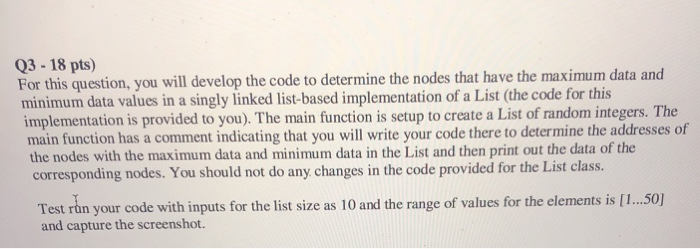
Q3 - 18 pts) For this question, you will develop the code to determine the nodes that have the maximum data and minimum data values in a singly linked list-based implementation of a List (the code for this implementation is provided to you). The main function is setup to create a List of random integers. The main function has a comment indicating that you will write your code there to determine the addresses of the nodes with the maximum data and minimum data in the List and then print out the data of the corresponding nodes. You should not do any changes in the code provided for the List class. Test run your code with inputs for the list size as 10 and the range of values for the elements is [1...50] and capture the screenshot system("pause");
return 0;
}
Step by Step Solution
There are 3 Steps involved in it
1 Expert Approved Answer
Step: 1 Unlock

Question Has Been Solved by an Expert!
Get step-by-step solutions from verified subject matter experts
Step: 2 Unlock
Step: 3 Unlock
 Study Help