







Question: Include screen shots ( both terminals ) here logged on 1 . What happens after step 2 and why? ( Continue to step 3 and
Include screen shots both terminals here logged on
What happens after step and why? Continue to step and and then answer
What happens after step and and why?
Include screen shotsboth terminals here
What happens after step and step and why?
What happens after step and why?
Explain the results wait to see of steps to and why?
Include screen shots both terminalshere
What happens after step and why?
What happens after step and why?
What happens after step and why?
Include screen shots both terminalshere
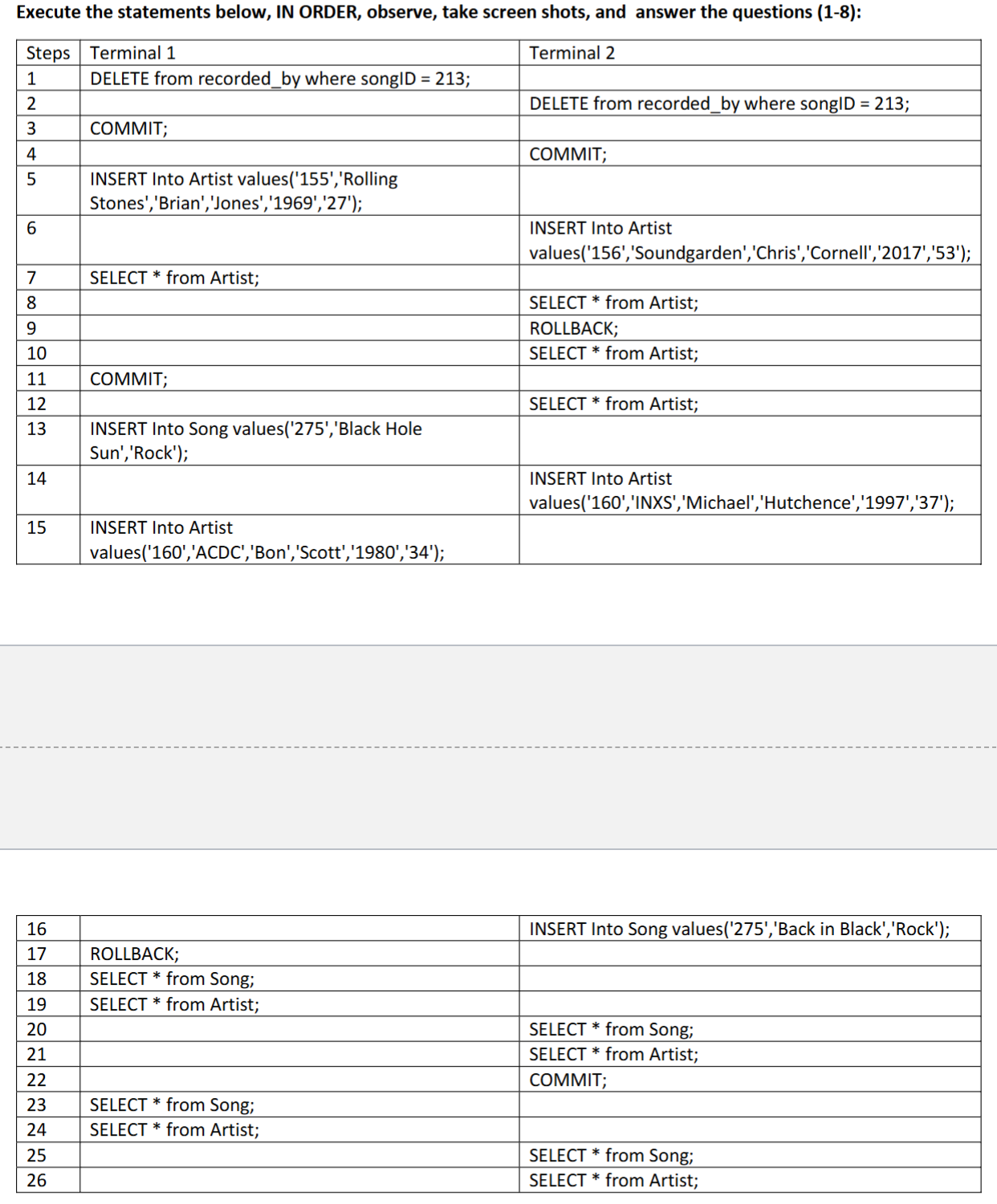
Using Music.sql as the script file and the table thats included in the photo Execute the statements below, IN ORDER, observe, take screen shots, and answer the questions :
begintabularlll
hline Steps & Terminal & Terminal
hline & DELETE from recordedby where songID ; &
hline & & DELETE from recordedby where songID ;
hline & COMMIT; &
hline & & COMMIT;
hline & begintabularl
INSERT Into Artist values'Rolling
Stones','Brian','Jones',;
endtabular & begintabularl
INSERT Into Artist
values'Soundgarden','Chris','Cornell',;
endtabular
hline & &
hline & SELECT from Artist; & SELECT from Artist;
hline & & ROLLBACK;
hline & & SELECT from Artist;
hline & & SELECT from Artist;
hline & COMMIT; &
hline & & begintabularl
INSERT Into Song values'Black Hole
Sun','Rock';
endtabular
hline & & begintabularl
INSERT Into Artist
values'INXS','Michael','Hutchence',;
endtabular
hline & &
hline & begintabularl
INSERT Into Artist
values'ACDC','Bon','Scott',;
endtabular
hline
endtabular
begintabularlll
hline & & INSERT Into Song values'Back in Black','Rock';
hline & ROLLBACK; &
hline & SELECT from Song; &
hline & SELECT from Artist; &
hline & & SELECT from Song;
hline & & SELECT from Artist;
hline & & COMMIT;
hline & SELECT from Song; &
hline & SELECT from Artist; &
hline & & SELECT from Song;
hline & & SELECT from Artist;
hline
endtabular
Step by Step Solution
There are 3 Steps involved in it
1 Expert Approved Answer
Step: 1 Unlock

Question Has Been Solved by an Expert!
Get step-by-step solutions from verified subject matter experts
Step: 2 Unlock
Step: 3 Unlock
 Study Help