







Question: included a clearer image answer to second comment: the required part is the 22 steps assessment based on the excel workbook information provided A1 f
included a clearer image
answer to second comment: the required part is the 22 steps assessment based on the excel workbook information provided
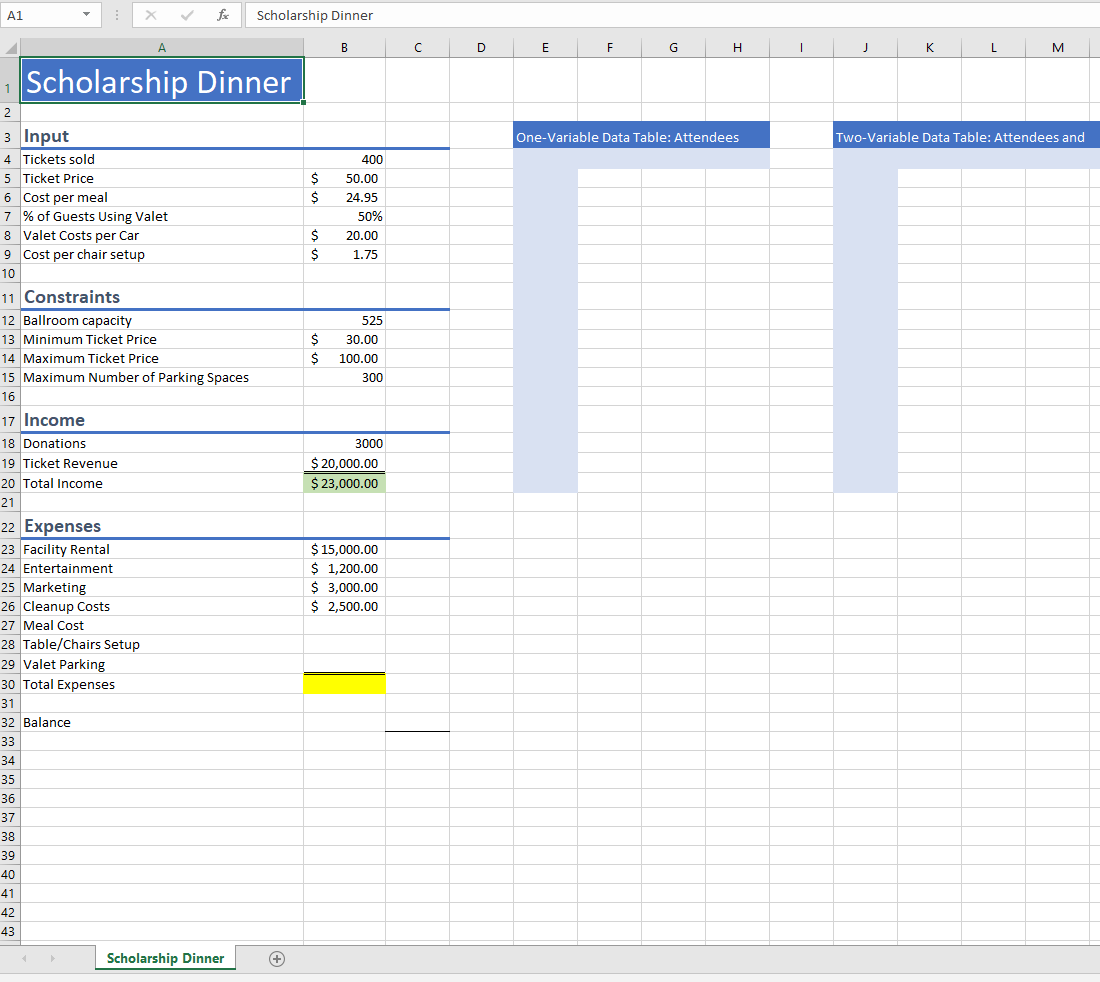
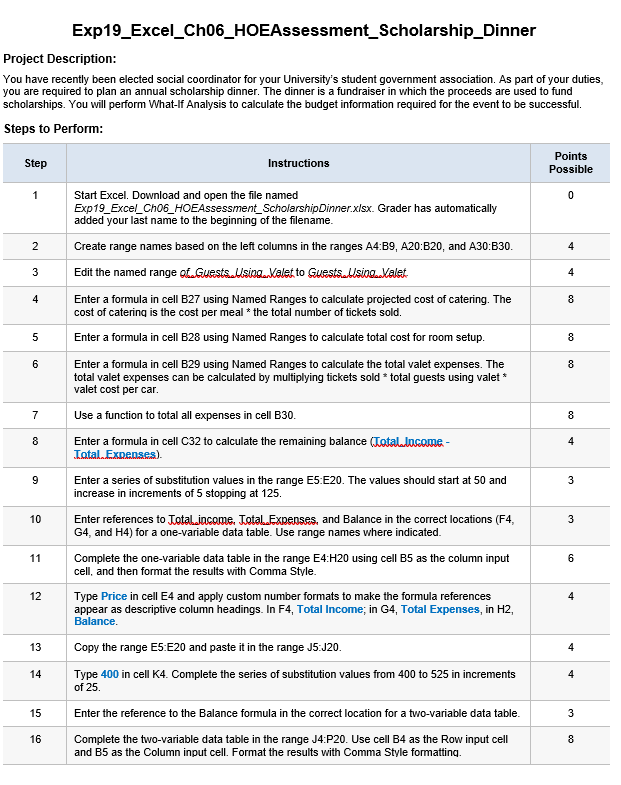
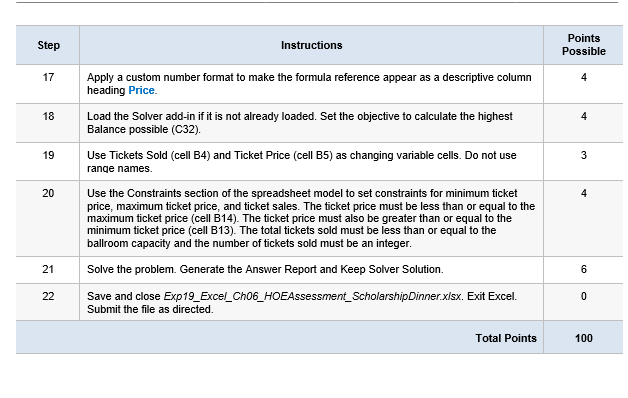
A1 f Scholarship Dinner B C D E F H | J K L M Scholarship Dinner One-Variable Data Table: Attendees TWO-Variable Data Table: Attendees and $ $ 400 50.00 24.95 50% 20.00 1.75 $ $ $ 525 30.00 100.00 300 S 3000 $ 20,000.00 $ 23,000.00 2 3 Input 4 Tickets sold 5 Ticket Price 6 Cost per meal 7 % of Guests Using Valet 8 Valet Costs per Car 9 Cost per chair setup 10 11 Constraints 12 Ballroom capacity 13 Minimum Ticket Price 14 Maximum Ticket Price 15 Maximum Number of Parking Spaces 16 17 Income 18 Donations 19 Ticket Revenue 20 Total Income 21 22 Expenses 23 Facility Rental 24 Entertainment 25 Marketing 26 Cleanup Costs 27 Meal Cost 28 Table/Chairs Setup 29 Valet Parking 30 Total Expenses 31 32 Balance 33 34 35 36 37 38 39 40 41 42 43 $ 15,000.00 $ 1,200.00 $ 3,000.00 $ 2,500.00 Scholarship Dinner + Exp19_Excel_Ch06_HOEAssessment_Scholarship_Dinner Project Description: You have recently been elected social coordinator for your University's student government association. As part of your duties, you are required to plan an annual scholarship dinner. The dinner is a fundraiser in which the proceeds are used to fund scholarships. You will perform What-If Analysis to calculate the budget information required for the event to be successful. Steps to Perform: Step Instructions Points Possible 1 0 2 4 3 4 4 8 5 8 6 8 Start Excel. Download and open the file named Exp19_Excel_Ch06_HOEAssessment_Scholarship Dinner.xlsx. Grader has automatically added your last name to the beginning of the filename. Create range names based on the left columns in the ranges A4:B9, A20:B20, and A30:130. Edit the named range of. Guests. Usina. Valet to Guests. Using. Valet Enter a formula in cell B27 using Named Ranges to calculate projected cost of catering. The cost of catering is the cost per meal * the total number of tickets sold. Enter a formula in cell B28 using Named Ranges to calculate total cost for room setup. Enter a formula in cell B29 using Named Ranges to calculate the total valet expenses. The total valet expenses can be calculated by multiplying tickets sold * total guests using valet * valet cost per car. Use a function to total all expenses in cell B30. Enter a formula in cell C32 to calculate the remaining balance (Totaldocome- Total Expenses) Enter a series of substitution values in the range E5:E20. The values should start at 50 and increase in increments of 5 stopping at 125. Enter references to Total income. Total.Expenses, and Balance in the correct locations (F4, G4, and H4) for a one-variable data table. Use range names where indicated. Complete the one-variable data table in the range E4:H20 using cell B5 as the column input cell, and then format the results with Comma Style. Type Price in cell E4 and apply custom number formats to make the formula references appear as descriptive column headings. In F4, Total Income; in G4, Total Expenses, in H2, Balance 7 8 8 4 9 3 10 11 6 12 4 13 4 Copy the range E5:E20 and paste it in the range J5:J20. Type 400 in cell K4. Complete the series of substitution values from 400 to 525 in increments of 25. 14 4 15 3 Enter the reference to the Balance formula in the correct location for a two-variable data table. Complete the two-variable data table in the range J4:P20. Use cell B4 as the Row input cell and B5 as the Column input cell. Format the results with Comma Style formatting. 16 00 Step Instructions Points Possible 17 4 18 Apply a custom number format to make the formula reference appear as a descriptive column heading Price. Load the Solver add-in if it is not already loaded. Set the objective to calculate the highest Balance possible (C32) Use Tickets Sold (cell B4) and Ticket Price (cell B5) as changing variable cells. Do not use 4 19 3 range names 20 4 Use the Constraints section of the spreadsheet model to set constraints for minimum ticket price, maximum ticket price, and ticket sales. The ticket price must be less than or equal to the maximum ticket price (cell B14). The ticket price must also be greater than or equal to the minimum ticket price (cell B13). The total tickets sold must be less than or equal to the ballroom capacity and the number of tickets sold must be an integer. Solve the problem. Generate the Answer Report and Keep Solver Solution. Save and close Exp19_Excel_Ch06_HOEAssessment_ScholarshipDinner.xlsx. Exit Excel. Submit the file as directed. 21 6 22 0 Total Points 100 A1 f Scholarship Dinner B C D E F H | J K L M Scholarship Dinner One-Variable Data Table: Attendees TWO-Variable Data Table: Attendees and $ $ 400 50.00 24.95 50% 20.00 1.75 $ $ $ 525 30.00 100.00 300 S 3000 $ 20,000.00 $ 23,000.00 2 3 Input 4 Tickets sold 5 Ticket Price 6 Cost per meal 7 % of Guests Using Valet 8 Valet Costs per Car 9 Cost per chair setup 10 11 Constraints 12 Ballroom capacity 13 Minimum Ticket Price 14 Maximum Ticket Price 15 Maximum Number of Parking Spaces 16 17 Income 18 Donations 19 Ticket Revenue 20 Total Income 21 22 Expenses 23 Facility Rental 24 Entertainment 25 Marketing 26 Cleanup Costs 27 Meal Cost 28 Table/Chairs Setup 29 Valet Parking 30 Total Expenses 31 32 Balance 33 34 35 36 37 38 39 40 41 42 43 $ 15,000.00 $ 1,200.00 $ 3,000.00 $ 2,500.00 Scholarship Dinner + Exp19_Excel_Ch06_HOEAssessment_Scholarship_Dinner Project Description: You have recently been elected social coordinator for your University's student government association. As part of your duties, you are required to plan an annual scholarship dinner. The dinner is a fundraiser in which the proceeds are used to fund scholarships. You will perform What-If Analysis to calculate the budget information required for the event to be successful. Steps to Perform: Step Instructions Points Possible 1 0 2 4 3 4 4 8 5 8 6 8 Start Excel. Download and open the file named Exp19_Excel_Ch06_HOEAssessment_Scholarship Dinner.xlsx. Grader has automatically added your last name to the beginning of the filename. Create range names based on the left columns in the ranges A4:B9, A20:B20, and A30:130. Edit the named range of. Guests. Usina. Valet to Guests. Using. Valet Enter a formula in cell B27 using Named Ranges to calculate projected cost of catering. The cost of catering is the cost per meal * the total number of tickets sold. Enter a formula in cell B28 using Named Ranges to calculate total cost for room setup. Enter a formula in cell B29 using Named Ranges to calculate the total valet expenses. The total valet expenses can be calculated by multiplying tickets sold * total guests using valet * valet cost per car. Use a function to total all expenses in cell B30. Enter a formula in cell C32 to calculate the remaining balance (Totaldocome- Total Expenses) Enter a series of substitution values in the range E5:E20. The values should start at 50 and increase in increments of 5 stopping at 125. Enter references to Total income. Total.Expenses, and Balance in the correct locations (F4, G4, and H4) for a one-variable data table. Use range names where indicated. Complete the one-variable data table in the range E4:H20 using cell B5 as the column input cell, and then format the results with Comma Style. Type Price in cell E4 and apply custom number formats to make the formula references appear as descriptive column headings. In F4, Total Income; in G4, Total Expenses, in H2, Balance 7 8 8 4 9 3 10 11 6 12 4 13 4 Copy the range E5:E20 and paste it in the range J5:J20. Type 400 in cell K4. Complete the series of substitution values from 400 to 525 in increments of 25. 14 4 15 3 Enter the reference to the Balance formula in the correct location for a two-variable data table. Complete the two-variable data table in the range J4:P20. Use cell B4 as the Row input cell and B5 as the Column input cell. Format the results with Comma Style formatting. 16 00 Step Instructions Points Possible 17 4 18 Apply a custom number format to make the formula reference appear as a descriptive column heading Price. Load the Solver add-in if it is not already loaded. Set the objective to calculate the highest Balance possible (C32) Use Tickets Sold (cell B4) and Ticket Price (cell B5) as changing variable cells. Do not use 4 19 3 range names 20 4 Use the Constraints section of the spreadsheet model to set constraints for minimum ticket price, maximum ticket price, and ticket sales. The ticket price must be less than or equal to the maximum ticket price (cell B14). The ticket price must also be greater than or equal to the minimum ticket price (cell B13). The total tickets sold must be less than or equal to the ballroom capacity and the number of tickets sold must be an integer. Solve the problem. Generate the Answer Report and Keep Solver Solution. Save and close Exp19_Excel_Ch06_HOEAssessment_ScholarshipDinner.xlsx. Exit Excel. Submit the file as directed. 21 6 22 0 Total Points 100
Step by Step Solution
There are 3 Steps involved in it

Get step-by-step solutions from verified subject matter experts
 Study Help