







Question: Independent Challenge 2 As you continue to develop the website for the Murfreesboro Regional Soccer League, you add social media features to help participants stay
Independent Challenge
As you continue to develop the website for the Murfreesboro Regional Soccer League, you add social media features to
help participants stay informed about the league and to assist new member recruitment efforts. You embed a YouTube
video and a tweet, and you add Facebook Like and Twitter Tweet buttons.
a In your editor, open HTMNhtml from the IC folder where you store your Data Files for this unit, save it as
news.html then repeat to save HTMNcss as styles.css In the comment section at the top of each file,
enter your name and today's date where indicated, then save the files.
b In news.html add an empty div element with the class value socialmediabuttons within the nav
element and after the ul element. Within the new div element, add code for a Facebook Like button for a
URL of your choice and a Twitter Tweet button with the default text Get moving play soccer!
Hint: Be sure to add the div and script elements for the Facebook Like button just after the opening
tag. Save your changes.
c In styles.css and within the site navigation section, add a style rule for the element with the class value
socialmediabuttons that floats the element to the left and clears other floats on both sides. Add a rule
for the ul element within the nav element, for div elements within the nav element, and for iframe
elements within the nav element that sets the display property to inlineblock and sets the
verticalalign property to middle. Save your changes, open news.html in a browser, then verify that the
buttons are displayed at the bottom of
the nav bar. Note: To view the Like
button, the web page must be opened
from a web server.
d Return to news.html in your editor, then
below the pelement that follows the h
heading Epic Game, add code to embed a
YouTube video with content related to
soccer. Save your changes, refresh or
reload news.html in your browser, then
verify that the video is displayed and that
you can play it
e Return to news.html in your editor, then
below the pelement that follows the h
heading Shoutout from a Pro, add code
to embed a tweet related to soccer.
Hint: Delete the script element that is
part of the code generated by Twitter for a
tweet to avoid duplication. Save your
changes, refresh or reload news.html in
your browser, then verify that the tweet is
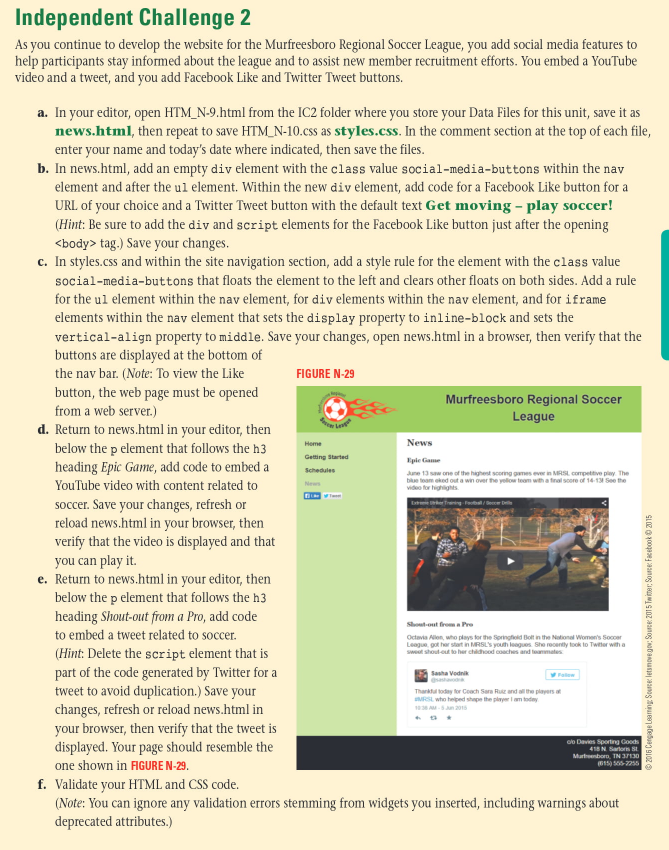
displayed. Your page should resemble the
one shown in FGURE N
FIGURE N
f Validate your HTML and CSS code.
Note: You can ignore any validation errors stemming from widgets you inserted, including warnings about
deprecated attributes.
Step by Step Solution
There are 3 Steps involved in it
1 Expert Approved Answer
Step: 1 Unlock

Question Has Been Solved by an Expert!
Get step-by-step solutions from verified subject matter experts
Step: 2 Unlock
Step: 3 Unlock
 Study Help