







Question: Individual Project | Requirements and Work Breakdown Structure (WBS) Due Oct 22 by 11:59pm Points 100 Submitting a file upload File Types xlsx and xls
Individual Project | Requirements and Work Breakdown Structure (WBS)
- Due Oct 22 by 11:59pm
- Points 100
- Submitting a file upload
- File Types xlsx and xls
Part I: Elicit Requirements
Document the requirements for your project. At a minimum, you should identify three-to five-high level requirements, functions, and features and fifteen-to twenty-five-detailed requirements. The requirements you identify will be used as the basis for the WBS.
Note. Provide the appropriate level of detail while maintaining a reasonable number of requirements since you will base your planning and scheduling on these requirements.
Format your requirements in one of two ways:
- Simple Sentence format that outlines the high-level parent requirements and then breaks these down into multiple user requirements, which then flows into system requirements. "The system SHALL..."
- User Stories format, you will have high-level requirements known as Epics and in each Epic, you will have multiple User Stories that follow the formatted language: As a ROLE, I need a FUNCTION, so that I can, BUSINESS VALUE.
Note. Remember, your requirements should represent ALL the scope in your product and project.
Part II: Work Breakdown Structure
Create a WBS that identifies the following:
- Summary tasks - A summary task is a parent or top-level task that groups together a set of related detail tasks (subtasks). For example, the Summary task "System Integration Testing" might include detail tasks such as "Test User Interface", "Test Data Integrations" and "End to End Testing", these detail tasks should then be further decomposed to show more subtasks that are related to the detail tasks. Summary tasks organize related tasks in the WBS in a logical manner.
- Detail tasks - Subtasks to at least a level 3 decomposition (excellent submissions will include WBS level 4 in under several Summary Tasks.
- Milestones - Project milestones mark specific event along a project's timeline. They are checkpoints that identify when groups of activities included under a Summary task have been completed and/or a deliverable approved by the sponsor or customer. Milestones are used to communicate progress to stakeholders.
- Project management deliverables & tasks as well as closing tasks
- Keep ALL tasks in one column of the Excel sheet (this will make it easier to import your task list to MS Project for the next assignment)
- DO NOT provide start dates, finish dates, duration estimates or Gantt charts (these items will built in during subsequent lessons and assignments)
Note. While there is no minimum or maximum number of tasks, the expectation is that you will have between 75 100 tasks in your WBS and at least 3 to 4 levels of decomposition.
Cite any research or templates used consistent with APA style guidelines.
Submit your Requirements & WBS by the due date by clicking on the assignment in Canvas and uploading the document. Include a title page. Use Times New Roman, 12 point font.
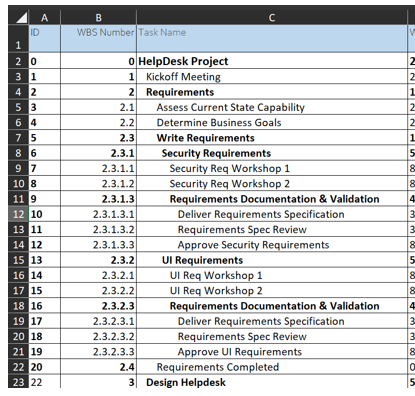
\begin{tabular}{|c|c|c|c|} \hline & A & B & C \\ \hline 1 & 10 & WBS Number & Task Name \\ \hline 2 & 0 & 0 & HelpDesk Project \\ \hline 3 & 1 & 1 & Kickoff Meeting \\ \hline 4 & 2 & 2 & Requirements \\ \hline 5 & 3 & 2.1 & Assess Current State Capability \\ \hline 6 & 4 & 2.2 & Determine Business Goals \\ \hline 7 & 5 & 2.3 & Write Requirements \\ \hline 8 & 6 & 2.3 .1 & Security Requirements \\ \hline 9 & 7 & 2.3.1.1 & Security Req Workshop 1 \\ \hline 10 & 8 & 2.3 .1 .2 & Security Req Workshop 2 \\ \hline 11 & 9 & 2.3.1.3 & Requirements Documentation \& Validation \\ \hline 12 & 10 & 2.3.1.3.1 & Deliver Requirements Specification \\ \hline 13 & 11 & 2.3.1.3.2 & Requirements Spec Review \\ \hline 14 & 12 & 23.1.3.3 & Approve Security Requirements \\ \hline 15 & 13 & 2.3 .2 & UI Requirements \\ \hline 16 & 14 & 2.3.2.1 & UI Req Workshop 1 \\ \hline 17 & 15 & 2.3 .2 .2 & UI Req Workshop 2 \\ \hline 18 & 16 & 2.3.2.3 & Requirements Documentation \& Validation \\ \hline 19 & 17 & 2.3.2.3.1 & Deliver Requirements Specification \\ \hline 20 & 18 & 2.3.2.3.2 & Requirements Spec Review \\ \hline 21 & 19 & 2.3 .2 .3 .3 & Approve UI Requirements \\ \hline 22 & 20 & 2.4 & Requirements Completed \\ \hline 23 & 22 & 3 & Design Helpdesk \\ \hline \end{tabular}
Step by Step Solution
There are 3 Steps involved in it

Get step-by-step solutions from verified subject matter experts
 Study Help