







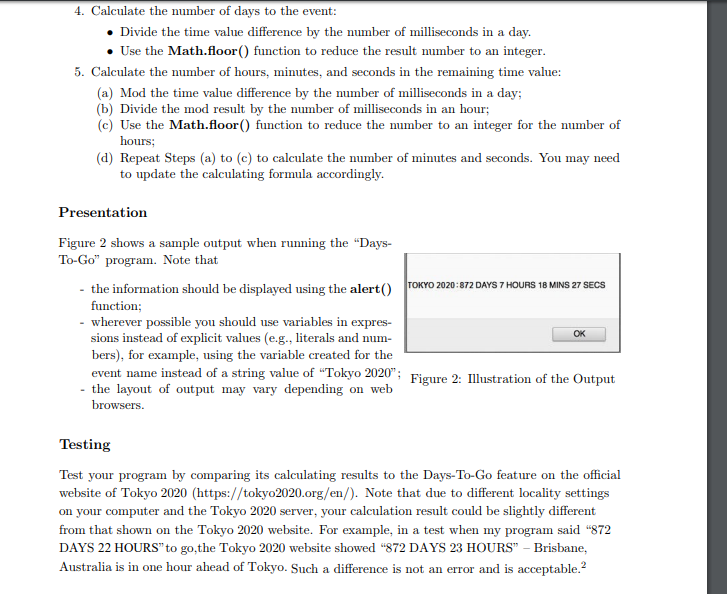
Question: Ineed help on this javascript program 4. Calculate the number of days to the event: Divide the time value difference by the number of milliseconds
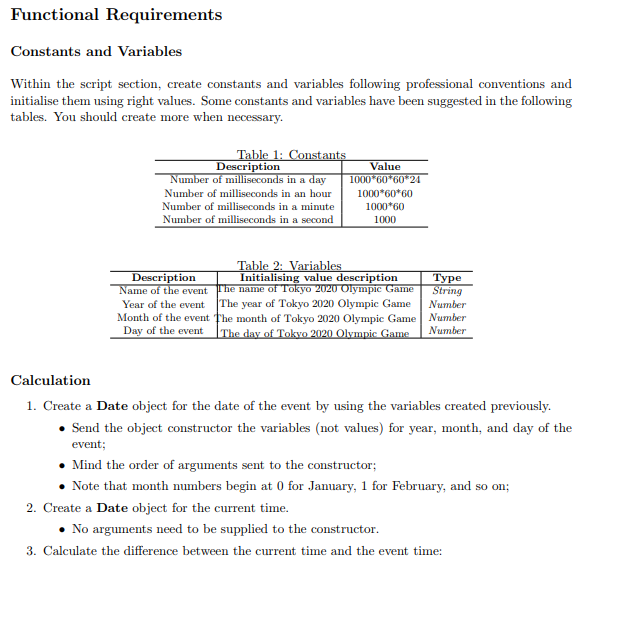 Ineed help on this javascript program
4. Calculate the number of days to the event: Divide the time value difference by the number of milliseconds in a day. Use the Math.floor) function to reduce the result number to an integer. . 5. Calculate the number of hours, minutes, and seconds in the remaining time value: (a) Mod the time value difference by the number of milliseconds in a day; (b) Divide the mod result by the number of milliseconds in an hour (c) Use the Math.floor) function to reduce the number to an integer for the number of hours: (d) Repeat Steps (a) to (c) to calculate the number of minutes and seconds. You may need to update the calculating formula accordingly. Presentation Figure 2 shows a sample output when running the "Days- To-Go" program. Note that the information should be displayed using the alerTOKYO 2020:872 DAYS 7 HOURS 18 MINS 27 SECS function; wherever possible you should use variables in expres- sions instead of explicit values (e.g.. literals and num- bers), for example, using the variable created for the event name instead of a string value of Tokyo 2020"; OK 'Figure 2: lustration of the Output - the layout of output may vary depending on web Testing Test your program by comparing its calculating results to the Days-To-Go feature on the official website of Tokyo 2020 (https://tokyo2020.org/en/). Note that due to different locality settings on your computer and the Tokyo 2020 server, your calculation result could be slightly different from that shown on the Tokyo 2020 website. For example, in a test when my program said "872 DAYS 22 HOURS" to go,the Tokyo 2020 website showed "872 DAYS 23 HOURS" - Brisbane, Australia is in one hour ahead of Tokyo. Such a difference is not an error and is acceptable.2
Step by Step Solution
There are 3 Steps involved in it

Get step-by-step solutions from verified subject matter experts
 Study Help