







Question: Infix to Postfix calculator in Java. Source code given: ESTester.java import java.util.Scanner; public class ESTester { public static void main(String[] args) { Scanner input =
Infix to Postfix calculator in Java.
![public class ESTester { public static void main(String[] args) { Scanner input](https://dsd5zvtm8ll6.cloudfront.net/si.experts.images/questions/2024/09/66f92efbda9b3_52366f92efb5d6a5.jpg)
Source code given:
| ESTester.java | |||||||||||||||||||||||||||||||||||||||||||||||||||||||||||||||||||||||||||||||||||||||||||||||||||||||||||||||||||||||||||||||||||||||||||||||||||||||||||||||||||||||||||||||||||||||||||||||||||||||||||||||||||||||||||||||||||||||||||||||||||||||||||||||||||||||||||||||||||||||||||||||||||||||||||||||||||||||||||||||||||||||||||||||||||||||||||||||||||||||||||||||||||||||||||||||||||||||||||||||||||||||||||||||||||||||||||||||||||||
| |||||||||||||||||||||||||||||||||||||||||||||||||||||||||||||||||||||||||||||||||||||||||||||||||||||||||||||||||||||||||||||||||||||||||||||||||||||||||||||||||||||||||||||||||||||||||||||||||||||||||||||||||||||||||||||||||||||||||||||||||||||||||||||||||||||||||||||||||||||||||||||||||||||||||||||||||||||||||||||||||||||||||||||||||||||||||||||||||||||||||||||||||||||||||||||||||||||||||||||||||||||||||||||||||||||||||||||||||||||
| ExpressionScanner.java | |||||||||||||||||||||||||||||||||||||||||||||||||||||||||||||||||||||||||||||||||||||||||||||||||||||||||||||||||||||||||||||||||||||||||||||||||||||||||||||||||||||||||||||||||||||||||||||||||||||||||||||||||||||||||||||||||||||||||||||||||||||||||||||||||||||||||||||||||||||||||||||||||||||||||||||||||||||||||||||||||||||||||||||||||||||||||||||||||||||||||||||||||||||||||||||||||||||||||||||||||||||||||||||||||||||||||||||||||||||
| |||||||||||||||||||||||||||||||||||||||||||||||||||||||||||||||||||||||||||||||||||||||||||||||||||||||||||||||||||||||||||||||||||||||||||||||||||||||||||||||||||||||||||||||||||||||||||||||||||||||||||||||||||||||||||||||||||||||||||||||||||||||||||||||||||||||||||||||||||||||||||||||||||||||||||||||||||||||||||||||||||||||||||||||||||||||||||||||||||||||||||||||||||||||||||||||||||||||||||||||||||||||||||||||||||||||||||||||||||||
| Token.java | |||||||||||||||||||||||||||||||||||||||||||||||||||||||||||||||||||||||||||||||||||||||||||||||||||||||||||||||||||||||||||||||||||||||||||||||||||||||||||||||||||||||||||||||||||||||||||||||||||||||||||||||||||||||||||||||||||||||||||||||||||||||||||||||||||||||||||||||||||||||||||||||||||||||||||||||||||||||||||||||||||||||||||||||||||||||||||||||||||||||||||||||||||||||||||||||||||||||||||||||||||||||||||||||||||||||||||||||||||||
|
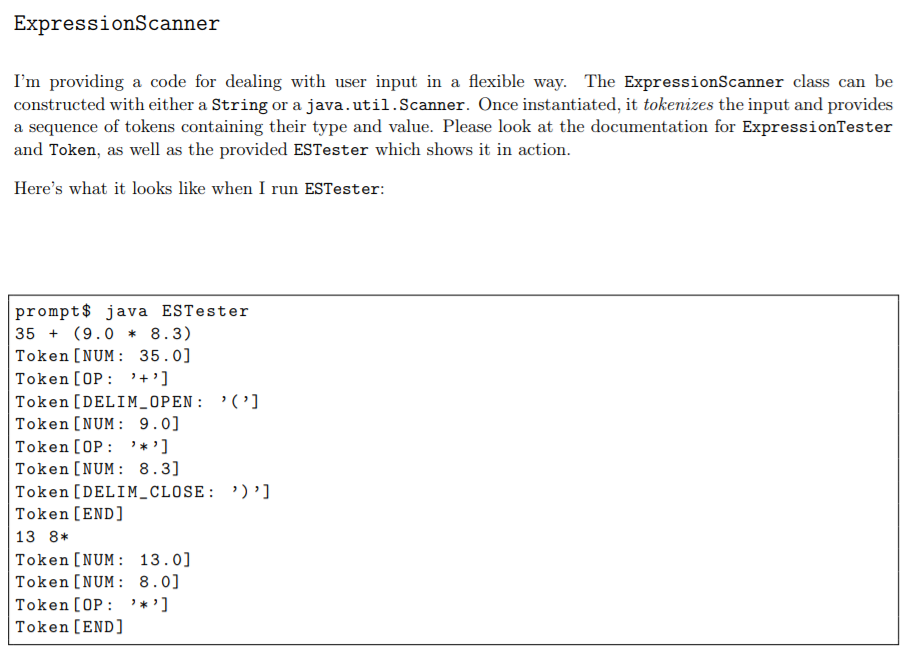
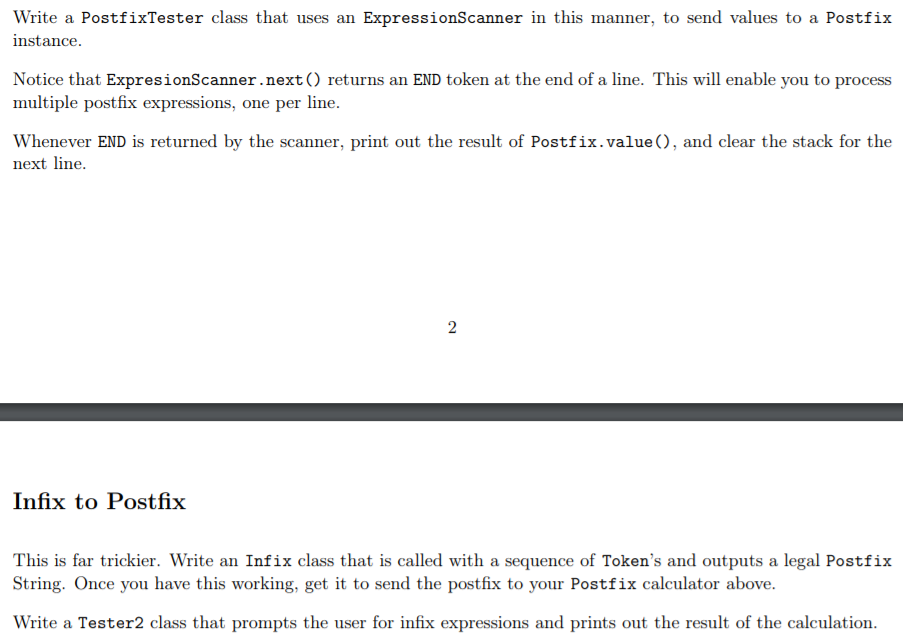
ExpressionScanner I'm providing a code for dealing with user input in a flexible way.The ExpressionScanner class can be constructed with either a String or a java.util.Scanner. Once instantiated, it tokenizes the input and provides a sequence of tokens containing their type and value. Please look at the documentation for ExpressionTester and Token, as well as the provided ESTester which shows it in action Here's what it looks like when I run ESTester: prompt$ java ESTester 35 (9.0 8.3) Token [NUM: 35.0] Token [OP:''] Token [DELIM_OPEN:('] Token [NUM:9.0] Token [OP:'] Token [NUM: 8.3] Token [DELIM-CLOSE: ,),] Token [END 13 8* Token [NUM: 13.0] Token [NUM: 8.0] Token [OP:'] Token [END ExpressionScanner I'm providing a code for dealing with user input in a flexible way.The ExpressionScanner class can be constructed with either a String or a java.util.Scanner. Once instantiated, it tokenizes the input and provides a sequence of tokens containing their type and value. Please look at the documentation for ExpressionTester and Token, as well as the provided ESTester which shows it in action Here's what it looks like when I run ESTester: prompt$ java ESTester 35 (9.0 8.3) Token [NUM: 35.0] Token [OP:''] Token [DELIM_OPEN:('] Token [NUM:9.0] Token [OP:'] Token [NUM: 8.3] Token [DELIM-CLOSE: ,),] Token [END 13 8* Token [NUM: 13.0] Token [NUM: 8.0] Token [OP:'] Token [END
Step by Step Solution
There are 3 Steps involved in it

Get step-by-step solutions from verified subject matter experts
 Study Help