







Question: initialize the vector input Here for MATLAB rader, we will use a randon Benerated vector for testing Nandi(1030) Random length for a vector between 10
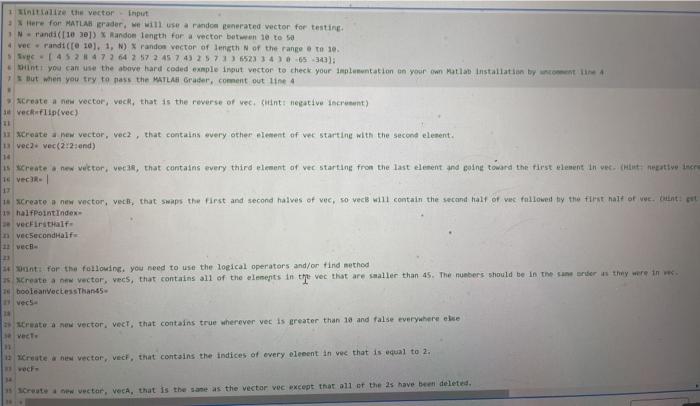
initialize the vector input Here for MATLAB rader, we will use a randon Benerated vector for testing Nandi(1030) Random length for a vector between 10 to 5 4 veerandt([10). 1, N) Pandos vector of length of the range o to 10 Sve 452 473 64 273 45 7 43 257 $523346530); int you can use the above hard coded exmple input vector to check your innlumentation on your own Matlab installation by the But when you try to mass the MATLAB Grader, coment out line 4 Create a new vector, Vect that is the reverse of vecchint negative incrunt) e vec flip(vec) 11 Create a new vector, vec, that contains every other element of we starting with the second element. u vecvec(2721and) 14 s create new witor, ver38, that contains every third element of vec starting from the last element and going toward the first element in velit metto incre e vecar- 17 18 Create a new vector, veces, that was the first and second halves of vec, so vecis will contain the second half of we followed by the first hall of we but it 19 halfPoint Index vechirstHalf vecsecondHalf 11 vecil 23 ant for the following you need to use the logical operators and/or find method Create a new vector, vecs, that contains all of the elements in the vec that are smaller than 45. The numbers should be in the same order they were in booleanVeless Than 45 vech- - Create a new vector, vect, that contains true wherever vec is greater than 10 and false everywhere else vette Create a new vector, vect, that contains the indices of every levent in vee that is equal to 2. Create a new Vector, Veca, that is the same as the vector vec except that all of the 2s have been deleted
Step by Step Solution
There are 3 Steps involved in it

Get step-by-step solutions from verified subject matter experts
 Study Help