







Question: Input any numbers (for example: 1000 on payment #5on the Extra Payment column, and you will notice that you will pay off your loan earlier
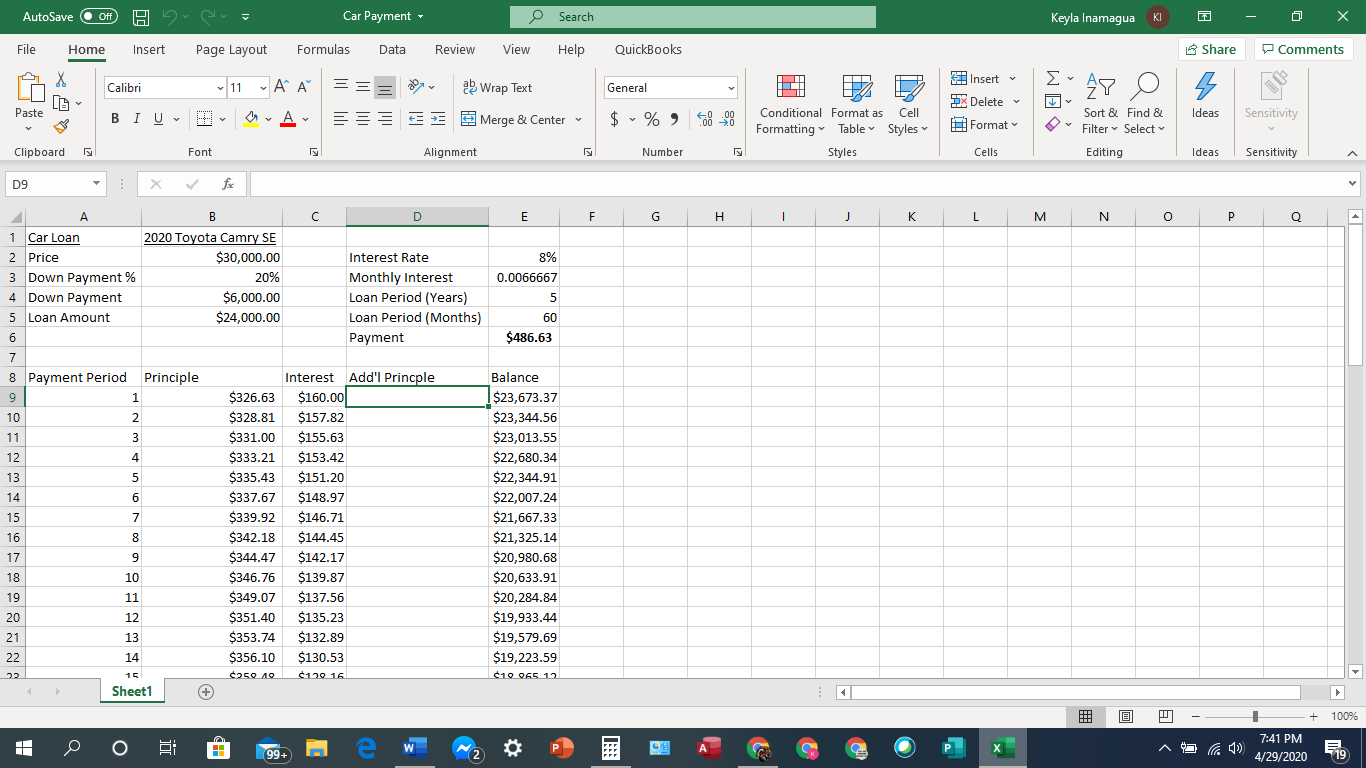
Input any numbers (for example: 1000 on payment #5on the "Extra Payment" column, and you will notice that you will pay off your loan earlier than 60 payments, and you will start seeing negative balance in color red.Use IF statement to figure out which payment is the last payment, then once you are done with that last payment, the loan balance is zero.Once the loan has been paid off, do not show any more payment number following that row. what kind of IF statement should I use?
Car Payment ~ KI X AutoSave O Off) Search Keyla Inamagua File Home Insert Page Layout Formulas Data Review View Help QuickBooks Share Comments LO X Calibri 11 ~ AA = ab Wrap Text General Insert Ex AY O Delete * Paste BIU- E CEE Merge & Center $ ~ % " 00 20 Conditional Format as Cell Table Styles ~ Format Sort & Find & Ideas Sensitivity Formatting Filter * Select v Clipboard Font Alignment Number Styles Cells Editing Ideas Sensitivity DS X V A B C D E F G H I J K L M N O P Q Car Loan 2020 Toyota Camry SE 2 Price $30,000.00 Interest Rate 8% 3 Down Payment % 20% Monthly Interest 0.0066667 4 Down Payment $6,000.00 Loan Period (Years) 5 Loan Amount $24,000.00 Loan Period (Months) 60 Payment $486.63 8 Payment Period Principle Interest Add'l Princple Balance 9 G UA W N P $326.63 $160.00 $23,673.37 10 $328.81 $157.82 $23,344.56 11 $331.00 $155.63 $23,013.55 12 $333.21 $153.42 $22,680.34 13 $335.43 $151.20 $22,344.91 14 $337.67 $148.97 $22,007.24 7 $339.92 $146.71 $21,667.33 8 $342.18 $144.45 $21,325.14 9 $344.47 $142.17 $20,980.68 18 10 $346.76 $139.87 $20,633.91 19 11 $349.07 $137.56 $20,284.84 20 12 $351.40 $135.23 $19,933.44 21 13 $353.74 $132.89 $19,579.69 22 14 $356.10 $130.53 $19,223.59 15 $120 16 $10 065 17 Sheet1 + + 100% O me P BEE P X 7:41 PM 199 w A O 4/29/2020
Step by Step Solution
There are 3 Steps involved in it

Get step-by-step solutions from verified subject matter experts
 Study Help