







Question: Input time in 1 2 - hour notation and print out the corresponding 2 4 - hour notation. There are several steps. Name your source
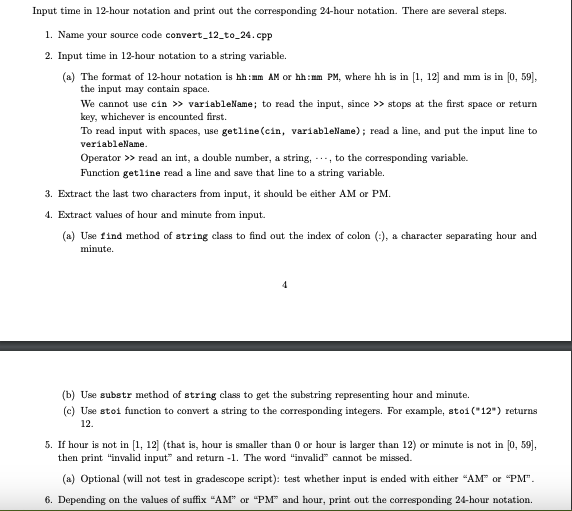
Input time in hour notation and print out the corresponding hour notation. There are several steps.
Name your source code converttocpp
Input time in hour notation to a string variable.
a The format of hour notation is hh:mm AM or hh:mm PM where hh is in and mm is in
the input may contain space.
We cannot use cin variablellame; to read the input, since stops at the first space or return
key, whichever is encounted first.
To read input with spaces, use getlinecin variablellame; read a line, and put the input line to
veriablellame.
Operator read an int, a double number, a string, cdots, to the corresponding variable.
Function getline read a line and save that line to a string variable.
Extract the last two characters from input, it should be either AM or PM
Extract values of hour and minute from input.
a Use find method of string class to find out the index of colon i a character separating hour and
minute.
b Use substr method of string class to get the substring representing hour and minute.
c Use stoi function to convert a string to the corresponding integers. For example, sto returns
If hour is not in that is hour is smaller than or hour is larger than or minute is not in
then print "invalid input" and return The word "invalid" cannot be missed.
a Optional will not test in gradescope script: test whether input is ended with either AM or PM
Depending on the values of suffix AM or PM and hour, print out the corresponding hour notation.
Step by Step Solution
There are 3 Steps involved in it
1 Expert Approved Answer
Step: 1 Unlock

Question Has Been Solved by an Expert!
Get step-by-step solutions from verified subject matter experts
Step: 2 Unlock
Step: 3 Unlock
 Study Help