







Question: Insert a USB storage device into the computer. The steps outlined below would also apply if you are inserting a portable hard drive that has
Insert a USB storage device into the computer. The steps outlined below would also apply if you are inserting a portable hard drive that has a USB connection.
a Locate the USB port on the computer. The port will have the USB symbol
b Depending on the USB device, remove the cap, push the slider button, or swivel the device to expose the metal tip.
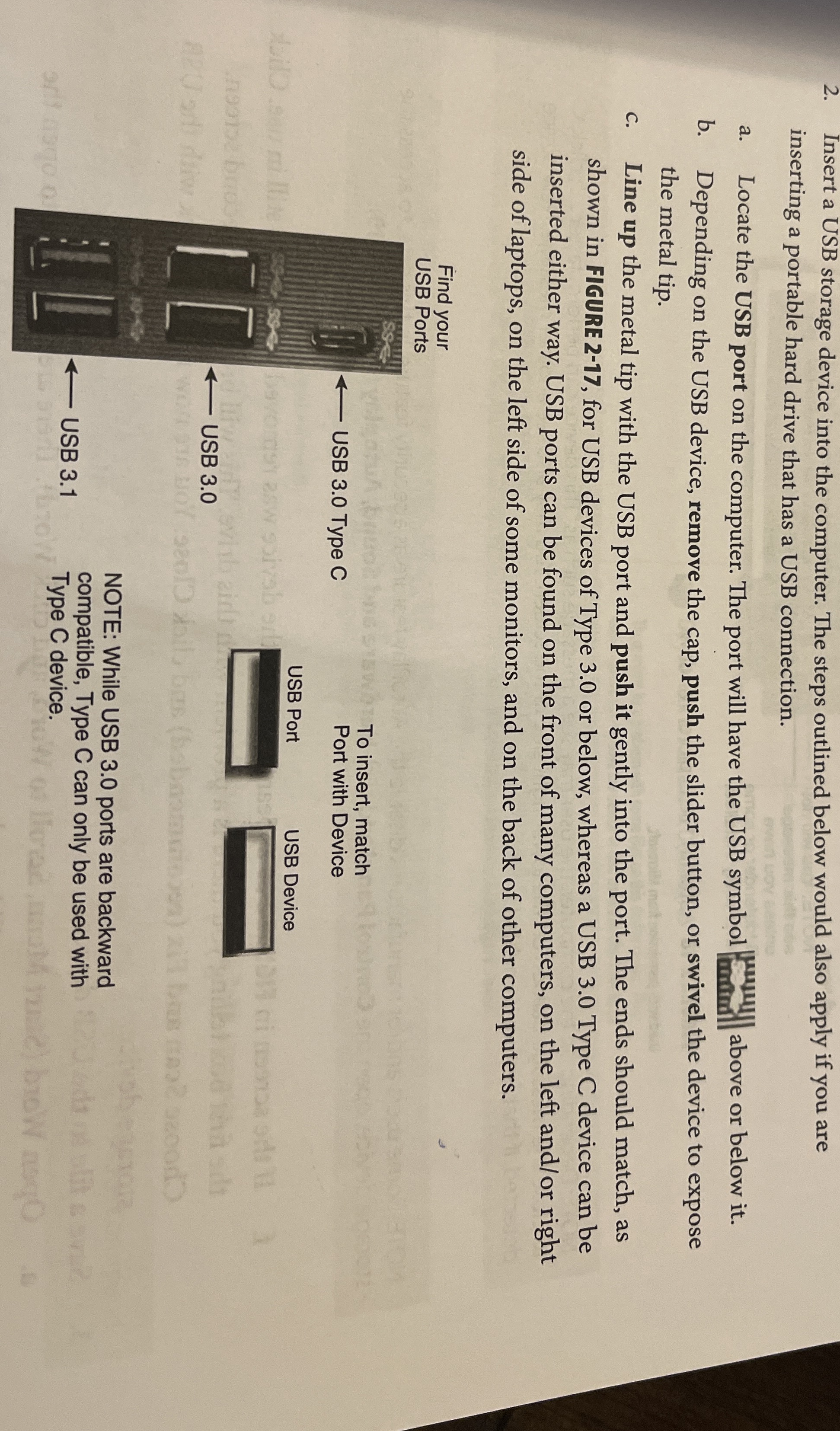
c Line up the metal tip with the USB port and push it gently into the port. The ends should match, as shown in FIGURE for USB devices of Type or below, whereas a USB Type C device can be inserted either way. USB ports can be found on the front of many computers, on the left andor right side of laptops, on the left side of some monitors, and on the back of other computers.
Find your USB Ports
To insert, match Port with Device
NOTE: While USB ports are backward compatible, Type C can only be used with Type C device.
Step by Step Solution
There are 3 Steps involved in it
1 Expert Approved Answer
Step: 1 Unlock

Question Has Been Solved by an Expert!
Get step-by-step solutions from verified subject matter experts
Step: 2 Unlock
Step: 3 Unlock
 Study Help