







Question: INSERT : Using SQL, Insert 4 rows of data to each of the Dentist Office tables that you created in Assign #7. Just make up
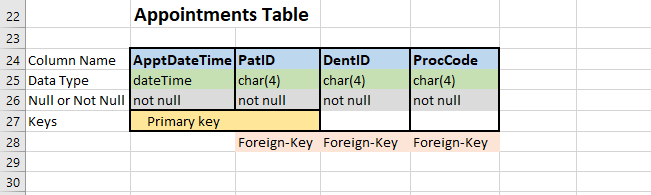
INSERT : Using SQL, Insert 4 rows of data to each of the Dentist Office tables that you created in Assign #7. Just make up the data that you add. You should have at least 16 SQL Insert statements to hand in. Print out these SQL statements to hand them in.
DELETE: Next, again using SQL, Delete the last 2 rows in each table from your Database. Use SQL Delete statements. Delete using a where clause based on the Primary key in each table. Print these SQL statements and hand them in. You should have at least 8 Delete statements.
UPDATE: Lastly, change all the lastnames in your Dentists table to Moore. Also change the firstname of the last row of data in each possible table, to Frank. Change any zipcodes from CA to 90000. You should have at least 3 update statements.
DROP Table: Finally, remove the entire Procedures Table.



Dentists Table FirstName LastName Email Office varchar(30) varchar(30 varhar(30) char(4) 4 Column Name DentID 5 Data Type 6 Null or Not Null not null 7 Keys chiate) not null not null null null Primary key
Step by Step Solution
There are 3 Steps involved in it

Get step-by-step solutions from verified subject matter experts
 Study Help