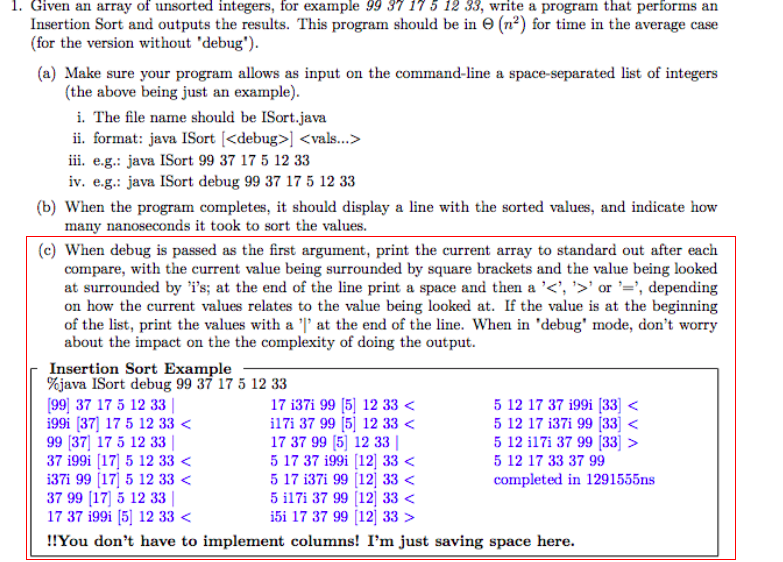
Question: Insertion sort question, I know how to make the code work for the part to just put everything the integers in a sorted number, but

Insertion sort question, I know how to make the code work for the part to just put everything the integers in a sorted number, but I have difficulties to print each iteration step bolded in red. If anyone can help me with this please explain to me how it would work.

public static void sort(int arr[])

{ int n = arr.length; for (int i=1; i=0 && arr[j] > key) { arr[j+1] = arr[j]; j = j-1; } arr[j+1] = key; } } //print array of size n public static void printArrayInAssortedOrder(int arr[]) { int n = arr.length; for (int i=0; i 

}

public static void main(String args[]) { int arr[] = {32, 111, 13, 3, 6}; InsertionSort ob = new InsertionSort(); ob.sort(arr); printArrayInAssortedOrder(arr);
 } }Insertion sort question, I know how to make the code work for

1. Given an array of unsorted integers, for example 99 37 175 12 33, write a program that performs an (n2) for time in the average case Insertion Sort and outputs the results. This program should be in 9 (for the version without 'debug') (a) Make sure your program allows as input on the command-line a space-separated list of integers (the above being just an example) i. The file name should be ISort.java ii. format: Java ISort [ iii. e.g.: java ISort 99 37 17 5 12 33 iv. e.g.: java ISort debug 99 37 17 5 12 33 (b) When the program completes, it should display a line with the sorted values, and indicate how many nanoseconds it took to sort the values. (c) When debug is passed as the first argument, print the current array to standard out after each compare, with the current value being surrounded by square brackets and the value being looked at surrounded by 'i's; at the end of the line print a space and then a ' 5 12 17 37 199i [33 5 12 17 33 37 99 completed in 1291555ns

Step by Step Solution

There are 3 Steps involved in it

1 Expert Approved Answer
Step: 1 Unlock blur-text-image
Question Has Been Solved by an Expert!

Get step-by-step solutions from verified subject matter experts

Step: 2 Unlock
Step: 3 Unlock

Students Have Also Explored These Related Databases Questions!