







Question: Installation Commands: sudo apt-get update sudo apt-get install curl apt-transport-https cacertificates software-properties-common y curl -fsSL https://download.docker.com/linux/ubuntu/ gpg | sudo apt-key add - sudo add-apt-repository deb
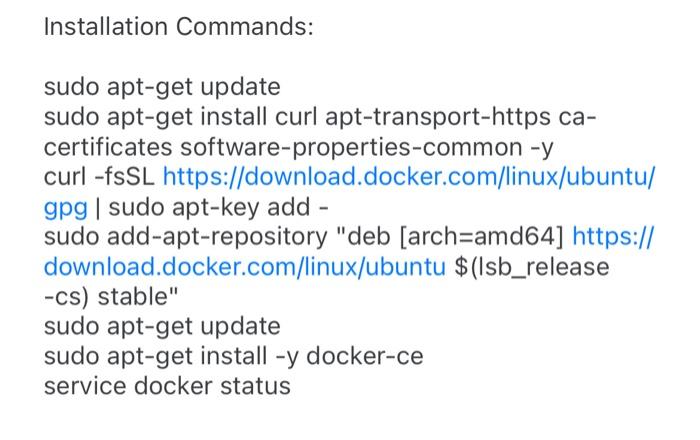
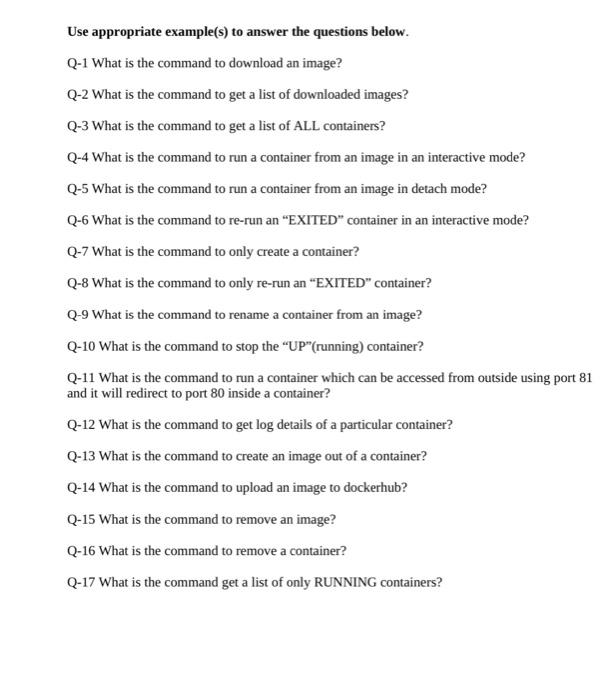
Installation Commands: sudo apt-get update sudo apt-get install curl apt-transport-https cacertificates software-properties-common y curl -fsSL https://download.docker.com/linux/ubuntu/ gpg | sudo apt-key add - sudo add-apt-repository "deb [arch=amd64] https:// download.docker.com/linux/ubuntu $ (Isb_release -cs) stable" sudo apt-get update sudo apt-get install -y docker-ce service docker status Use appropriate example(s) to answer the questions below. Q-1 What is the command to download an image? Q-2 What is the command to get a list of downloaded images? Q-3 What is the command to get a list of ALL containers? Q-4 What is the command to run a container from an image in an interactive mode? Q-5 What is the command to run a container from an image in detach mode? Q-6 What is the command to re-run an "EXITED" container in an interactive mode? Q-7 What is the command to only create a container? Q-8 What is the command to only re-run an "EXITED" container? Q-9 What is the command to rename a container from an image? Q-10 What is the command to stop the "UP"(running) container? Q-11 What is the command to run a container which can be accessed from outside using port 81 and it will redirect to port 80 inside a container? Q-12 What is the command to get log details of a particular container? Q-13 What is the command to create an image out of a container? Q-14 What is the command to upload an image to dockerhub? Q-15 What is the command to remove an image? Q-16 What is the command to remove a container? Q-17 What is the command get a list of only RUNNING containers
Step by Step Solution
There are 3 Steps involved in it

Get step-by-step solutions from verified subject matter experts
 Study Help