







Question: Instruction: 1. Use Notepad to create new text file named EX05_1.java. Enter the following lines (be sure to replace YourFullName with your full name). The
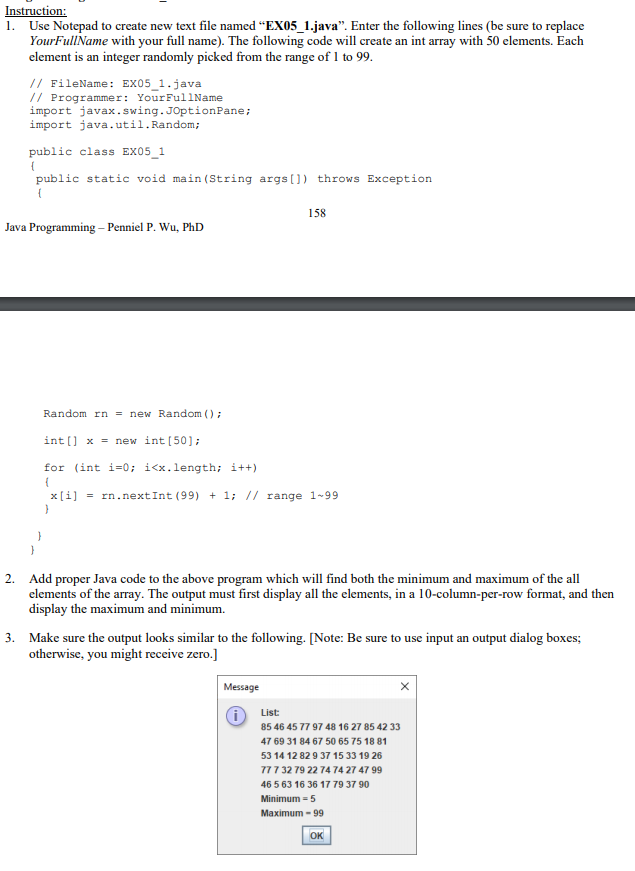
Instruction: 1. Use Notepad to create new text file named "EX05_1.java. Enter the following lines (be sure to replace YourFullName with your full name). The following code will create an int array with 50 elements. Each element is an integer randomly picked from the range of 1 to 99. // FileName: EX05_1.java // Programmer: Your FullName import javax.swing.JOptionPane; import java.util.Random; public class EX05_1 public static void main(String args[]) throws Exception { 158 Java Programming - Penniel P. Wu, PhD Random rn = new Random(); int[] x = new int [50]; for (int i=0; i
Step by Step Solution
There are 3 Steps involved in it
1 Expert Approved Answer
Step: 1 Unlock

Question Has Been Solved by an Expert!
Get step-by-step solutions from verified subject matter experts
Step: 2 Unlock
Step: 3 Unlock
 Study Help