







Question: Instructions: 1 . Create using MATLAB 2 . Use the following program: C l C clear Approximate the value of e ? ? x using
Instructions:
Create using MATLAB
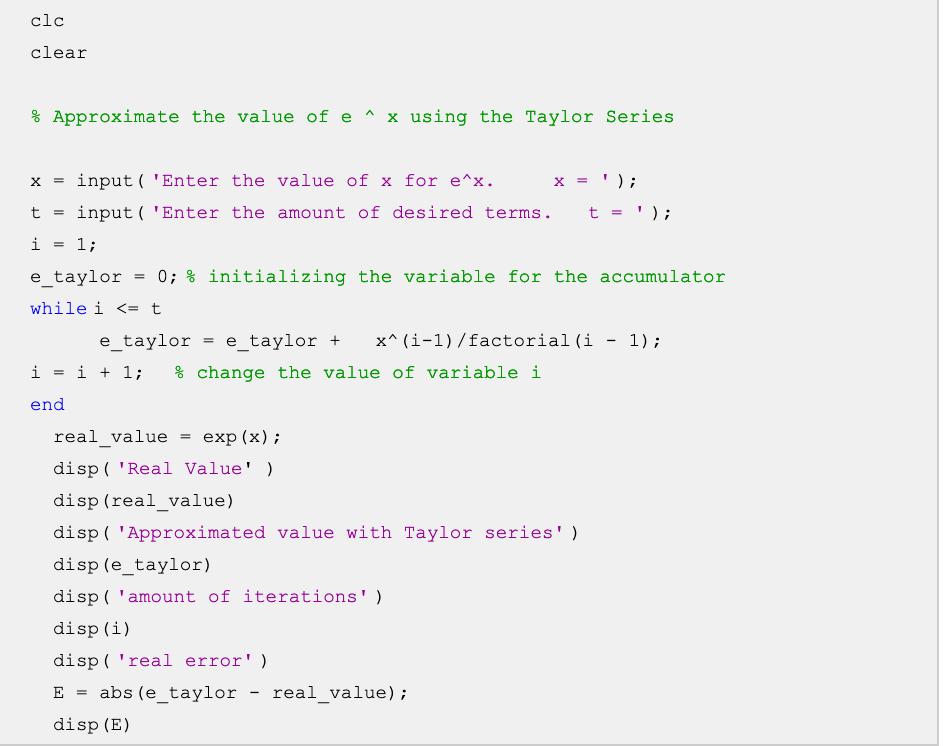
Use the following program:
clear
Approximate the value of using the Taylor Series
input 'Enter the value of for ;
input Enter the amount of desired terms. ;
;
etaylor ; initializing the variable for the accumulator
while
etaylor etaylor factorial ;
; change the value of variable
end
realvalue exp;
dispReal Value'
disprealvalue
dispApproximated value with Taylor series'
disp etaylor
dispamount of iterations'
disp
dispreal error'
abs etaylor realvalue;
disp
Modify the program to do:
a The program calculates the actual value with the Matlab expx command.
b Change the while cycle for a forloop command from to imax iteration.
c Declare an imax variable equal to to assign the maximum iteration.
d Add before the for loop a line with: real exp x;
e Assign the value of to a tolerance variable. If you want to challenge yourself, create a menu to select the tolerance value with different values.
f Add within the loop algorithm and if abs etaylor real tolerance, then break.
Create the flowchart of the program.
Step by Step Solution
There are 3 Steps involved in it
1 Expert Approved Answer
Step: 1 Unlock

Question Has Been Solved by an Expert!
Get step-by-step solutions from verified subject matter experts
Step: 2 Unlock
Step: 3 Unlock
 Study Help