







Question: INSTRUCTIONS: Answer ALL questions To answer EACH question you MUST do the following: 1. Create the appropriate application in Visual Studio. 2. Answer the sub-questions
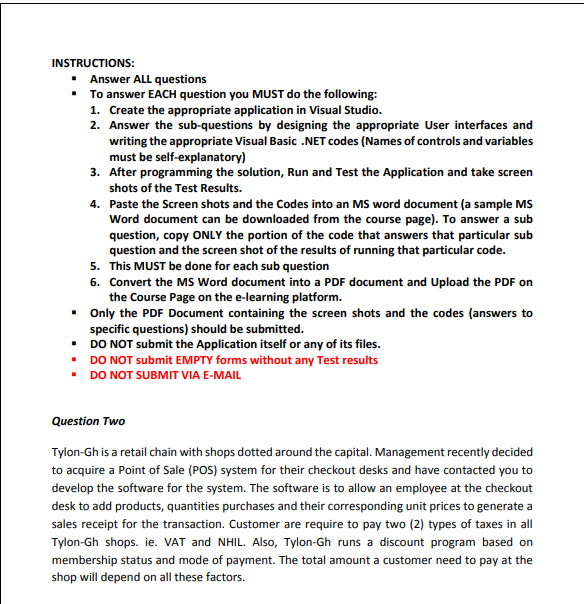
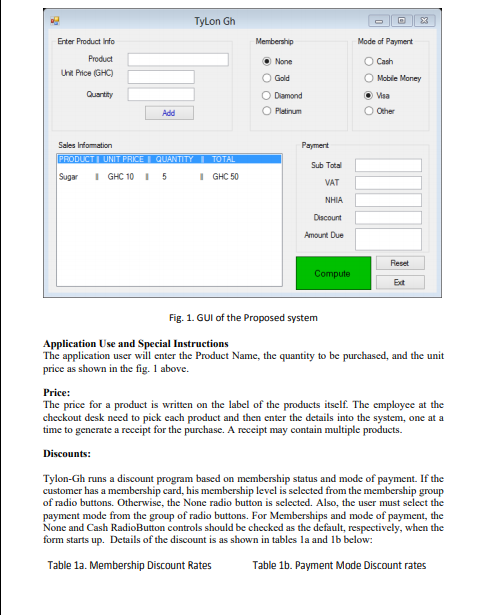
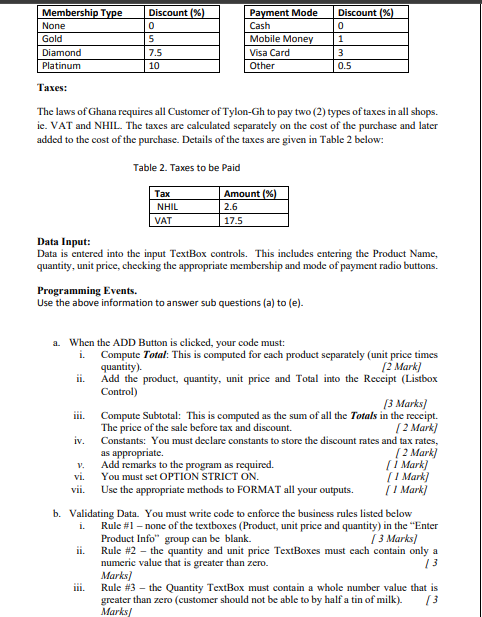
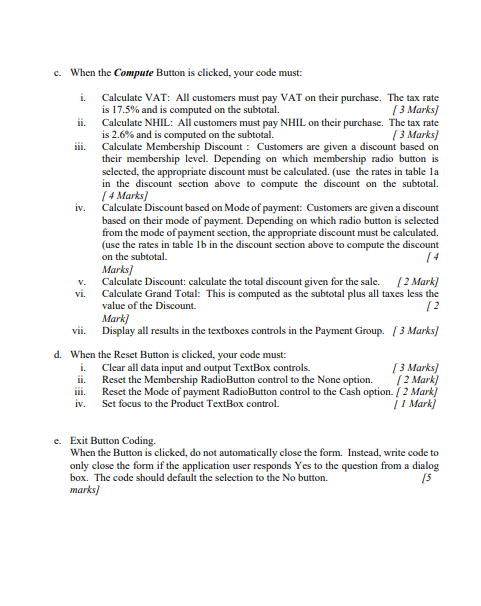
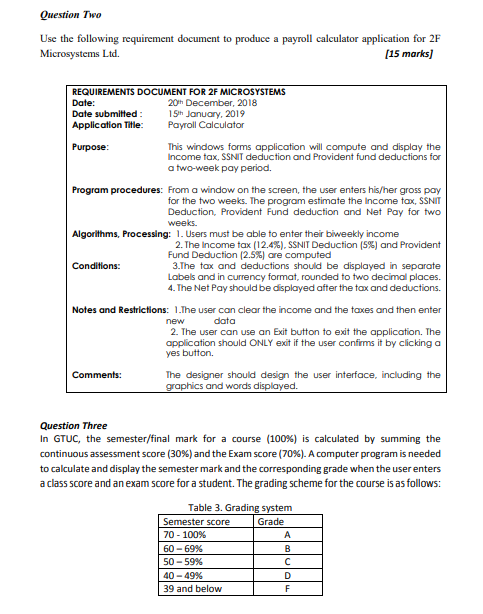
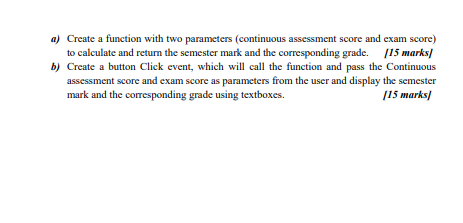
INSTRUCTIONS: Answer ALL questions To answer EACH question you MUST do the following: 1. Create the appropriate application in Visual Studio. 2. Answer the sub-questions by designing the appropriate User interfaces and writing the appropriate Visual Basic .NET codes (Names of controls and variables must be self-explanatory) 3. After programming the solution, Run and Test the Application and take screen shots of the Test Results. 4. Paste the Screen shots and the Codes into an MS word document (a sample MS Word document can be downloaded from the course page). To answer a sub question, copy ONLY the portion of the code that answers that particular sub question and the screen shot of the results of running that particular code. 5. This MUST be done for each sub question 6. Convert the MS Word document into a PDF document and Upload the PDF on the Course Page on the e-learning platform. . Only the PDF Document containing the screen shots and the codes (answers to specific questions) should be submitted. DO NOT submit the Application itself or any of its files. DO NOT submit EMPTY forms without any Test results DO NOT SUBMIT VIA E-MAIL Question Two Tylon-Gh is a retail chain with shops dotted around the capital. Management recently decided to acquire a Point of Sale (POS) system for their checkout desks and have contacted you to develop the software for the system. The software is to allow an employee at the checkout desk to add products, quantities purchases and their corresponding unit prices to generate a sales receipt for the transaction. Customer are require to pay two (2) types of taxes in all Tylon-Gh shops. ie. VAT and NHIL. Also, Tylon-Gh runs a discount program based on membership status and mode of payment. The total amount a customer need to pay at the shop will depend on all these factors. Tylon Gh Enter Product Info Membership Mode of Payment Product Unit Price (GHC) None Gold Cash O Mobile Money O Visa Other Quantity O Diamond Platinum Add Payment Sales Information PRODUCTI UNIT PRICE QUANTITY TOTAL Sugar I GHC 10 1 5 1 GHC 50 Sub Total VAT NHIA Discount Amount Due Reset Compute Ext Fig. 1. GUI of the Proposed system Application Use and Special Instructions The application user will enter the Product Name, the quantity to be purchased, and the unit price as shown in the fig. 1 above. Price: The price for a product is written on the label of the products itself. The employee at the checkout desk need to pick cach product and then enter the details into the system, one at a time to generate a receipt for the purchase. A receipt may contain multiple products. Discounts: Tylon-Gh runs a discount program based on membership status and mode of payment. If the customer has a membership card, his membership level is selected from the membership group of radio buttons. Otherwise, the None radio button is selected. Also, the user must select the payment mode from the group of radio buttons. For Memberships and mode of payment, the None and Cash RadioButton controls should be checked as the default, respectively, when the form starts up. Details of the discount is as shown in tables la and 1b below: Table 1a. Membership Discount Rates Table 1b. Payment Mode Discount rates Discount %) 0 Membership Type None Gold Diamond Platinum Discount (%) 0 5 7.5 10 Payment Mode Cash Mobile Money Visa Card Other 1 3 0.5 Taxes: The laws of Ghana requires all Customer of Tylon-Gh to pay two (2) types of taxes in all shops. ie. VAT and NHIL. The taxes are calculated separately on the cost of the purchase and later added to the cost of the purchase. Details of the taxes are given in Table 2 below: Table 2. Taxes to be paid Tax NHIL VAT Amount %) 2.6 17.5 Data Input: Data is entered into the input TextBox controls. This includes entering the Product Name, quantity, unit price, checking the appropriate membership and mode of payment radio buttons. Programming Events. Use the above information to answer sub questions (a) to (e). a. When the ADD Button is clicked, your code must: i. Compute Total: This is computed for each product separately (unit price times quantity). 12 Mark) ii. Add the product, quantity, unit price and Total into the Receipt (Listbox Control) [3 Marks] Compute Subtotal: This is computed as the sum of all the Totals in the receipt. The price of the sale before tax and discount. ( 2 Mark] iv. Constants: You must declare constants to store the discount rates and tax rates, as appropriate 2 Mark) Add remarks to the program as required. (1 Mark) vi. You must set OPTION STRICT ON. 1 Mark) vii. Use the appropriate methods to FORMAT all your outputs. [ 1 Mark] b. Validating Data. You must write code to enforce the business rules listed below Rule #1 - none of the textboxes (Product, unit price and quantity) in the "Enter Product Info group can be blank. ( 3 Marks/ ii. Rule #2 - the quantity and unit price TextBoxes must cach contain only a numeric value that is greater than zero. 13 Marks] Rule #3 the Quantity TextBox must contain a whole number value that is greater than zero (customer should not be able to by half a tin of milk). Marks/ i. ili. c. When the Compute Button is clicked, your code must: i. Calculate VAT: All customers must pay VAT on their purchase. The tax rate is 17.5% and is computed on the subtotal. (3 Marks) Calculate NHIL: All customers must pay NHIL on their purchase. The tax rate is 2.6% and is computed on the subtotal. (3 Marks) Calculate Membership Discount : Customers are given a discount based on their membership level. Depending on which membership radio button is selected, the appropriate discount must be calculated. (use the rates in table la in the discount section above to compute the discount on the subtotal. [ 4 Marks) iv. Calculate Discount based on Mode of payment: Customers are given a discount based on their mode of payment. Depending on which radio button is selected from the mode of payment section, the appropriate discount must be calculated. (use the rates in table lb in the discount section above to compute the discount on the subtotal. [4 Marks v. Calculate Discount: calculate the total discount given for the sale. (2 Mark] vi. Calculate Grand Total: This is computed as the subtotal plus all taxes less the value of the Discount 12 Mark] vii. Display all results in the textboxes controls in the Payment Group. (3 Marks) d. When the Reset Button is clicked, your code must: Clear all data input and output TextBox controls. (3 Marks) Reset the Membership RadioButton control to the None option. ( 2 Mark) Reset the Mode of payment RadioButton control to the Cash option. ( 2 Mark iv. Set focus to the Product TextBox control. | 1 Mark i. c. Exit Button Coding When the Button is clicked, do not automatically close the form. Instead, write code to only close the form if the application user responds Yes to the question from a dialog box. The code should default the selection to the No button. 15 marks] Question Two Use the following requirement document to produce a payroll calculator application for 2F Microsystems Ltd. (15 marks] REQUIREMENTS DOCUMENT FOR 2F MICROSYSTEMS Date: 20th December, 2018 Date submitted : 15th January, 2019 Application Title: Payroll Calculator Purpose: This windows forms application will compute and display the Income tax, SSNIT deduction and Provident fund deductions for a two-week pay period. Program procedures: From a window on the screen, the user enters his/her gross pay for the two weeks. The program estimate the income tax, SSNIT Deduction, Provident Fund deduction and Net Pay for two weeks. Algorithms, Processing: 1. Users must be able to enter their biweekly income 2. The Income tax (12.4%), SSNIT Deduction (5%) and Provident Fund Deduction (2.5%) are computed Conditions: 3.The tax and deductions should be displayed in separate Labels and in currency format, rounded to two decimal places. 4. The Net Pay should be displayed after the tax and deductions. Notes and Restrictions: 1. The user can clear the income and the taxes and then enter new data 2. The user can use an Exit button to exit the application. The application should ONLY exit if the user confirms it by clicking a yes button Comments: The designer should design the user interface, including the graphics and words displayed. Question Three In GTUC, the semester/final mark for a course (100%) is calculated by summing the continuous assessment score (30%) and the Exam score (70%). A computer program is needed to calculate and display the semester mark and the corresponding grade when the user enters a class score and an exam score for a student. The grading scheme for the course is as follows: Table 3. Grading system Semester score 70 - 100% 60 - 69% 50-59% 40-49% 39 and below Grade A B C D F a) Create a function with two parameters (continuous assessment score and exam score) to calculate and return the semester mark and the corresponding grade. (15 marks/ b) Create a button Click event, which will call the function and pass the Continuous assessment score and exam score as parameters from the user and display the semester mark and the corresponding grade using textboxes. 115 marks/
Step by Step Solution
There are 3 Steps involved in it

Get step-by-step solutions from verified subject matter experts
 Study Help