







Question: Instructions are in commented code Java language please, let me know any questions Will not be updating question again, I CANNOT make ALL of the
Instructions are in commented code
Java language please, let me know any questions
Will not be updating question again, I CANNOT make ALL of the given code copiable because the question becomes too long to post! The code that needs to be updated (ManageVideoGames) is now copiable
Only need answers for ManageVideoGame class!
VIDEO GAME CLASS:
import java.time.LocalDate;
import java.time.format.DateTimeFormatter;
import java.time.format.FormatStyle;
import java.util.Arrays;
public class VideoGame implements Comparable {
private static final int DEFAULT_NUMBER_OF_PLATFORMS = 5;
private String title;
private String developer; //lead developer
private String platforms[];
private LocalDate releaseDate;
@Override
public String toString() {
DateTimeFormatter myDateFormatter = DateTimeFormatter.ofLocalizedDate(FormatStyle.SHORT);
String date = myDateFormatter.format(this.releaseDate);
return this.title+" developed by "+ this.developer +" for "
+Arrays.toString(this.platforms) +" platforms,Realeased on " +date;
}
@Override
public boolean equals(Object otherObject) {
return this.title.equals(((VideoGame)otherObject).getTitle());
}
@Override
public int compareTo(VideoGame other) {
return this.title.compareTo(other.title);
}
public VideoGame() {
platforms = new String[DEFAULT_NUMBER_OF_PLATFORMS];
}
public VideoGame(String title, String developer, String[] platforms, LocalDate releaseDate) {
this.title = title;
this.developer = developer;
this.platforms = platforms;
this.releaseDate = releaseDate;
}
public String getTitle() {
return title;
}
public String getDeveloper() {
return developer;
}
public String[] getPlatforms() {
return platforms;
}
public LocalDate getReleaseDate() {
return releaseDate;
}
public void setTitle(String title) {
this.title = title;
}
public void setDeveloper(String developer) {
this.developer = developer;
}
public void setPlatforms(String[] platforms) {
this.platforms = platforms;
}
public void setReleaseDate(LocalDate releaseDate) {
this.releaseDate = releaseDate;
}
}
TESTDATE CLASS:
import java.time.LocalDate;
import java.time.format.DateTimeFormatter;
public class TestDate {
public static void main(String[] args) {
LocalDate date1 = LocalDate.of(2021, 8, 13); //August 13, 2021
LocalDate date2 = LocalDate.of(2018, 9, 30); //September 30, 2018
System.out.println("d1: " + date1);
System.out.println("d2: " + date2);
if (date1.isAfter(date2)) {
System.out.println(" " + date1 + " is after " + date2);
}
if (date1.equals(date2)) {
System.out.println(date1 + " is on same date as " + date2);
}
if (date1.isBefore(date2)) {
System.out.println(date1 + " is before " + date2);
}
if (date1.compareTo(date2) > 0) {
System.out.println(date1 + " is after " + date2);
} else if (date1.compareTo(date2) == 0) {
System.out.println(date1 + " is on same date as " + date2);
} else {
System.out.println(date1 + " is before " + date2);
}
LocalDate localDate = LocalDate.of(2009, 9, 10); //Sep. 10, 2009
System.out.println(localDate);
DateTimeFormatter dateFormatter = DateTimeFormatter.ofPattern("M/d/yyyy"); // 9/10/2009
System.out.println(dateFormatter.format(localDate));
LocalDate today = LocalDate.now(); //current date
LocalDate christmas = LocalDate.of(2021, 12, 24); // 12/24/2021
System.out.println("today: " + today);
System.out.println("christimas: " + christmas);
System.out.println("has christmas passed this year? " + today.isAfter(christmas));
}
}
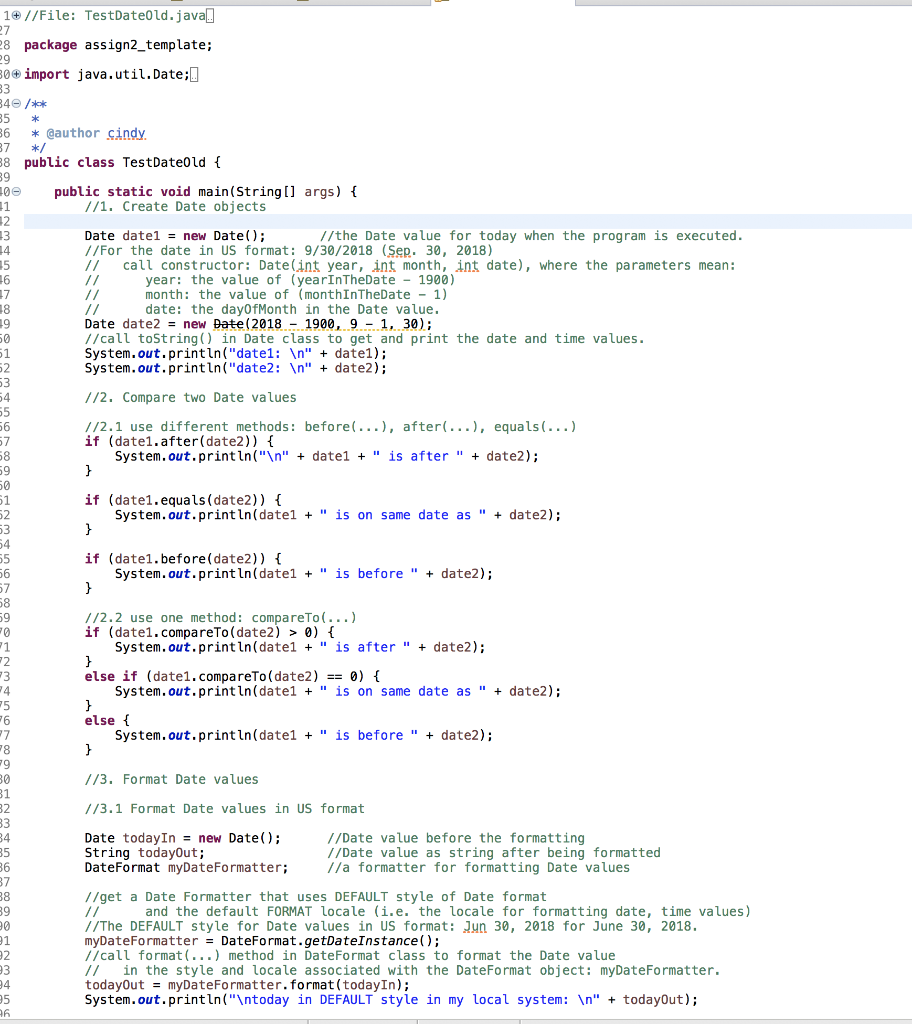
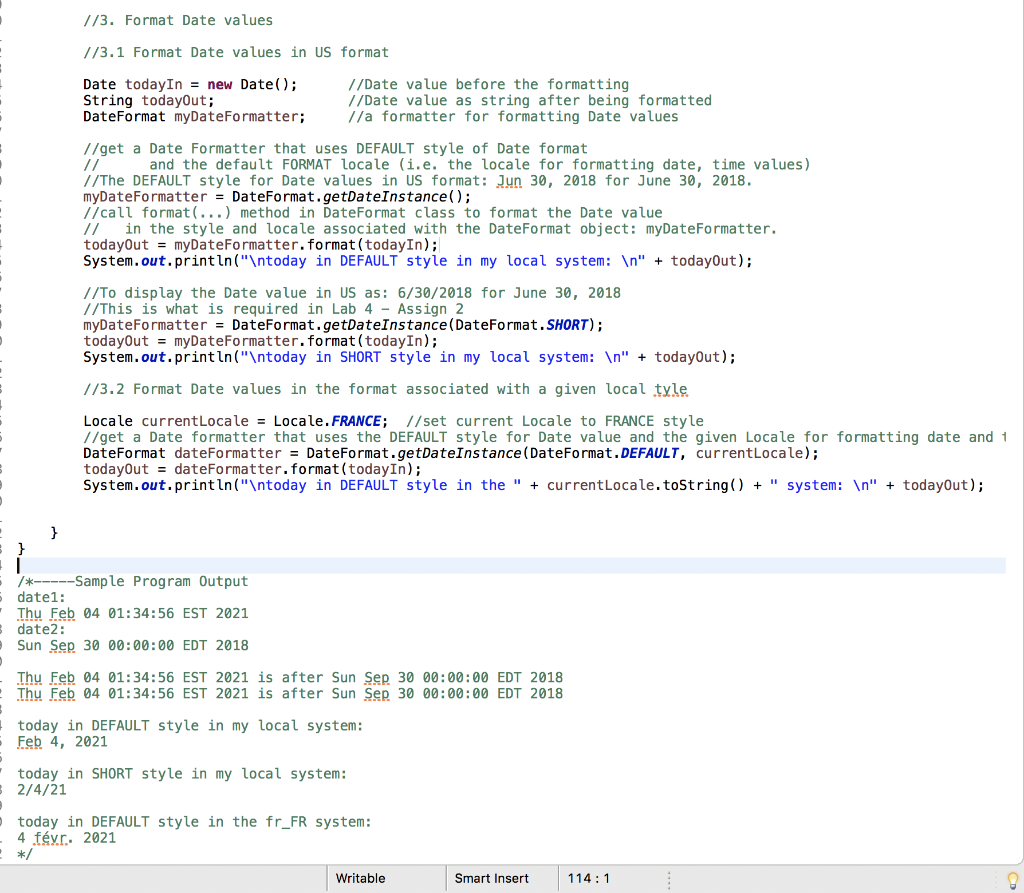
ManageVideoGames Class:
import java.time.LocalDate;
import java.util.List;
import java.util.LinkedList;
import java.util.Scanner;
public class ManageVideoGames {
public static void main(String[] args) {
//2.2.2 Application Class - ManageVideoGames
//create an empty list of VideoGames
//1. display menu
//2. get user choice
//3. take action based on user choice
//4. loop through steps 1, 2, 3 above until user quits
}
//define other methods for modularization, samples are listed below.
//method to display menu
public static void displayMenu() {
//add your code
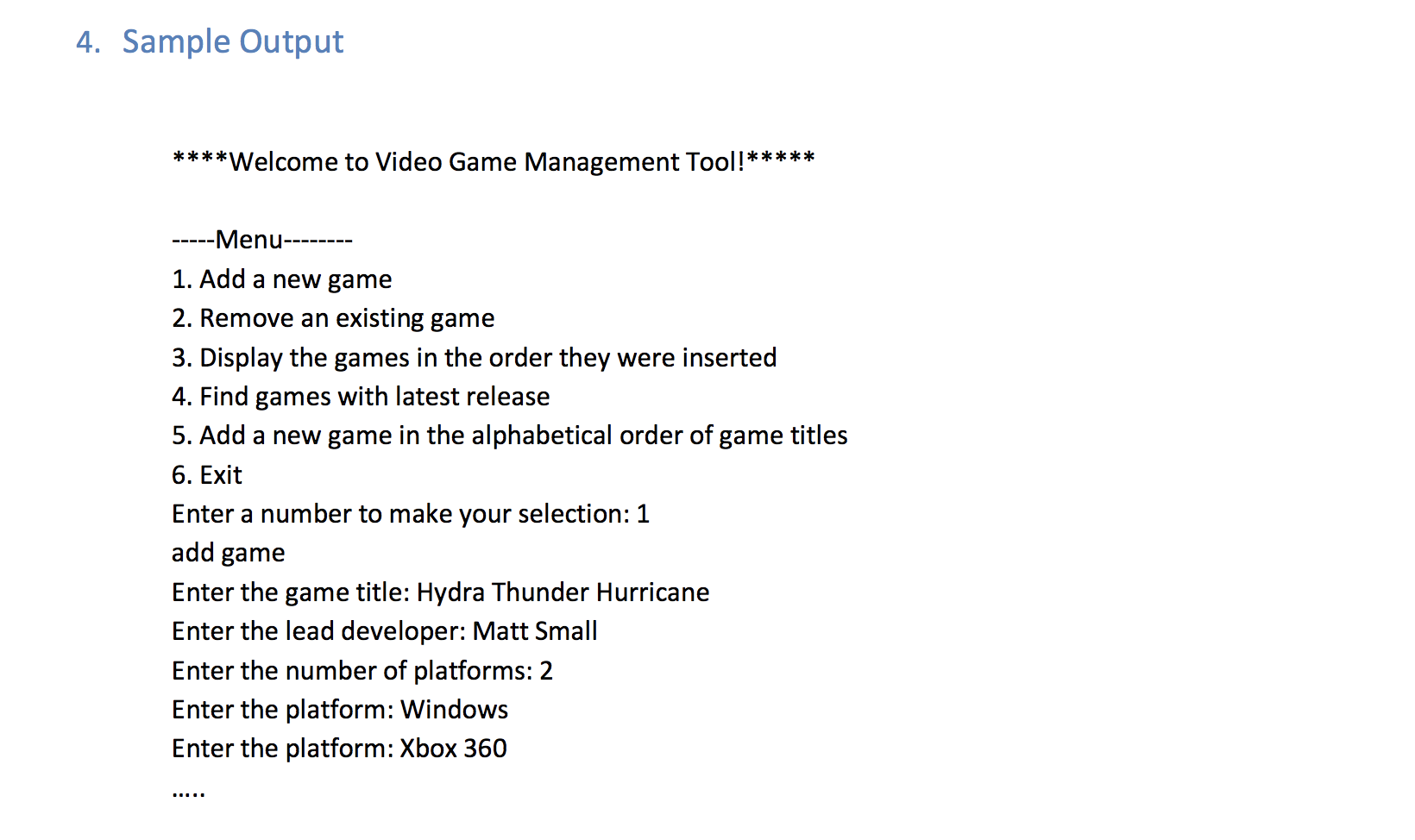
//display the menu like in Page 5 in Assign2-F21.pdf
}
//method to get user choice
public static int getUserChoice() {
//add your code
// keep reading user input until user enters correct input
return -1;
}
//method to get user input, create and return a video game
public static VideoGame getNewGame() {
//add your code here
/*
get new game based on user input:
keyboard input
game title:
use nextLine() to avoid problems caused by newline character
platforms:
get how-many: int
use loop to get each platform.
date value:
get 3 integers: month, day, year
use LocaleDate.of(year, month, day) to create a date
TestDate.java
*/
return null;
}
//method to add a video game without maintaining sorted order
//add your own code
//method to remove a game based on user input
//add your own code
//method to find the game with latest release date
//add your own code
/*
find game with latest release date
simple assumption: only one game has the latest release date.
need to loop through the collection and find the latest release date (largest)
while looping,
record and update the current latest release date value
and the corresponding VideoGame object.
compare dates: isBefore, isAfter, or compareTo
TestDate.java
*/
//OPTIONAL BONUS:
// method to add a video game in alphabetical order of game titles
//add your own code
/*
add new game in alphabetical order of game titles
Do not append the new game to the current collection and then sort the entire collection.
Instead,
start with the first game,
loop through the collection and
find the first game whose title is alphabetically larger than the new game.
Then insert the new game at the location of this target.
If no existing game title is larger than the new game,
append the new game to the end of game collection list.
*/
}
Sample Output:
1//File: TestDateOld.java.. 27 28 package assign2_template; 29 30 import java.util.Date;. 33 340 / 35 * 36 * @author cindy. 37 */ 88 public class TestDateOld { 39 200 public static void main(String[] args) { 11 //1. Create Date objects 12 13 Date datel = new Date(); //the Date value for today when the program is executed. 14 //For the date in US format: 9/30/2018 (Sep. 30, 2018) 35 // call constructor: Date(int year, int month, int date), where the parameters mean: 16 year: the value of (yearInTheDate - 1900) 17 month: the value of (monthInTheDate - 1) 18 // date: the dayOfMonth in the Date value. 19 Date date2 = new Date(2018 - 1900, 9 - 1, 30); 50 //call toString(in Date class to get and print the date and time values. 51 System.out.println("date1: " + date1); 52 System.out.println("date2: " + date2); 53 54 //2. Compare two Date values 55 56 1/2.1 use different methods: before(...), after(...), equals(...) 57 if (date1.after(date2)) { 58 System.out.println(" " + datel + " is after " + date2); 59 } 51 52 53 54 55 if (date1.equals(date)) { System.out.println(datel + " is on same date as " + date2); } if (date1.before(date2)) { System.out.println(datel + " is before " + date2); } 57 58 59 0 1/2.2 use one method: compareTo(...) if (date1.compareTo(date2) > 0) { System.out.println(date1 + " is after " + date2); else if (date1.compareTo(date2) == ) { System.out.println(datel + " is on same date as " + date2); } else { System.out.println(date1 + " is before " + date2); } //3. Format Date values 1/3.1 Format Date values in US format 24 75 6 27 18 19 30 31 32 33 34 35 36 37 38 39 30 91 2 3 24 95 26 Date today In = new Date(); //Date value before the formatting String todayOut; I/Date value as string after being formatted DateFormat myDateFormatter; //a formatter for formatting Date values //get a Date Formatter that uses DEFAULT style of Date format // and the default FORMAT locale (i.e. the locale for formatting date, time values) //The DEFAULT style for Date values in US format: Jun 30, 2018 for June 30, 2018. myDateFormatter = DateFormat.getDateInstance(); 1/call format (...) method in DateFormat class to format the Date value // in the style and locale associated with the DateFormat object: myDateFormatter. todayOut = myDateFormatter.format(todayIn); System.out.println(" today in DEFAULT style in my local system: " + todayOut); //3. Format Date values //3.1 Format Date values in US format Date todayIn = new Date(); 1/Date value before the formatting String todayOut; 1/Date value as string after being formatted DateFormat myDateFormatter; //a formatter for formatting Date values //get a Date Formatter that uses DEFAULT style of Date format and the default FORMAT locale (i.e. the locale for formatting date, time values) 1/The DEFAULT style for Date values in US format: Jun 30, 2018 for June 30, 2018. myDateFormatter = DateFormat.getDateInstance(); //call format (...) method in DateFormat class to format the Date value // in the style and locale associated with the DateFormat object: myDateFormatter. todayout = myDateFormatter.format(todayIn); System.out.println(" today in DEFAULT style in my local system: " + todayOut); //To display the Date value in US as: 6/30/2018 for June 30, 2018 //This is what is required in Lab 4 - Assign 2 myDateFormatter = DateFormat.getDateInstance(DateFormat. SHORT); todayOut = myDateFormatter.format(todayIn); System.out.println(" today in SHORT style in my local system: " + todayOut); 1/3.2 Format Date values in the format associated with a given local tyle Locale currentLocale = Locale. FRANCE; //set current Locale to FRANCE style //get a Date formatter that uses the DEFAULT style for Date value and the given Locale for formatting date and 1 DateFormat dateFormatter = DateFormat.getDateInstance(DateFormat. DEFAULT, currentLocale); todayOut = dateFormatter.format(todayIn); System.out.println(" today in DEFAULT style in the " + current locale.toString() + " system: " + todayOut); } -Sample Program Output date1: Thu Feb 04 01:34:56 EST 2021 date2: Sun Sep 30 00:00:00 EDT 2018 Thu Feb 04 01:34:56 EST 2021 is after Sun Sep 30 00:00:00 EDT 2018 Thu Feb 04 01:34:56 EST 2021 is after Sun Sep 30 00:00:00 EDT 2018 today in DEFAULT style in my local system: Feb 4, 2021 today in SHORT style in my local system: 2/4/21 today in DEFAULT style in the fr_FR system: 4 fvr. 2021 */ Writable Smart Insert 114:1 4. Sample Output ***** **Welcome to Video Game Management Tool!** ***** --Menu------ 1. Add a new game 2. Remove an existing game 3. Display the games in the order they were inserted 4. Find games with latest release 5. Add a new game in the alphabetical order of game titles 6. Exit Enter a number to make your selection: 1 add game Enter the game title: Hydra Thunder Hurricane Enter the lead developer: Matt Small Enter the number of platforms: 2 Enter the platform: Windows Enter the platform: Xbox 360
Step by Step Solution
There are 3 Steps involved in it

Get step-by-step solutions from verified subject matter experts
 Study Help