







Question: Instructions are on the bottom (images) http://www.w3.org/TR/xhtml1/DTD/xhtml1-strict.dtd> PHP Code Blocks content=text/html; charset=iso-8859-1 /> echo This text is displayed using standard PHP script delimeters. ; ?>
Instructions are on the bottom (images)
"http://www.w3.org/TR/xhtml1/DTD/xhtml1-strict.dtd">
PHP Code Blocks
content="text/html; charset=iso-8859-1" />
echo "This text is displayed using standard PHP script delimeters. ";
?>
Then add this:
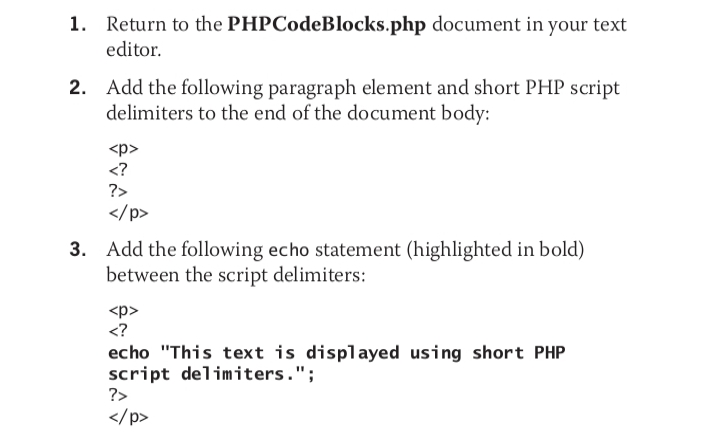
1. Return to the PHPCodeBlocks.php document in your text editor. 2. Add the following paragraph element and short PHP script delimiters to the end of the document body:
3. Add the following echo statement (highlighted in bold) between the script delimiters:
echo "This text is displayed using short PHP script delimiters."; ?>
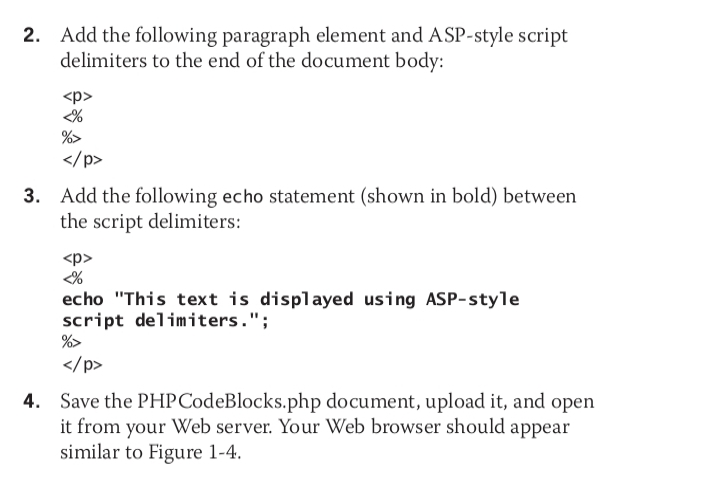
2. Add the following paragraph element and ASP-style script delimiters to the end of the document body:
3. Add the following echo statement (shown in bold) between the script delimiters:
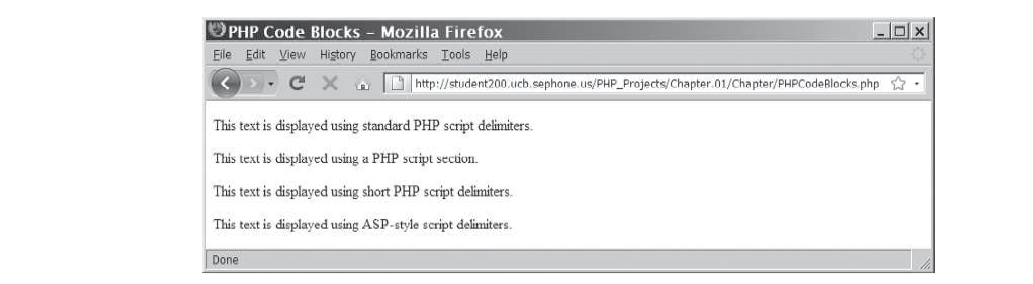
4. Save the PHP CodeBlocks.php document, upload it, and open it from your Web server. Your Web browser should appear similar to Figure 1-4. PHP Code Blocks - Mozilla Firefox COX Eile Edit View History Bookmarks Tools Help > C X http://student200 ucb.sephone Us/PHP_Projects/Chapter 01/Chapter/PHPCodeBlocks php * . This text is displayed using standard PHP script delimiters This text is displayed using a PHP script section. This text is displayed using short PHP script delimiters This text is displayed using ASP-style script delimiters Done
Step by Step Solution
There are 3 Steps involved in it

Get step-by-step solutions from verified subject matter experts
 Study Help