


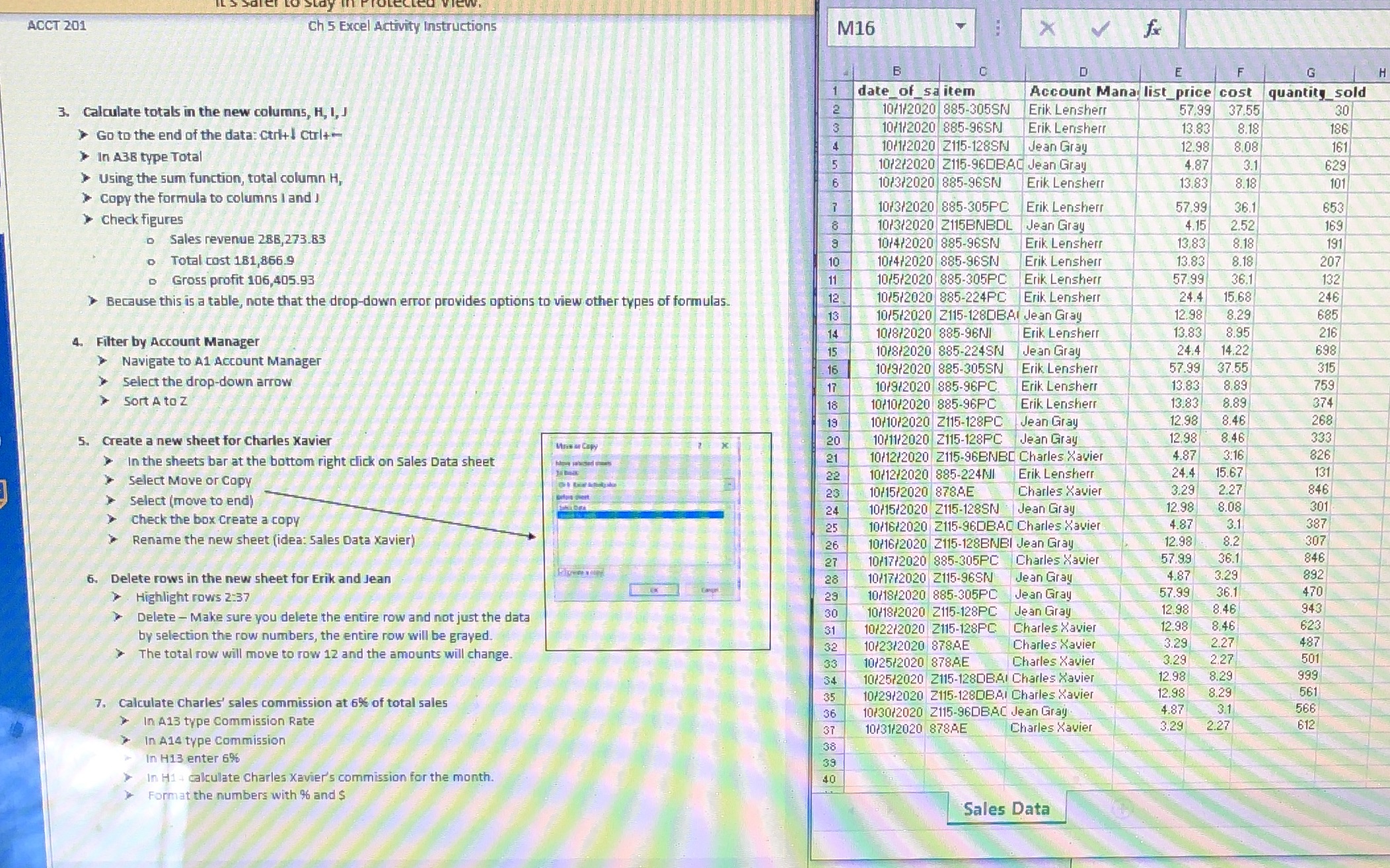
Question: Instructions are on the left ACCT 201 Ch 5 Excel Activity Instructions M16 X B D G date of sa item Account Mana list_price cost

Instructions are on the left
Instructions are on the left ACCT 201 Ch 5 Excel
ACCT 201 Ch 5 Excel Activity Instructions M16 X B D G date of sa item Account Mana list_price cost quantity sold 3. Calculate totals in the new columns, H, 1, J 10/1/2020 885-305SN Erik Lensherr 57.99 37.55 30 10/1/2020 885-96SN > Go to the end of the data: Ctri+! curl+ Erik Lensherr 13.83 8.18 186 10/1/2020 2115-128SN Jean Gray 12.98 8.08 161 >In A38 type Total 10/2/2020 2115-960BAC Jean Gray 4.87 3.1 629 Using the sum function, total column H, 16 10/3/2020 885-96SN Erik Lensherr 13.83 8.18 101 >Copy the formula to columns | and ) 10/3/2020 885-305PC Erik Lensherr 57.99 36.1 653 >Check figures 10/3/2020 2115BNBOL |Jean Gray 4.15 2.52 169 Sales revenue 286,273.83 10/4/2020 885-96SN Erik Lensherr 13.83 8.18 191 Total cost 181,866.9 10 10/4/2020 885-96SN Erik Lensherr 13.83 8.18 207 Gross profit 106,405.93 11 10/5/2020 885-305PC Erik Lensherr 57.99 36.1 132 Because this is a table, note that the drop-down error provides options to view other types of formulas. 12 1075/2020 885-224PC Erik Lensherr 24.4 15.68 246 13 10/5/2020 2115-1280BAl Jean Gray 12.98 8.29 685 14 10/8/2020 885-96NI Erik Lensherr 13.83 8.95 216 . Filter by Account Manager 15 10/8/2020 885-224SN Jean Gray 24.4 14.22 698 > Navigate to A1 Account Manager 16 10/9/2020 885-305SN Erik Lensherr 57.99 37.55 315 Select the drop-down arrow 17 10/9/2020 885-96PC. Erik Lensherr 13.83 8.89 759 Sort A to Z 18 10/10/2020 885-96PC Erik Lensherr 13.83 8.89 374 19 10/10/2020 2115-128PC Jean Gray 12.98 8.46 268 5. Create a new sheet for Charles Xavier 20 10/11/2020 2115-128PC Jean Gray 12.98 8.46 333 In the sheets bar at the bottom right click on Sales Data sheet 21 10/12/2020 2115-96BNBC Charles Xavier 4.87 3:16 826 131 Select Move or Copy 22 10712/2020 885-224MI Erik Lensherr 24.4 15.67 23 10/15/2020 878AE Charles Xavier 3.29 2.27 846 Select (move to end) 24 10/15/2020 2115-128SN Jean Gray 12.98 8.08 301 Check the box Create a copy 25 10/16/2020 2115-960BAC Charles Xavier 4.87 3.1 387 Rename the new sheet (idea: Sales Data Xavier) 26 10716/2020 2115-128BNBI Jean Gray 12.98 8.2 307 27 10/17/2020 885-305PC Charles Xavier 57.99 36.1 846 3.29 892 6. Delete rows in the new sheet for Erik and Jean 28 10/17/2020 2115-96SN Jean Gray 4.87 57.99 470 Highlight rows 2:37 23 10/18/2020 885-305PC Jean Gray 36.1 30 10/18/2020 2115-128PC Jean Gray 12.98 8.46 943 Delete - Make sure you delete the entire row and not just the data 31 10/22/2020 2115-128PC Charles Xavier 8.46 623 by selection the row numbers, the entire row will be grayed. 32 10/23/2020 87SAE Charles Xavier 3.29 2.27 487 The total row will move to row 12 and the amounts will change. 33 10/25/2020 878AE Charles Xavier 3.29 2.27 501 54 10/25/2020 2115-1280BAI Charles Xavier 12.98 8.29 999 12.98 561 . Calculate Charles' sales commission at 6% of total sales 35 10/29/2020 2115-1280BAI Charles Xavier 8.29 36 10/30/2020 Z115-96DBAC Jean Gray 4.87 3.1 566 In A13 type Commission Rate 37 10/31/2020 878AE Charles Xavier 3.29 2.27 612 In A14 type Commission 38 In H13 enter 69% 39 In H14 calculate Charles Xavier's commission for the month. 40 Format the numbers with % and $ Sales Data

Step by Step Solution

There are 3 Steps involved in it

1 Expert Approved Answer
Step: 1 Unlock blur-text-image

Question Has Been Solved by an Expert!

Get step-by-step solutions from verified subject matter experts

Step: 2 Unlock
Step: 3 Unlock

Students Have Also Explored These Related Accounting Questions!