







Question: INSTRUCTIONS: ax STEP 1: INPUTS - Enter numbers in the yellow highlighted fields following the instructions. begin{tabular}{|l|l|} hline Sales Revenue: Enter a number between 600,000
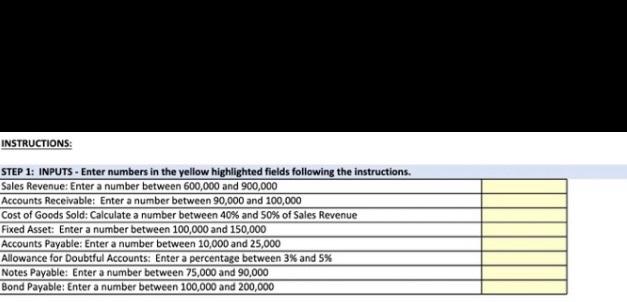

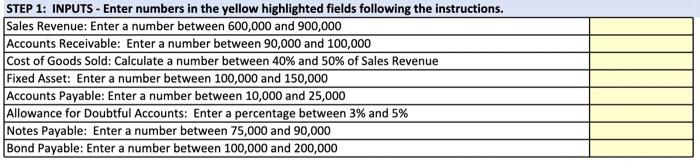

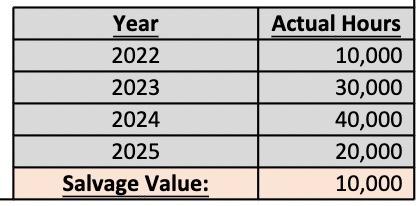
INSTRUCTIONS: ax STEP 1: INPUTS - Enter numbers in the yellow highlighted fields following the instructions. \begin{tabular}{|l|l|} \hline Sales Revenue: Enter a number between 600,000 and 900,000 \\ \hline Accounts Receivable: Enter a number between 90,000 and 100,000 \\ \hline Cost of Goods Sold: Calculate a number between 40% and 50% of Sales Revenue \\ \hline Fixed Asset: Enter a number between 100,000 and 150,000 \\ \hline Accounts Payable: Enter a number between 10,000 and 25,000 & \\ \hline Allowance for Doubtful Accounts: Enter a percentage between 3% and 5% & \\ \hline Notes Payable: Enter a number between 75,000 and 90,000 \\ \hline Bond Payable: Enter a number between 100,000 and 200,000 \\ \hline \end{tabular} Lnes of Broduction Methsd Depreciation Calculution Leful ife it 4 yean \begin{tabular}{|l|l|l|l|l|} Year & Cest & Depreciation Cxpence & Accumulated Depredatien & Eopk Value \\ jot2 & & & & \\ \hline 2023 & & & & \\ \hline asd & & & & \\ jods & & & & \\ \hline \end{tabular} \begin{tabular}{|c|r|} \hline Year & Actual Hours \\ \hline 2022 & 10,000 \\ \hline 2023 & 30,000 \\ \hline 2024 & 40,000 \\ \hline 2025 & 20,000 \\ \hline Salvage Value: & 10,000 \\ \hline \end{tabular}
Step by Step Solution
There are 3 Steps involved in it

Get step-by-step solutions from verified subject matter experts
 Study Help