







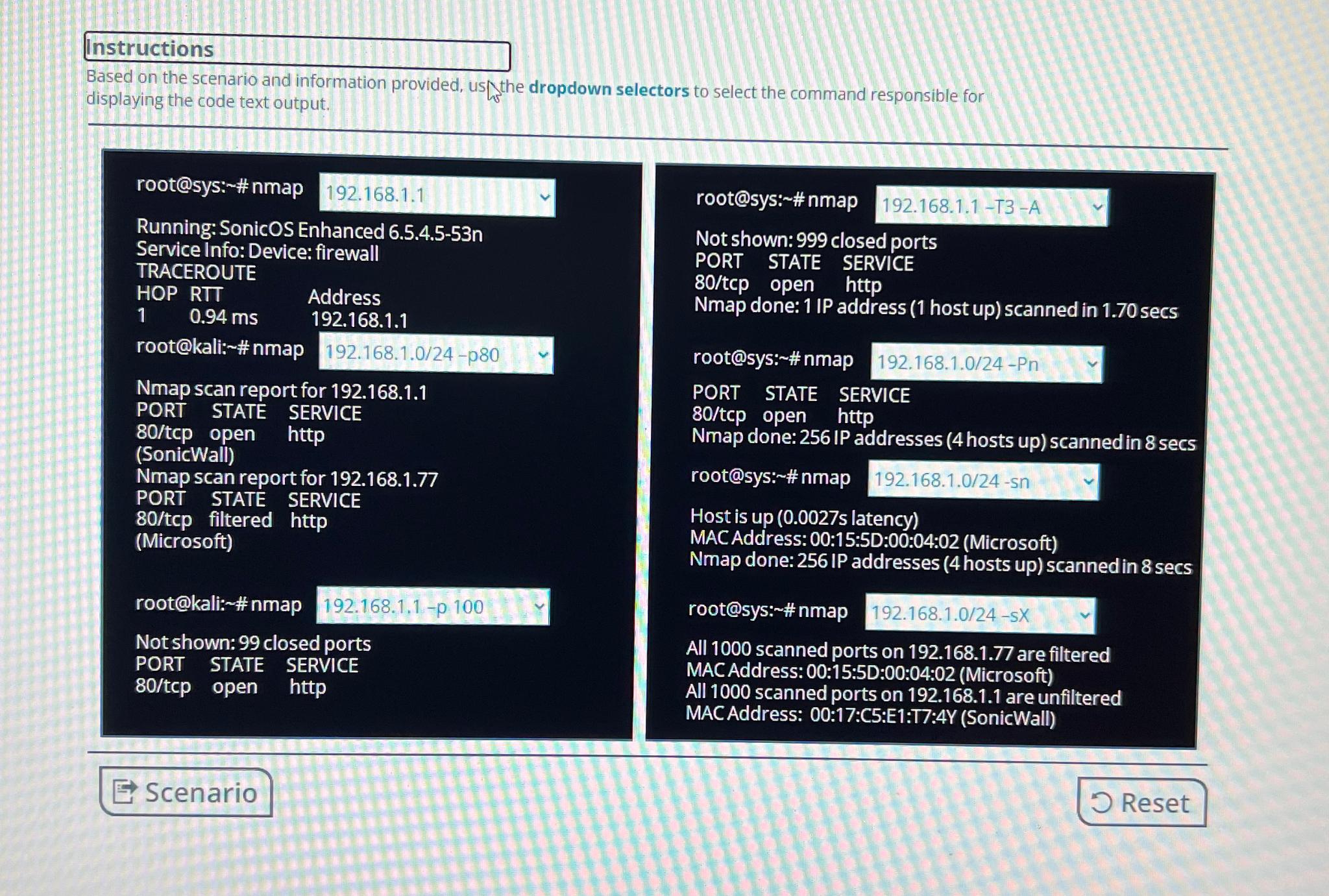
Question: Instructions Based on the scenario and information provided, us the dropdown selectors to select the command responsible for displaying the code text output. root@sys: #
Instructions
Based on the scenario and information provided, us the dropdown selectors to select the command responsible for displaying the code text output.
root@sys: # nmap
Running: SonicOS Enhanced n
Service Info: Device: firewall
TRACEROUTE
HOP RTT Address
root@kali: # nmap p
Nmap scan report for
PORT STATE SERVICE
tcp open http
SonicWall
Nmap scan report for
PORT STATE SERVICE
filtered http
Microsoft
root@kali: # nmap
p
Not shown: closed ports
PORT STATE SERVICE
tcp open http
root@sys: # nmap
T A
Not shown: closed ports
PORT STATE SERVICE
tcp open http
Nmap done: IP address host up scanned in secs
root@sys: # nmap
Pn
PORT STATE SERVICE
open http
Nmap done: IP addresses hosts up scanned in secs
root@sys: # nmap
sn
Host is up s latency
MAC Address: ::D:::Microsoft
Nmap done: IP addresses hosts up scanned in secs
root@sys: # nmap
sX
All scanned ports on are filtered
MACAddress: ::D:::Microsoft
All scanned ports on are unfiltered
MACAddress: ::C:E:T:Y SonicWall
Step by Step Solution
There are 3 Steps involved in it
1 Expert Approved Answer
Step: 1 Unlock

Question Has Been Solved by an Expert!
Get step-by-step solutions from verified subject matter experts
Step: 2 Unlock
Step: 3 Unlock
 Study Help