



Question: Instructions: Begin by reviewing the tax return scenario below. Then, pre pare the 2016 fiduciary income tax return (Form 1041) for the Lawrence Trust. In
Instructions:
Begin by reviewing the tax return scenario below. Then, pre pare the 2016 fiduciary income tax return (Form 1041) for the Lawrence Trust. In addition, determine the amount and character of the income and expense items that each beneficiary must report for the year, and prepare a Schedule K-1 for David Lawrence. Omit all alternative minimum tax computations.
TAX RETURN SCENARIO The year's activities of the trust include the following:
Dividend income, all U.S. stocks $62,500 Taxable interest income 12,500 Tax-exempt interest income 18,750 Fiduciary's fees 5,000
The trust and David both use the calendar tax year. Under the terms of the trust instrument, fiduciary's fees are allocated to income. The trustee must distribute all of the entity's accounting income to David Lawrence by February 15 of the following year. The trustee followed this charge and made no other distributions during the year. Fiduciary's fees properly were assigned as an offset to taxable interest income.
The trust was created on March 19, 2000. There are no tax credits for the year, and none of the entity's income was derived from a personal services contract. The trust has no economic interest in any foreign trust. Its Federal identification number is 11-1111111.
The trustee, Johnson State Federal Bank, is located at 9594 President Road, Manhattan, NV 89022. Its employer identification number is 98-3456789. David lives at 17676 Gulch Road, Hawthorne, NV 89415. His Social Security number is 987-65-4321
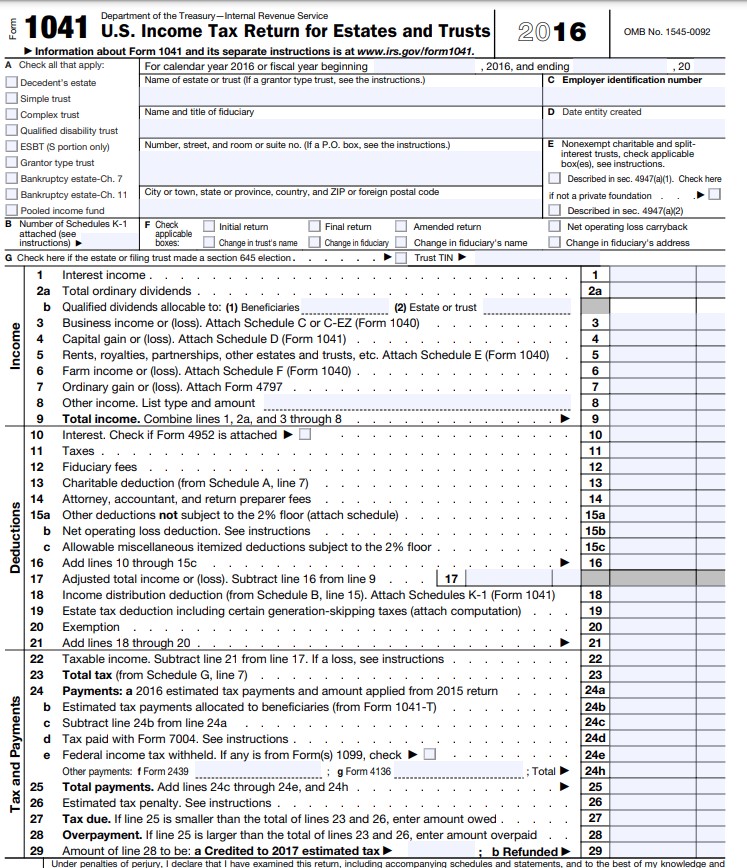
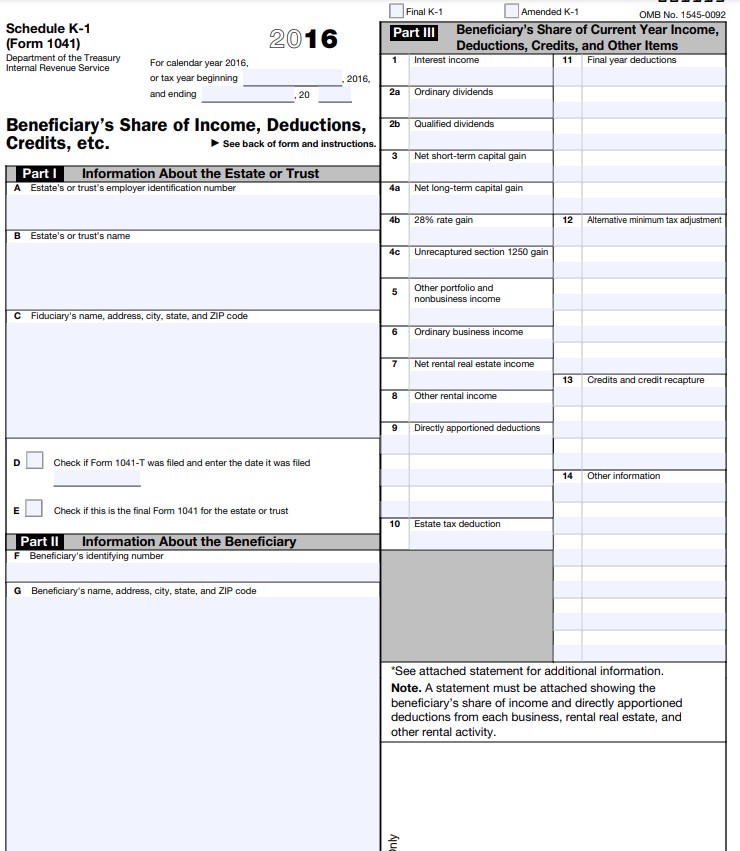
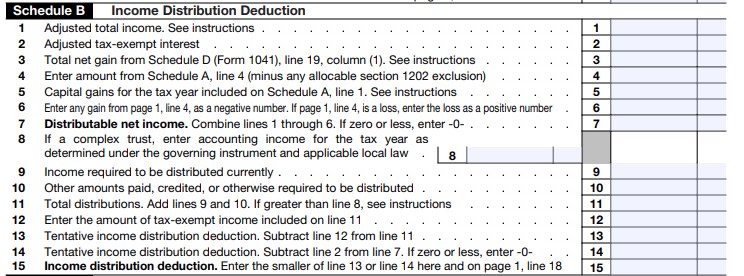
Department of the Treasury-Internal Revenue Service Form 1041 U.S. Income Tax Return for Estates and Trusts 2016 OMB No. 1545-0092 Information about Form 1041 and its separate instructions is at www.irs.gov/form1041 A Check all that apply. For calendar year 2016 or fiscal year beginning 2016, and ending , 20 Decedent's estate Name of estate or trust (If a grantor type trust, see the instructions.) C Employer identification number Simple trust Complex trust Name and title of fiduciary D Date entity created Qualified disability trust ESBT (S portion only) Number, street, and room or suite no. (If a P.O. box, see the instructions.) E Nonexempt charitable and split- interest trusts, check applicable Grantor type trust boxes), see instructions. Bankruptcy estate-Ch. 7 Described in sec. 4947(a)(1). Check here Bankruptcy estate-Ch. 11 City or town, state or province, country, and ZIP or foreign postal code if not a private foundation Pooled income fund Described in sec. 4947(a)(2) B Number of Schedules K-1 Check Final return Amended return Net operating loss carryback attached (see applicable Initial return nstructions Change in trust's name Change in fiduciary Change in fiduciary's name Change in fiduciary's address G Check here if the estate or filing trust made a section 645 election. Trust TIN 1 Interest income . 2a Total ordinary dividends . 2a b Qualified dividends allocable to: (1) Beneficiaries_ (2) Estate or trust Business income or (loss). Attach Schedule C or C-EZ (Form 1040) 3 Capital gain or (loss). Attach Schedule D (Form 1041) . Income Rents, royalties, partnerships, other estates and trusts, etc. Attach Schedule E (Form 1040) Farm income or (loss). Attach Schedule F (Form 1040) . Ordinary gain or (loss). Attach Form 4797 . Other income. List type and amount Total income. Combine lines 1, 2a, and 3 through 8 Interest. Check if Form 4952 is attached 10 11 Taxes . 11 12 Fiduciary fees 12 13 Charitable deduction (from Schedule A, line 7) 13 14 Attorney, accountant, and return preparer fees 14 15a Other deductions not subject to the 2% floor (attach schedule) . 15a b Net operating loss deduction. See instructions . 15b C Allowable miscellaneous itemized deductions subject to the 2% floor . 15c De 16 Add lines 10 through 15c 16 17 Adjusted total income or (loss). Subtract line 16 from line 9 . 17 18 Income distribution deduction (from Schedule B, line 15). Attach Schedules K-1 (Form 1041) 18 19 Estate tax deduction including certain generation-skipping taxes (attach computation) 19 20 Exemption . 20 21 Add lines 18 through 20 21 22 Taxable income. Subtract line 21 from line 17. If a loss, see instructions 22 23 Total tax (from Schedule G, line 7) . 23 24 Payments: a 2016 estimated tax payments and amount applied from 2015 return 24a b Estimated tax payments allocated to beneficiaries (from Form 1041-1) 24b C Subtract line 24b from line 24a 24c Tax paid with Form 7004. See instructions . 24d Tax and Payments Federal income tax withheld. If any is from Form(s) 1099, check 24e Other payments: f Form 2439 .; g Form 4136 24h Total payments. Add lines 24c through 24e, and 24h 25 Estimated tax penalty. See instructions . 26 Tax due. If line 25 is smaller than the total of lines 23 and 26, enter amount owed . 27 Overpayment. If line 25 is larger than the total of lines 23 and 26, enter amount overpaid 28 29 Amount of line 28 to be: a Credited to 2017 estimated tax > :b Refunded 29Final K-1 Amended K-1 OMB No. 1545-0092 Schedule K-1 2016 Part III Beneficiary's Share of Current Year Income, (Form 1041) Deductions, Credits, and Other Items Department of the Treasury For calendar year 2016, Interest income 11 Final year deductions Internal Revenue Service or tax year beginning 2016, and ending 20 2a Ordinary dividends Beneficiary's Share of Income, Deductions, 2b Qualified dividends Credits, etc. See back of form and instructions. 3 Net short-term capital gain Part | Information About the Estate or Trust A Estate's or trust's employer identification number 48 Net long-term capital gain 28% rate gain 12 Alternative minimum tax adjustment Estate's or trust's name 4c Unrecaptured section 1250 gain 5 Other portfolio and nonbusiness income C Fiduciary's name, address, city, state, and ZIP code 6 Ordinary business income Net rental real estate income 13 Credits and credit recapture B Other rental income 9 Directly apportioned deductions D Check if Form 1041-T was filed and enter the date it was filed 14 Other information E Check if this is the final Form 1041 for the estate or trust 10 Estate tax deduction Part II Information About the Beneficiary F Beneficiary's identifying number G Beneficiary's name, address, city, state, and ZIP code See attached statement for additional information. Note. A statement must be attached showing the beneficiary's share of income and directly apportioned deductions from each business, rental real estate, and other rental activity.Schedule B Income Distribution Deduction 1 Adjusted total income. See instructions . 1 2 Adjusted tax-exempt interest 2 3 Total net gain from Schedule D (Form 1041), line 19, column (1). See instructions 3 4 Enter amount from Schedule A, line 4 (minus any allocable section 1202 exclusion) 4 5 Capital gains for the tax year included on Schedule A, line 1. See instructions 5 6 Enter any gain from page 1, line 4, as a negative number. If page 1, line 4, is a loss, enter the loss as a positive number 6 7 Distributable net income. Combine lines 1 through 6. If zero or less, enter -0- . 7 8 If a complex trust, enter accounting income for the tax year as determined under the governing instrument and applicable local law 8 9 Income required to be distributed currently . 9 10 Other amounts paid, credited, or otherwise required to be distributed 10 11 Total distributions. Add lines 9 and 10. If greater than line 8, see instructions 11 12 Enter the amount of tax-exempt income included on line 11 12 13 Tentative income distribution deduction. Subtract line 12 from line 11 13 14 Tentative income distribution deduction. Subtract line 2 from line 7. If zero or less, enter -0- 14 15 Income distribution deduction. Enter the smaller of line 13 or line 14 here and on page 1, line 18 15
Step by Step Solution
There are 3 Steps involved in it

Get step-by-step solutions from verified subject matter experts