







Question: Instructions Create a Word document and name it YourtastName YourFirstName System Unit. Replace YourtastName YourFirstName with your actual first and last name. Type your name
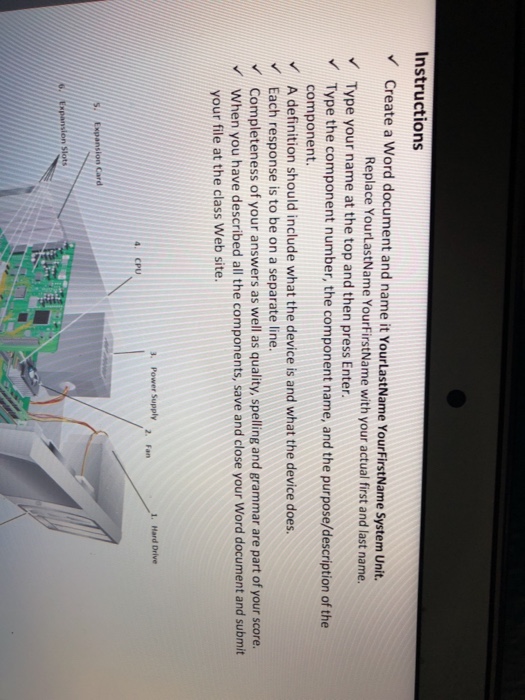
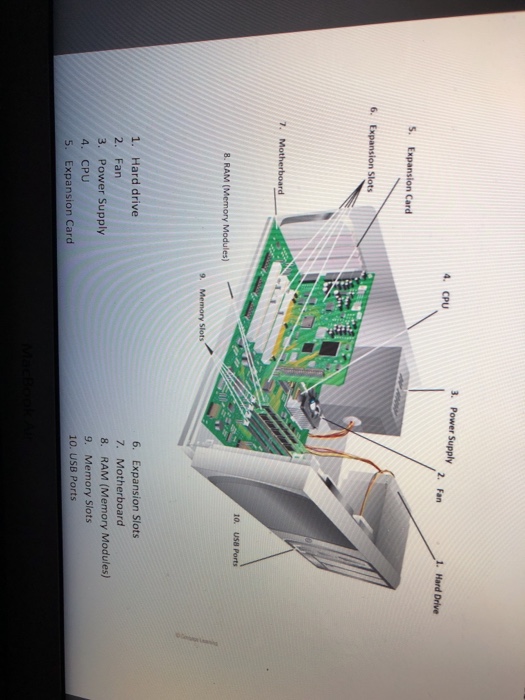
Instructions Create a Word document and name it YourtastName YourFirstName System Unit. Replace YourtastName YourFirstName with your actual first and last name. Type your name at the top and then press Enter Type the component number, the component name, and the purpose/description of the component A definition should include what the device is and what the device does. Each response is to be on a separate line. Completeness of your answers as well as quality, spelling and grammar are part of your score When you have described all the components, save and close your Word document and submit your file at the class Web site. 3. Power Supply 1. Hard Drive 4. CPU
Step by Step Solution
There are 3 Steps involved in it

Get step-by-step solutions from verified subject matter experts
 Study Help