







Question: INSTRUCTIONS: Create an applet code. 1. Code the following design. Only radio buttons are enabled when the applet is loaded. Shape: Square Rectangle Triangle Length:
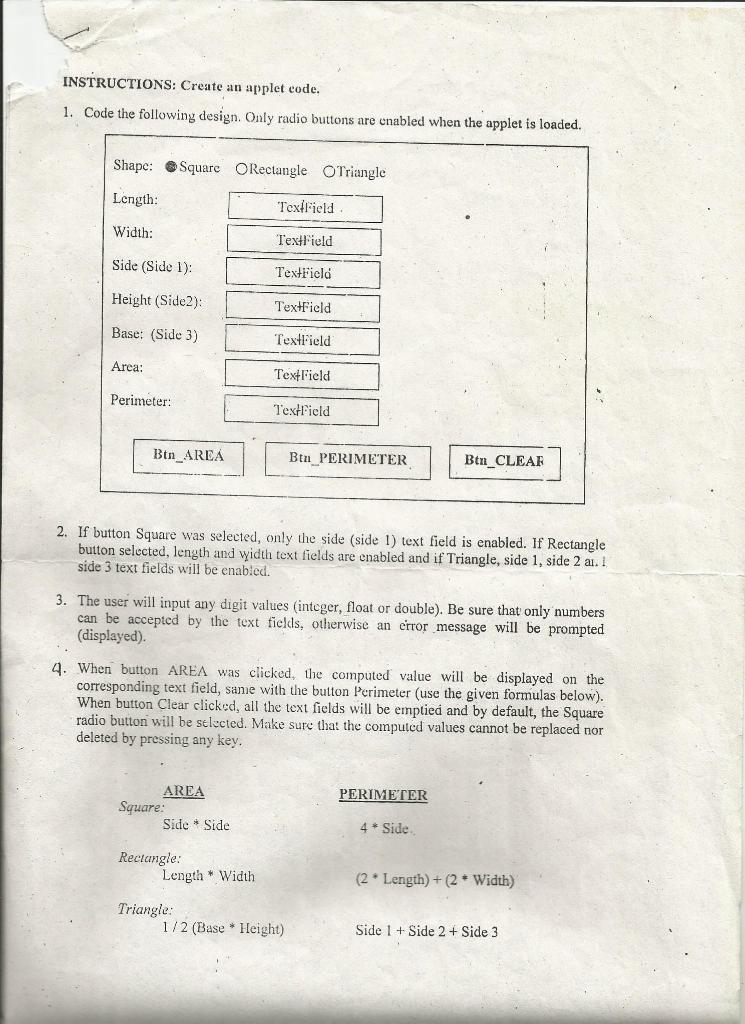
INSTRUCTIONS: Create an applet code. 1. Code the following design. Only radio buttons are enabled when the applet is loaded. Shape: Square Rectangle Triangle Length: "Textfield Width: TextField Side (Side 1): TextField Height (Side2): TextField Base: (Side 3) TextField Area: TextField Perimeter: TextField Btn_AREA Ben PERIMETER Btn_CLEAR 2. If button Square was selected, only the side (side 1) text field is enabled. If Rectangle button selected, length and width text fields are enabled and if Triangle, side 1, side 2 a. I side 3 text fields will be enabled. 3. The user will input any digit values integer, float or double). Be sure that only numbers can be accepted by the text fields, otherwise an error message will be prompted (displayed). 4. When button AREA was clicked, the computed value will be displayed on the corresponding text field, sanie with the button Perimeter (use the given formulas below). When button Clear clicked, all the text fields will be emptied and by default, the Square radio button will be selected. Make sure that the computed values cannot be replaced nor deleted by pressing any key. PERIMETER AREA Square: Side * Side 4 * Side Rectangle: Length * Width (2.Length)+(2* Width) Triangle: 1/2 (Base * Height) Side 1 + Side 2 + Side 3 INSTRUCTIONS: Create an applet code. 1. Code the following design. Only radio buttons are enabled when the applet is loaded. Shape: Square Rectangle Triangle Length: "Textfield Width: TextField Side (Side 1): TextField Height (Side2): TextField Base: (Side 3) TextField Area: TextField Perimeter: TextField Btn_AREA Ben PERIMETER Btn_CLEAR 2. If button Square was selected, only the side (side 1) text field is enabled. If Rectangle button selected, length and width text fields are enabled and if Triangle, side 1, side 2 a. I side 3 text fields will be enabled. 3. The user will input any digit values integer, float or double). Be sure that only numbers can be accepted by the text fields, otherwise an error message will be prompted (displayed). 4. When button AREA was clicked, the computed value will be displayed on the corresponding text field, sanie with the button Perimeter (use the given formulas below). When button Clear clicked, all the text fields will be emptied and by default, the Square radio button will be selected. Make sure that the computed values cannot be replaced nor deleted by pressing any key. PERIMETER AREA Square: Side * Side 4 * Side Rectangle: Length * Width (2.Length)+(2* Width) Triangle: 1/2 (Base * Height) Side 1 + Side 2 + Side 3
Step by Step Solution
There are 3 Steps involved in it

Get step-by-step solutions from verified subject matter experts
 Study Help