Question: INSTRUCTIONS Create the following HTML web page in NotePad. Refer to examples, exercises, AND textbook material in order to create the html tags and format

INSTRUCTIONS
INSTRUCTIONS Create the following HTML web pageINSTRUCTIONS Create the following HTML web pageINSTRUCTIONS Create the following HTML web pageINSTRUCTIONS Create the following HTML web pageINSTRUCTIONS Create the following HTML web pageINSTRUCTIONS Create the following HTML web pageINSTRUCTIONS Create the following HTML web pageINSTRUCTIONS Create the following HTML web pageINSTRUCTIONS Create the following HTML web page
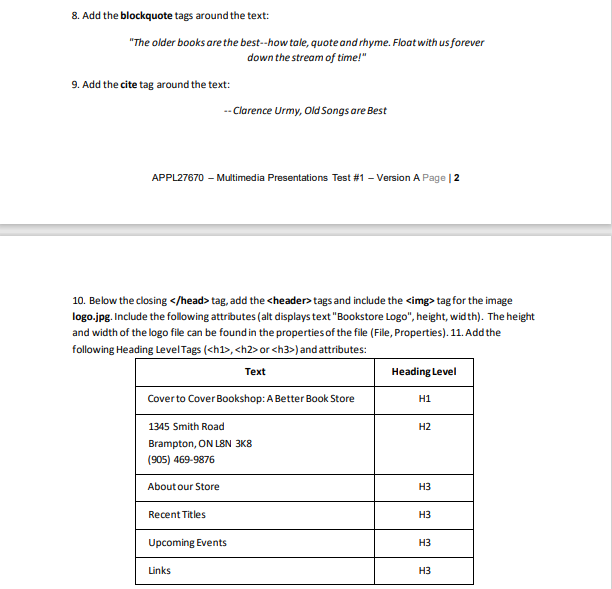
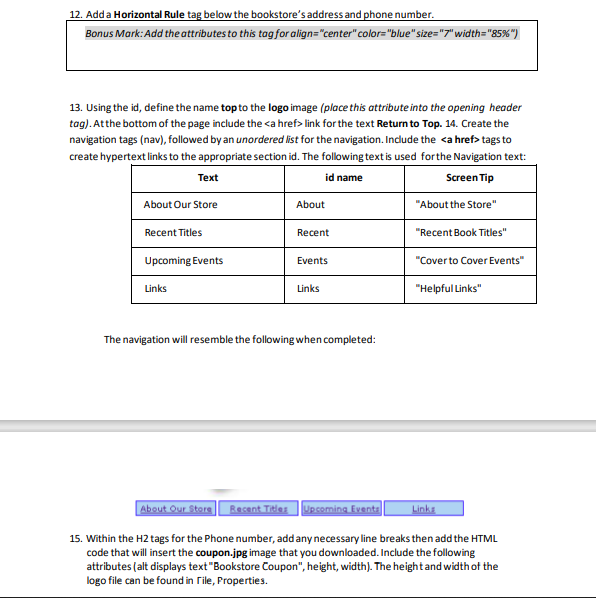
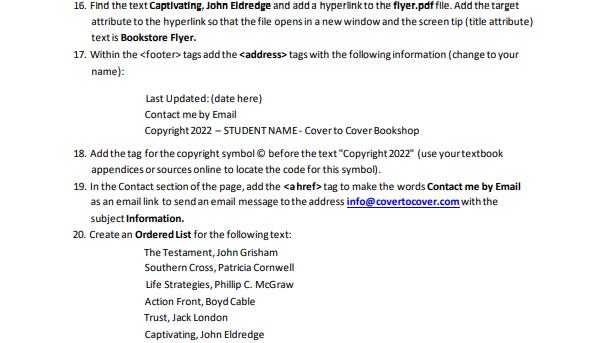
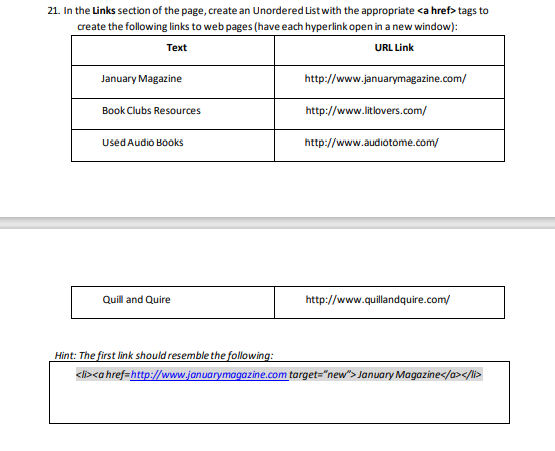
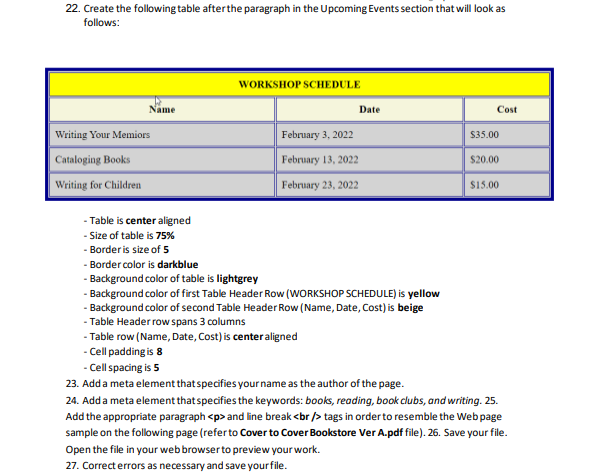
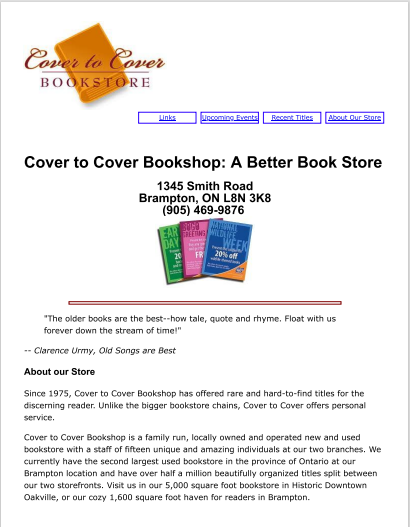
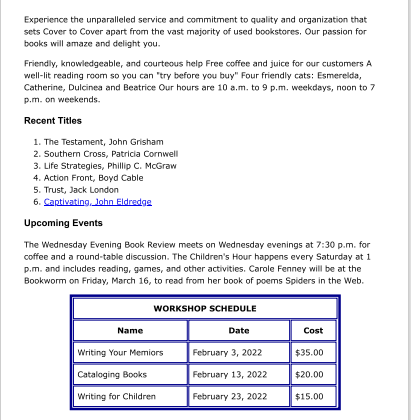
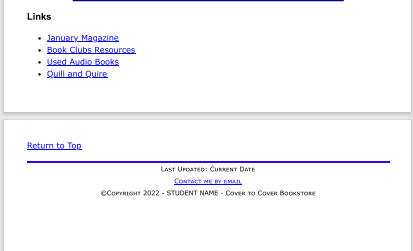
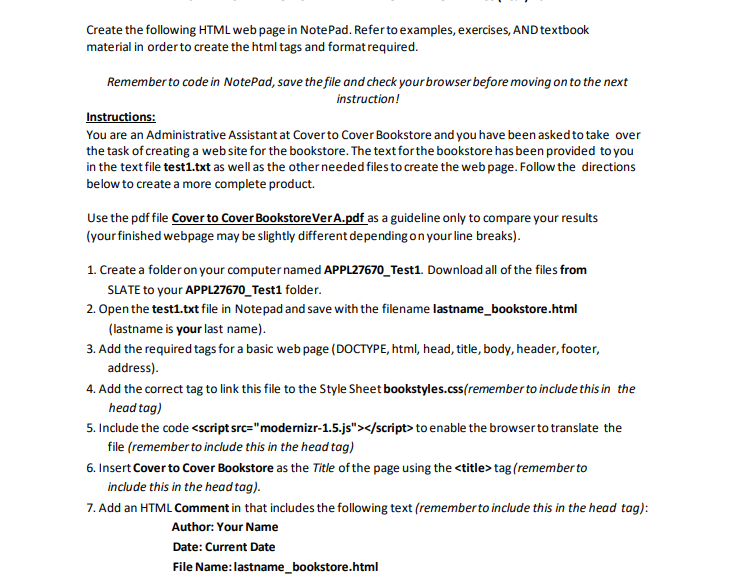
Create the following HTML web page in NotePad. Refer to examples, exercises, AND textbook material in order to create the html tags and format required. Remember to code in NotePad, save the file and check your browser before moving on to the next instruction! Instructions: You are an Administrative Assistant at Cover to Cover Bookstore and you have been asked to take over the task of creating a web site for the bookstore. The text for the bookstore has been provided to you in the text file test1.txt as well as the other needed files to create the web page. Follow the directions below to create a more complete product. Use the pdf file Cover to Cover BookstoreVer A.pdf as a guideline only to compare your results (your finished webpage may be slightly different depending on your line breaks). 1. Create a folder on your computer named APPL27670_Test1. Download all of the files from SLATE to your APPL27670_Test1 folder. 2. Open the test1.txt file in Notepad and save with the filename lastname_bookstore.html (lastname is your last name). 3. Add the required tags for a basic web page (DOCTYPE, html, head, title, body, header, footer, address). 4. Add the correct tag to link this file to the Style Sheet bookstyles.css(remember to include this in the head tag) 5. Include the code to enable the browser to translate the file (remember to include this in the head tag) 6. Insert Cover to Cover Bookstore as the Title of the page using the tag (rememberto include this in the head tag). 7. Add an HTML Comment in that includes the following text (remember to include this in the head tag): Author: Your Name Date: Current Date File Name: lastname_bookstore.html8. Add the blockquote tags around the text: "The older books are the best--how tale, quote and rhyme. Float with us forever down the stream of time!' 9. Add the cite tag around the text: -- Clarence Urmy, Old Songs are Best APPL27670 - Multimedia Presentations Test #1 - Version A Page | 2 10. Below the closing tag, add the <header> tags and include the tag for the image logo.jpg. Include the following attributes (alt displays text "Bookstore Logo", height, width). The height and width of the logo file can be found in the properties of the file (File, Properties). 11. Add the following Heading Level Tags (<h1>, <h2> or <h3>) and attributes: Text Heading Level Cover to Cover Bookshop: A Better Book Store H1 1345 Smith Road H2 Brampton, ON L8N 3K8 (905) 469-9876 About our Store H3 Recent Titles H3 Upcoming Events H3 Links EH12. Add a Horizontal Rule tag below the bookstore's address and phone number. Bonus Mark: Add the attributes to this tag for align="center" colors "blue" sizes"7" width="85%%") 13. Using the id, define the name top to the logo image (place this attribute into the opening header tog). At the bottom of the page include the link for the text Return to Top. 14. Create the navigation tags (nav), followed by an unordered list for the navigation. Include the tags to create hypertext links to the appropriate section id. The following text is used for the Navigation text: Text id name Screen Tip About Our Store About "About the Store" Recent Titles Recent "Recent Book Titles" Upcoming Events Events "Cover to Cover Events" Links Links "Helpful Links" The navigation will resemble the following when completed: About Our Store Recent Titles Upcoming Events Linka 15. Within the H2 tags for the Phone number, add any necessary line breaks then add the HTML code that will insert the coupon.jpg image that you downloaded. Include the following attributes (alt displays text "Bookstore Coupon", height, width). The height and width of the logo file can be found in Tile, Properties.16. Find the text Captivating, John Eldredge and add a hyperlink to the flyer.pdf file. Add the target attribute to the hyperlink so that the file opens in a new window and the screen tip ( title attribute) text is Bookstore Flyer. 17. Within the <footer> tags add the <address> tags with the following information (change to your name): Last Updated: (date here) Contact me by Email Copyright 2022 - STUDENT NAME - Cover to Cover Bookshop 18. Add the tag for the copyright symbol @ before the text "Copyright 2022" (use your textbook appendices or sources online to locate the code for this symbol). 19. In the Contact section of the page, add the <ahref> tag to make the words Contact me by Email as an email link to send an email message to the address info@ covertocover.com with the subject Information. 20. Create an Ordered List for the following text: The Testament, John Grisham Southern Cross, Patricia Cornwell Life Strategies, Phillip C. McGraw Action Front, Boyd Cable Trust, Jack London Captivating, John Eldredge21. In the Links section of the page, create an Unordered List with the appropriate tags to create the following links to web pages ( have each hyperlink open in a new window): Text URL Link January Magazine http://www.januarymagazine.com/ Book Clubs Resources http://www.litlovers.com/ Used Audio Books http://www.audiotome.com/ Quill and Quire http://www.quillandquire.com/ Hint: The first link should resemble the following: cisco href=http://www.januarymagazine.com target="new"> January Magazine 22. Create the following table after the paragraph in the Upcoming Events section that will look as follows: WORKSHOP SCHEDULE Name Date Cost Writing Your Memiors February 3, 2022 $35.00 Cataloging Books February 13, 2022 $20.00 Writing for Children February 23, 2022 $15.00 - Table is center aligned Size of table is 75% - Border is size of 5 - Border color is darkblue - Background color of table is lightgrey - Background color of first Table Header Row (WORKSHOP SCHEDULE) is yellow - Background color of second Table Header Row (Name, Date, Cost) is beige - Table Header row spans 3 columns - Table row (Name, Date, Cost) is center aligned - Cell padding is 8 - Cell spacing is 5 23. Add a meta element that specifies your name as the author of the page. 24. Add a meta element that specifies the keywords: books, reading, book clubs, and writing. 25. Add the appropriate paragraph <p> and line break <br>tags in order to resemble the Web page sample on the following page (refer to Cover to Cover Bookstore Ver A.pdf file). 26. Save your file. Open the file in your web browser to preview your work. 27. Correct errors as necessary and save your file.Cover to Cover BOOKSTORE Links Upcoming Events Becert Titles Nout Our Sore Cover to Cover Bookshop: A Better Book Store 1345 Smith Road Brampton, ON L8N 3K8 (905) 469-9876 GREETING LAY WEEK "The older books are the best--how tale, quote and rhyme, Float with us forever down the stream of time!" -- Clarence Urmy, Old Songs are Best About our Store Since 1975, Cover to Cover Bookshop has offered rare and hard-to-find titles for the discerning reader. Unlike the bigger bookstore chains, Cover to Cover offers personal service. Cover to Cover Bookshop is a family run, locally owned and operated new and used bookstore with a staff of fifteen unique and amazing individuals at our two branches. We currently have the second largest used bookstore in the province of Ontario at our Brampton location and have over half a million beautifully organized titles split between our two storefronts. Visit us in our 5,000 square foot bookstore in Historic Downtown Oakville, or our cozy 1,600 square foot haven for readers in Brampton.Experience the unparalleled service and commitment to quality and organization that sets Cover to Cover apart from the vast majority of used bookstores, Our passion for books will amaze and delight you. Friendly, knowledgeable, and courteous help Free coffee and juice for our customers A well-lit reading room so you can "try before you buy" Four friendly cats: Esmerelda, Catherine, Dulcinea and Beatrice Our hours are 10 a.m. to 9 p.m. weekdays, noon to 7 p.m. on weekends. Recent Titles 1. The Testament, John Grisham 2. Southern Cross, Patricia Cornwell 3. Life Strategies, Phillip C. McGraw 4. Action Front, Boyd Cable 5. Trust, Jack London 6. Captivating, John Eldredge Upcoming Events The Wednesday Evening Book Review meets on Wednesday evenings at 7:30 p.m. for coffee and a round-table discussion. The Children's Hour happens every Saturday at 1 p.m. and includes reading, games, and other activities. Carole Fenney will be at the Bookworm on Friday, March 16, to read from her book of poems Spiders in the Web. WORKSHOP SCHEDULE Name Date Cost Writing Your Memiors February 3, 2022 $35.00 Cataloging Books February 13, 2022 $20.00 Writing for Children February 23, 2022 $15.00Links January Magazine Book Clubs Resources Used Audio Books . Quill and Quire Return to Top LAST UPDATED; CURRENT DATE COPYRIGHT 2022 - STUDENT NAME - COVER TO COVER BOOKSTORE</p></ahref></address></footer></h3></h2></h1></header>

Step by Step Solution

There are 3 Steps involved in it

1 Expert Approved Answer
Step: 1 Unlock blur-text-image

Question Has Been Solved by an Expert!

Get step-by-step solutions from verified subject matter experts

Step: 2 Unlock
Step: 3 Unlock

Students Have Also Explored These Related Programming Questions!