







Question: Instructions: - Submit a single MSP file for grading. Use the file name 'Test2b' for your file. - Only MSP files (.mpp) will be accepted
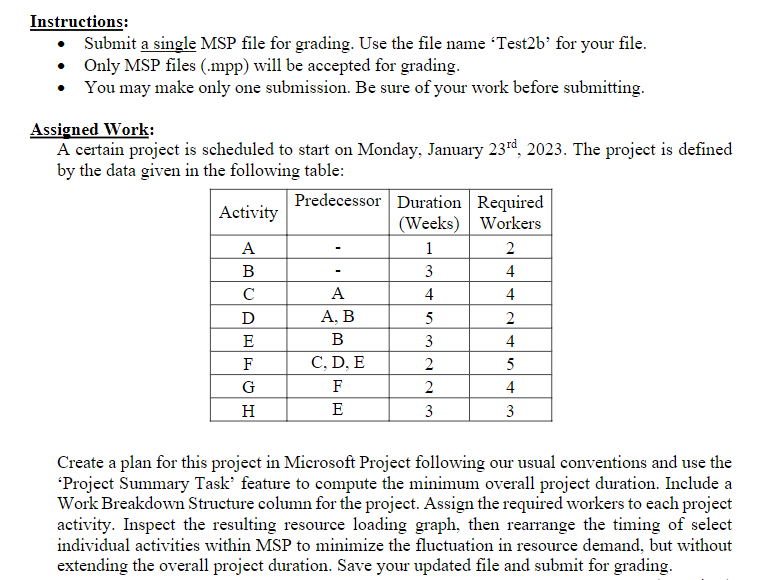
Instructions: - Submit a single MSP file for grading. Use the file name 'Test2b' for your file. - Only MSP files (.mpp) will be accepted for grading. - You may make only one submission. Be sure of your work before submitting. Assioned Work: A certain project is scheduled to start on Monday, January 23rd,2023. The project is defined by the data given in the following table: Create a plan for this project in Microsoft Project following our usual conventions and use the 'Project Summary Task' feature to compute the minimum overall project duration. Include a Work Breakdown Structure column for the project. Assign the required workers to each project activity. Inspect the resulting resource loading graph, then rearrange the timing of select individual activities within MSP to minimize the fluctuation in resource demand, but without extending the overall project duration. Save your updated file and submit for grading. Instructions: - Submit a single MSP file for grading. Use the file name 'Test2b' for your file. - Only MSP files (.mpp) will be accepted for grading. - You may make only one submission. Be sure of your work before submitting. Assioned Work: A certain project is scheduled to start on Monday, January 23rd,2023. The project is defined by the data given in the following table: Create a plan for this project in Microsoft Project following our usual conventions and use the 'Project Summary Task' feature to compute the minimum overall project duration. Include a Work Breakdown Structure column for the project. Assign the required workers to each project activity. Inspect the resulting resource loading graph, then rearrange the timing of select individual activities within MSP to minimize the fluctuation in resource demand, but without extending the overall project duration. Save your updated file and submit for grading
Step by Step Solution
There are 3 Steps involved in it

Get step-by-step solutions from verified subject matter experts
 Study Help