







Question: Instructions: # This assignment has 3 questaions # Please upload the .ktr files below (transformation file) in case of Pentaho transformations Every information neede to
Instructions:
# This assignment has 3 questaions
# Please upload the .ktr files below (transformation file) in case of Pentaho transformations
Every information neede to solve this problem is there.
Extract all the below fields from below tables in a single query using joins:
[Purchasing].[Vendor].[Name]
[Person].[Address].[AddressLine2]
+++++.]
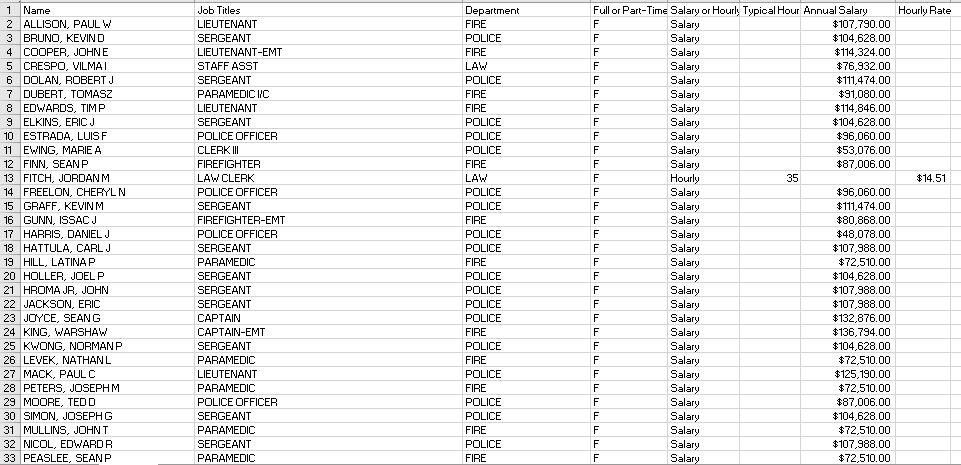
Using the attached spreadsheet above as data input, create a Pentaho Transformation for the following requirements:
Create 3 output files as below
Output_1.csv contains only Salaried employees Output_2.csv contains only Part-Time employees Output_3.csv contains only Salary greater than $90,000
Output file format:
First_Mid_Name|Last_Name|Job_Title|Department|Annual_Salary|Percentage_Median|today_date|Above_Median_Flag|Quarter
Transformations:
Split the fullname into first_mid_name and last_name. (Try using Split Fields step
Eg. Fullname: SIMON, JOSEPH G
First_Mid_Name: JOSEPH G
Last_Name: SIMON
If Annual Salary is blanks, calculate annual salary as below:
Hourly_Rate * Typical_Week * 52
Eg. For FITCH, JORDAN M, Annual Salary is blanks.
So, calculate Annual Salary as $14.51 * 35 * 52 = $26,408
For JobTitles, only for Department = FIRE
Map the job titles as below:
Job_Title in Input file
Job_Title in Output file
PARAMEDIC I/C
PARAMEDIC FIELD CHIEF
For any other value, output Job_Title as FIRE_OTHER.
The median salary of all the employees is $111,000.
Calculate Percent_Median value as below:
Percent_Median = Annual_Salary/Median * 100
If Percent_Median >= 100%, set Above_Median_Flag as Y else N.
Identify the quarter of today_date field. (Try using Calculate step.)
Using AdventureWorks2012 database and using Pentaho TABLE INPUT step in a transformation, generate an extracted file as below:
The output file will contain data rows only if the Availability is greater than 0 AND Quantity is greater than 200.
Output file fo
.
rmat: LocationID|Name|Availability|Quantity
Table 1:
[AdventureWorks2012].[Production].[Location]
Table 2:
[AdventureWorks2012].[Production].[ProductInventory]
Hint: Inner Join using LocationID
Reference:
If you are unable to connect to the database for any reasons, these table structures will help.
Structure of Table 1:
[Production].[Location](
[LocationID] [smallint] IDENTITY(1,1) NOT NULL,
[Name] [dbo].[Name] NOT NULL,
[CostRate] [smallmoney] NOT NULL CONSTRAINT [DF_Location_CostRate] DEFAULT ((0.00)),
[Availability] [decimal](8, 2) NOT NULL CONSTRAINT [DF_Location_Availability] DEFAULT ((0.00)),
[ModifiedDate] [datetime] NOT NULL CONSTRAINT [DF_Location_ModifiedDate] DEFAULT (getdate())
Structure of Table 2:
[Production].[ProductInventory](
[ProductID] [int] NOT NULL,
[LocationID] [smallint] NOT NULL,
[Shelf] [nvarchar](10) NOT NULL,
[Bin] [tinyint] NOT NULL,
[Quantity] [smallint] NOT NULL CONSTRAINT [DF_ProductInventory_Quantity] DEFAULT ((0)),
[rowguid] [uniqueidentifier] ROWGUIDCOL NOT NULL CONSTRAINT [DF_ProductInventory_rowguid] DEFAULT (newid()),
[ModifiedDate] [datetime] NOT NULL CONSTRAINT [DF_ProductInventory_ModifiedDate] DEFAULT (getdate()),
Full or Part-imay or Hourly Typical Hour Annual Say Hourly Rate POLICE 4 COOPER, JOHNE LIEUTENANT-EMT POLICE POLICE POLICE POLICE OFFICER POLICE POLICE POLICE POLICE 22 JACKSON, ERIC POLICE POLICE PARAMEDIC POLICE OFFICER POLICE 33 PEASLEE, SEANP Full or Part-imay or Hourly Typical Hour Annual Say Hourly Rate POLICE 4 COOPER, JOHNE LIEUTENANT-EMT POLICE POLICE POLICE POLICE OFFICER POLICE POLICE POLICE POLICE 22 JACKSON, ERIC POLICE POLICE PARAMEDIC POLICE OFFICER POLICE 33 PEASLEE, SEANP
Step by Step Solution
There are 3 Steps involved in it

Get step-by-step solutions from verified subject matter experts
 Study Help