







Question: Instructions: Use only ONE Google Sheet Microsoft Excel file. Then, rename each sheet as following: Sheet 1 = T - Accounts Sheet 2 = Trial
Instructions: Use only ONE Google Sheet Microsoft Excel file. Then, rename each sheet as following:
Sheet TAccounts
Sheet Trial Balance
Sheet Income Statement
Sheet Balance Sheet Report Form
Clarifications:
o If you're selling a service, the account used is called, "Fees Earned." But, if you're selling a product goods, then we will use "Sales" account.
Cheques means "Cash";
o If you taking anything from the business and using it for personal use, use the N Fantacci, Drawings" account eg May th transaction
Donations "Miscellaneous Expense," because there is no consistent frequency or the amount is not major!
City Water Commission "Utilities Expense"
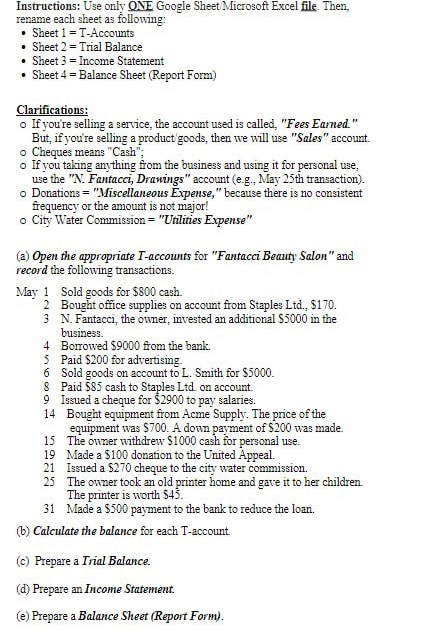
a Open the appropriate Taccounts for "Fantacci Beauty Salon" and record the following transactions.
May Sold goods for $ cash
Bought office supplies on account from Staples Ltd $
N Fantacci, the owner, invested an additional $ in the business.
Borrowed $ from the bank
Paid $ for advertising
Sold goods on account to L Smith for $
Paid $ cash to Staples Ltd on account.
Issued a cheque for $ to pay salaries.
Bought equipment from Acme Supply. The price of the equipment was $ A down payment of $ was made.
The owner withdrew $ cash for personal use.
Made a $ donation to the United Appeal.
Issued a $ cheque to the city water commission.
The owner took an old printer home and gave it to her children The printer is worth $
Made a $ payment to the bank to reduce the loan.
b Calculate the balance for each Taccount
c Prepare a Trial Balance.
d Prepare an Income Statement.
e Prepare a Balance Sheet Report Form
Step by Step Solution
There are 3 Steps involved in it
1 Expert Approved Answer
Step: 1 Unlock

Question Has Been Solved by an Expert!
Get step-by-step solutions from verified subject matter experts
Step: 2 Unlock
Step: 3 Unlock
 Study Help