







Question: Instructions: Using Visual Studio, choose an ASP.NET Empty Website to create a web application that will read a file of numbers and provide the total,
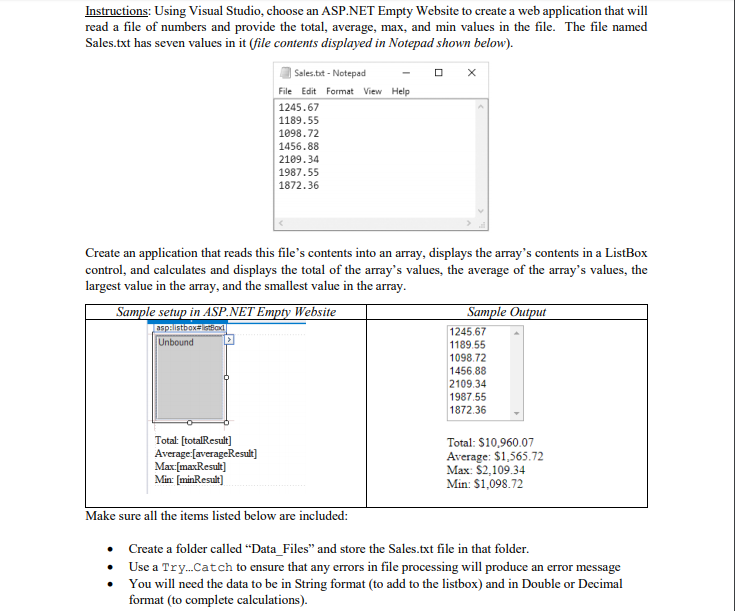
Instructions: Using Visual Studio, choose an ASP.NET Empty Website to create a web application that will read a file of numbers and provide the total, average, max, and min values in the file. The file named Sales.txt has seven values in it (file contents displayed in Notepad shown below). Sales.tot-Notepad File Edit Format View Help 1245.67 1189.55 1098.72 1456.88 2189.34 1987.55 1872.36 Create an application that reads this file's contents into an array, displays the array's contents in a ListBox control, and calculates and displays the total of the array's values, the average of the array's values, the largest value in the array, and the smallest value in the array Sample setup in ASP.NETE Website Sample Ou asp: listbox 245.67 189.55 1098.72 1456.88 2109.34 1987.55 1872.36 - Unbound Total: [totalResult] Average [averageResulit Total: $10,960.07 Average: $1,565.72 Max: S2,109.34 Min [minResult Min: $1,098.72 Make sure all the items listed below are included: Create a folder called Data Files" and store the Sales-txt file in that folder. . Use a Try...Catch to ensure that any errors in file processing will produce an error message . You will need the data to be in String format (to add to the listbox) and in Double or Decimal format (to complete calculations)
Step by Step Solution
There are 3 Steps involved in it

Get step-by-step solutions from verified subject matter experts
 Study Help