







Question: INSTRUCTIONS: ???Using your original food intake assignment, enter your 3 days of food intake into the MindTap's Diet & Wellness Analysis Plus program. ???Set up
INSTRUCTIONS:
- ???Using your original food intake assignment, enter your 3 days of food intake into the MindTap's Diet & Wellness Analysis Plus program.
- ???Set up your profile in the Diet & Wellness program.
- ???After you have recorded your 3 days of food intake, also record your physical activity for 3 days (optional).
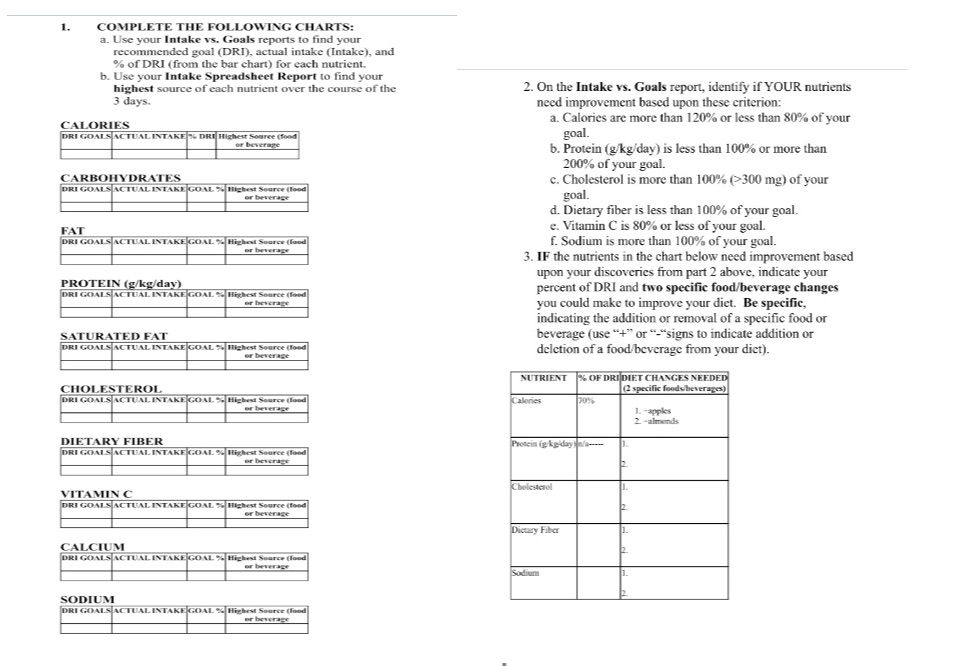
- ???Next, review and print the 3 Day Average Report (which contains the following reports: Intake vs. Goals Report, DRI Report, Macronutrient Range Report, the Fat Breakdown Report, the MyPlate Analysis Report, the Intake Spreadsheet Report, and the Energy Balance Report and fill in the summary tables provided.
Dashboard
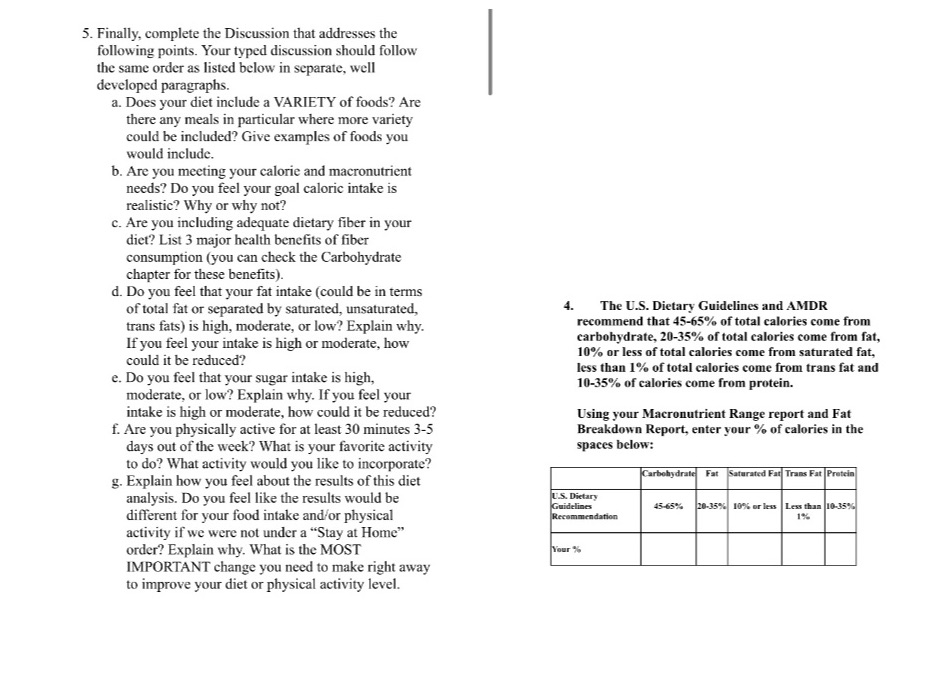
5. Finally, complete the Discussion that addresses the following points. Your typed discussion should follow the same order as listed below in separate, well developed paragraphs.
INSTRUCTIONS FOR WORKING IN THE DIET AND WELLNESS PLUS PROGRAM.
- ???In our canvas module page, click on "Access to MindTap & ebook" link.
- ???Once you have opened up the access to the ebook, click on the green apple icon found in the right side margin. It is called "Diet & Wellness Plus."
- ???Set up your profile by clicking on Primary Profile in the upper right hand corner and then either create a new profile or edit an old profile. Enter your personal data (height, weight, etc) then answer the questions and save.
- ???Go to "Track Diet" tab.
- ???In search bar, type in the food from your food intake or food diary for the 3 days.
- ???Enter food, search database and select the food closest to what you ate
- ???Enter or adjust the serving size of the food you ate
- ???Using the drop down menu, select the meal for this food (breakfast, lunch, dinner or snack)
- ???Click "Add Item"
- ???The "edit" button at the end of each food row can be used if you need to change the serving size or the meal timing, etc. Then click "update meal"
- ???Use the "Recipes" button if you want to add your own recipe if you cannot find the food you ate in the data base.
- ???Do the same for all 3 days
- ???Next, go to "Track Activity" tab.
- ???Enter the activities you did each day for 3 days, include the length of time spent on that activity.
- ???Lastly, using the 3 Day Average report, fill in the charts on the following pages.
Step by Step Solution
There are 3 Steps involved in it
1 Expert Approved Answer
Step: 1 Unlock

Question Has Been Solved by an Expert!
Get step-by-step solutions from verified subject matter experts
Step: 2 Unlock
Step: 3 Unlock
 Study Help