







Question: INSTRUCTIONS VISUAL BASICS Write a triangle class that executes on the following command line driver: Sub Main() ' instnatiate a Triangle Dim myTriangle As Triangle
INSTRUCTIONS VISUAL BASICS
Write a triangle class that executes on the following command line driver:
Sub Main()
' instnatiate a Triangle
Dim myTriangle As Triangle = New Triangle(3, 4)
' display the Triangle's information
myTriangle.DisplayInformation()
End Sub
The class should include private data members to contain the lengths of the adjacent, opposite, and hypotenuse side of the Triangle. Additionally, create data members to hold the area and perimeter of the Triangle. Include a default constructor that initializes the values to zero and an overload constructor that allows values for the opposite side and adjacent side to be provided. The class should provide properties that allow client code to get and set the adjacent and opposite sides of the Triangle, and get the hypotenuse, area, and perimeter. Provide a public, command-line method that allows information about the Triangle to be neatly displayed on the console. Provide code for a destructor that prints a message indicating that the destructor is executing. Adhere to all of the discussed principles of object-oriented design and develop an intuitive, robust class. When you test your code with the driver provided above, you should see the following output on the screen:
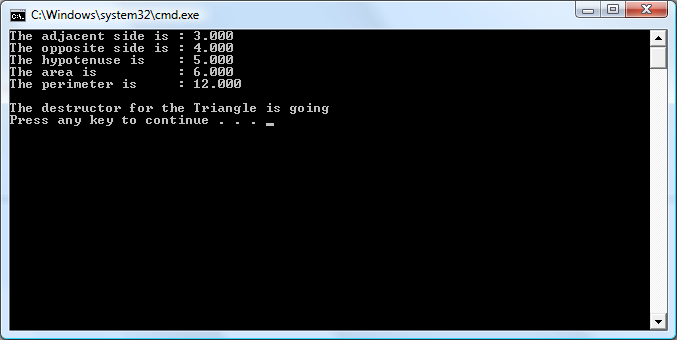
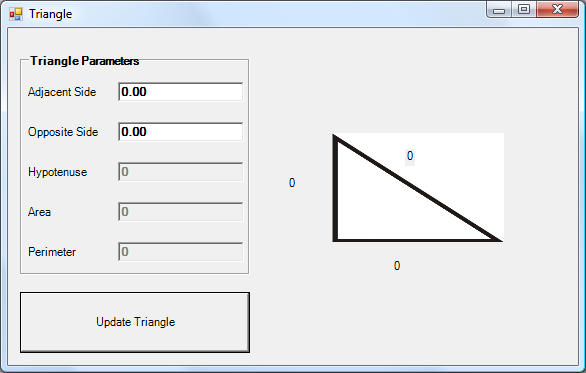
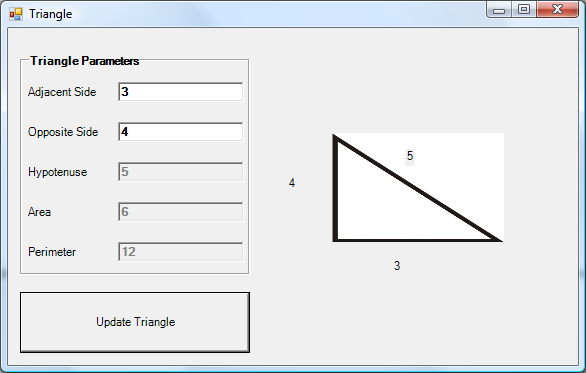
After you have written the command-line class, create a windows form that wraps up the class with a GUI. Provide controls that allow the user to provide inputs for the adjacent and opposite sides of the Triangle. Include an update button that causes the display the update and refreshes the numbers that display on the image. Your GUI should resemble the following display:
Step by Step Solution
There are 3 Steps involved in it

Get step-by-step solutions from verified subject matter experts
 Study Help