







Question: Instructions X Tasks Open the files code3... > Go to the code 3-1.ht... > code3-1.html code3-1 float.css X code3-1.css 1 @charset utf-8; 2 3/ New
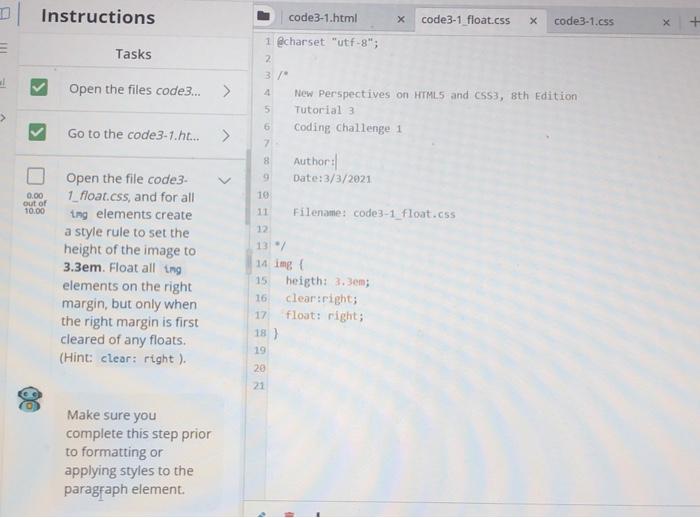
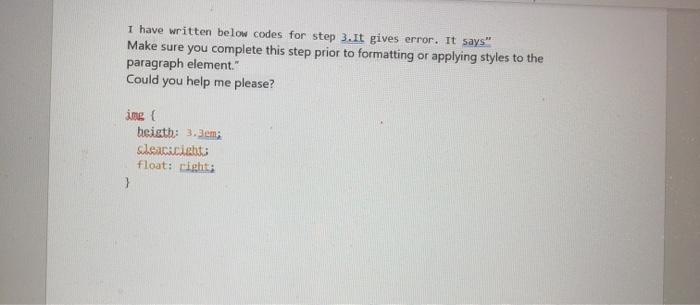
Instructions X Tasks Open the files code3... > Go to the code 3-1.ht... > code3-1.html code3-1 float.css X code3-1.css 1 @charset "utf-8"; 2 3/ New Perspectives on HTML5 and CSS3, 8th Edition 5 Tutorial 3 6 Coding Challenge 1 2 8 Author: Date:3/3/2021 10 Filename: code3-1_float.css 12 131 14 img 15 heigth: 3.3em; 16 clear:right; 17 float: right; 0.00 out of 10.00 Open the file code3. 1_float.css, and for all ing elements create a style rule to set the height of the image to 3.3em. Float all ting elements on the right margin, but only when the right margin is first cleared of any floats. (Hint: clear: right) 18) 19 20 21 Make sure you complete this step prior to formatting or applying styles to the paragraph element 1 have written below codes for step 3.It gives error. It says" Make sure you complete this step prior to formatting or applying styles to the paragraph element." Could you help me please? ime beigth: 3.3em; Sleacaciato float: Light }
Step by Step Solution
There are 3 Steps involved in it

Get step-by-step solutions from verified subject matter experts
 Study Help