







Question: INT 1700 -Understanding Operating Systems Supplemental Lab Assignment I -FOR LINUX Mr. Bugg-Page 1 This is the exact same lab we did earlier in the
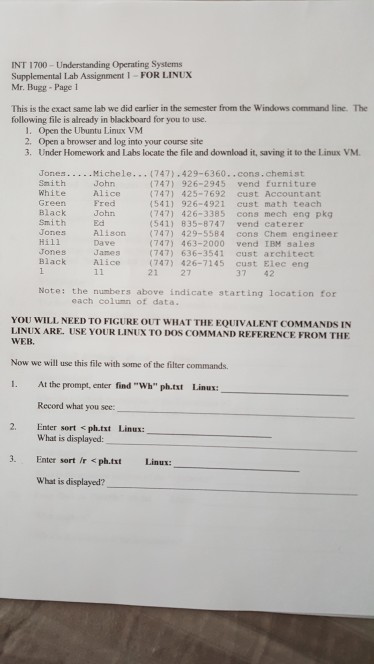
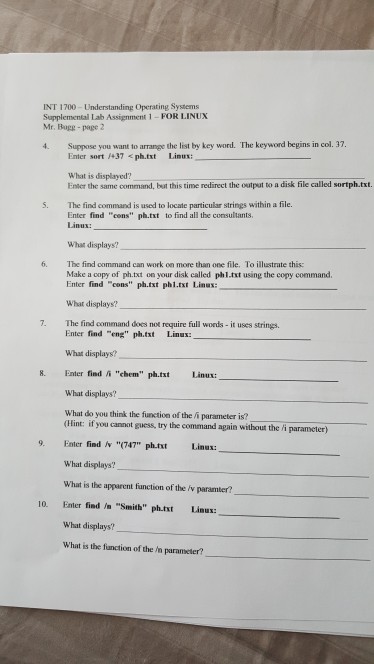
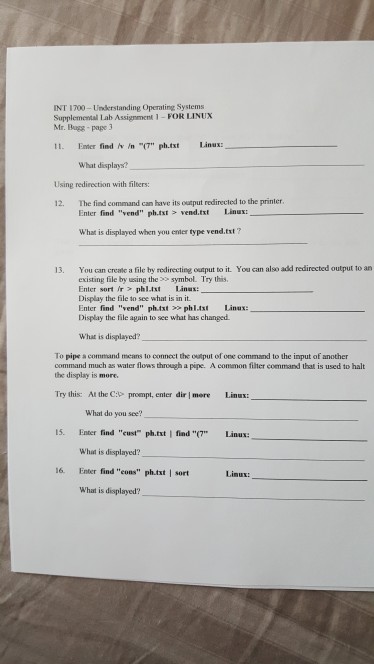
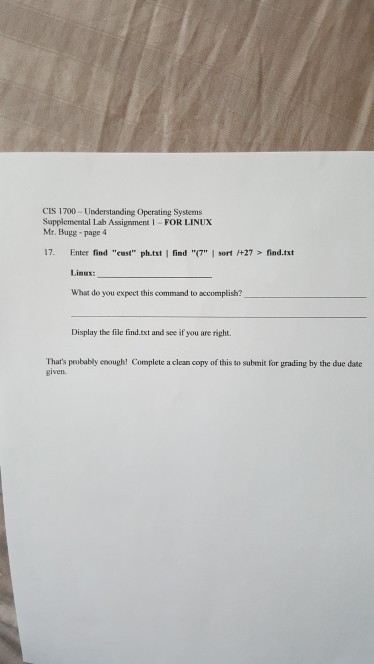
INT 1700 -Understanding Operating Systems Supplemental Lab Assignment I -FOR LINUX Mr. Bugg-Page 1 This is the exact same lab we did earlier in the semester from the Windows command line. The following file is already in blackboard for you to use. 1. Open the Ubuntu Linux VM 2. Open a browser and log into your course site 3. Under Homework and Labs locate the file and download it, saving it to the Linux VM (747) 926-2945 vend furniture (7471 425-7692 cust Accountant 5411 926-4921 cust math teach (747) 426-3385 cons mech eng pkg (541) 835-8747 vend caterer Smith White John Alice Fred John Ed Black Smith Jones Hill Jones Black Alison (747) 429-5584 cons Chem engineer Dave Janes Alice (747) 463-2000 vend IBM sales 747) 636-3541 cust architect (747) 426-7145 cust Elec eng 21 27 37 42 Note: the numbers above indicate starting location for each column of data. YOU WILL NEED TO FIGURE OUT WHAT THE EQUIVALENT COMMANDS IN LINUX ARE. USE YOUR LINUX TO DOS COMMAND REFERENCE FROM THE WEB Now we will use this file with some of the filter commands. 1. At the prompt, enter find "Wh" ph.txt Linux Recornd what you see 2. Enter sort
Step by Step Solution
There are 3 Steps involved in it

Get step-by-step solutions from verified subject matter experts
 Study Help