







Question: IntellJ Java Project Result should look like: create a Swing GUI for displaying selected customer information from the FiredUp database. You do not need to
IntellJ Java Project
Result should look like: 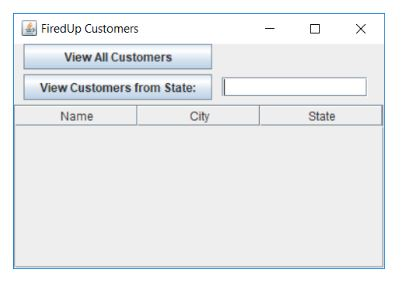
create a Swing GUI for displaying selected customer information from the FiredUp database. You do not need to connect your GUI to the database , just design the user interface.
The GUI should support 2 functions: (1) displaying data from all customers, and (2) displaying data from customers in a given state. The customer attributes to be displayed should include Name, City, and State (don't worry about any other attributes). For this lab, when the user engages function (1) or (2), pop up a message box (use JOptionPane) stating that the given function is not implemented yet.
A few tips:
- There should be a way for the user to select whether they want to view data on all customers or only those from a given state. There will need to be a way for the user to enter the state they are interested in.
- Use a JTable to display the customer data, and put the table inside a scroll pane: In GUI Designer, drag a JScrollPane onto the form, and then drag a JTable onto the scroll pane.
- The customer table should have columns for Name, City, and State. Since you aren't connecting to the database yet, you don't need to show any data in the table, but you can put in fake, hard-coded data if you want to. The column headers should show up whether there is data or not.
- JTable is not covered in the textbook. To learn how to work with tables, see this Simple JTable Example or check out the full Java Tutorial on How to Use Tables. You should also review the API documentation for javax.swing.JTable. It is common for a programmer to need to investigate a new component in order to learn how to use it. This is a good exercise in that skill. Feel free to post in the discussion or email the instructor with questions if you get stuck.
- You may use the given CustomersTableModel as the model for your table. Note that you will need to add the Customer class from the Lesson 4 JDBC tutorial to your project.
- ------------------------
public class Main { public static void main(String[] args) { System.out.println("FiredUp Customers:"); FiredUpDB firedUp = new FiredUpDB(); List
import java.util.ArrayList; public class Customer { private int id; private String name; private String city; private String state; private ArrayList emailAddresses; public Customer(int id, String name, String city, String state) { this.id = id; this.name = name; this.city = city; this.state = state; emailAddresses = new ArrayList(); } public int getId() { return id; } public String getName() { return name; } public String getCity() { return city; } public String getState() { return state; } /** * Add an email address to this customer's email addresses * @param email an email address belonging to this customer */ public void addEmailAddress(String email) { emailAddresses.add(email); } /** * @return the list of email addresses belonging to this customer */ public ArrayList getEmailAddresses() { return emailAddresses; }} ----------------------------------------------------------------
import java.sql.*; import java.util.ArrayList; import java.util.List; public class FiredUpDB { private static final String FIREDUP_URL = "jdbc:jtds:sqlserver://cisdbss.pcc.edu/FiredUp"; private static final String USERNAME = "275student"; private static final String PASSWORD = "275student"; private static final String CUSTOMER_SQL = "SELECT CustomerID, Name, City, StateProvince FROM CUSTOMER"; private static final String EMAIL_SQL = "SELECT EmailAddress FROM EMAIL WHERE FK_CustomerID = ?"; /** * Read all customers from the FiredUp database and return them as a list of Customer objects * @return a list of customers from the FiredUp database */ public List readCustomers() { ArrayList customers = readCustomerBasics(); readEmailAddresses(customers); return customers; } /** * Read from the FiredUp database customers from the given state * @param state the state of interest (US state or Canadian province) * @return a list of customers from the given state */ // Create method readCustomersFromState /** * @return a connection to the FiredUp database * @throws SQLException if unable to connect */ private Connection getConnection() throws SQLException { return DriverManager.getConnection(FIREDUP_URL, USERNAME, PASSWORD);} /** * Read customers from the database, including their basic properties from the CUSTOMER table, * but not including customer data from related tables such as email addresses or phone numbers * @return a list of Customer objects */ private ArrayList readCustomerBasics() { ArrayList customers = new ArrayList(); try ( Connection conn = getConnection(); PreparedStatement stmt = conn.prepareStatement(CUSTOMER_SQL); ResultSet rs = stmt.executeQuery() ) { while (rs.next()) { customers.add(new Customer(rs.getInt("CustomerID"), rs.getString("Name"), rs.getString("City"), rs.getString("StateProvince"))); } } catch (SQLException e) { e.printStackTrace(); } return customers; } /** * Read email addresses from the database for each customer in the given list, * adding the email addresses found to the corresponding Customer object * @param customers list of customers whose email addresses should be read */ private void readEmailAddresses(ArrayList customers) { try ( Connection conn = getConnection(); PreparedStatement stmt = conn.prepareStatement(EMAIL_SQL) ) { for (Customer cust : customers) { stmt.setInt(1, cust.getId()); ResultSet rs = stmt.executeQuery(); while (rs.next()) { cust.addEmailAddress(rs.getString("EmailAddress")); } } } catch (SQLException e) { e.printStackTrace(); } } } -----------------------------------------------------------------------------------------
CustomersTableModel source code:
(Note you need to import java.util.List. There is also a java.awt.List, but that is not the one used below.)
private class CustomersTableModel extends DefaultTableModel {
private final String[] COL_NAMES = {"Name", "City", "State"};
private List
public CustomersTableModel(List
super();
this.customers = customers;
setColumnIdentifiers(COL_NAMES);
setRowCount(customers.size());
}
public void setCustomers(List
this.customers = customers;
setRowCount(customers.size()); }
@Override
public Object getValueAt(int row, int col) {
switch(col) {
case 0: return customers.get(row).getName();
case 1: return customers.get(row).getCity();
case 2: return customers.get(row).getState();
default: return null; } }
@Override
public boolean isCellEditable(int row, int col) {
return false; } }
FiredUp Customers View All Customers View Customers from State: Name City State
Step by Step Solution
There are 3 Steps involved in it

Get step-by-step solutions from verified subject matter experts
 Study Help