





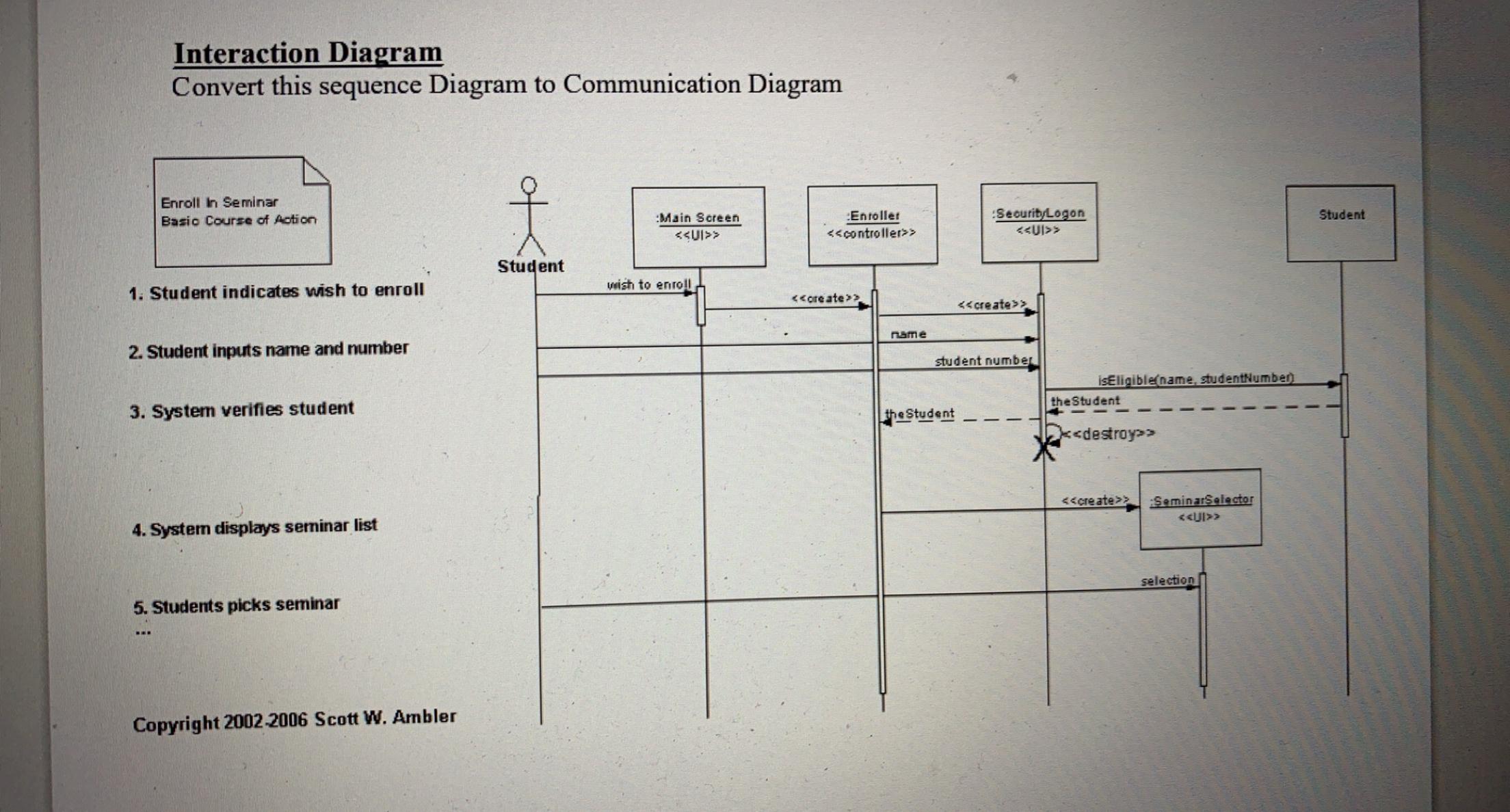
Question: Interaction Diagram Convert this sequence Diagram to Communication Diagram Enroll in Seminar Basic Course of action f Student Main Screen > Enroller > Seourib Logon
Interaction Diagram Convert this sequence Diagram

Interaction Diagram Convert this sequence Diagram to Communication Diagram Enroll in Seminar Basic Course of action f Student Main Screen > Enroller > Seourib Logon > Student wish to enroll 1. Student indicates wish to enroll > nume 2. Student inputs name and number student number IsEligible name studentNumber the Student 3. System verifies student the Student k> > SeminarSelector > 4. System displays seminar list selection 5. Students picks seminar Copyright 2002-2006 Scott W. Ambler

Step by Step Solution

There are 3 Steps involved in it

1 Expert Approved Answer
Step: 1 Unlock blur-text-image

Question Has Been Solved by an Expert!

Get step-by-step solutions from verified subject matter experts

Step: 2 Unlock
Step: 3 Unlock

Students Have Also Explored These Related General Management Questions!